Affiliate Disclosure: This post may contain affiliate links. If you purchase through links on our site, we may earn an affiliate commission at no extra cost to you.
Imagine the world without the ability to store information. Your favorite photos, important documents, and essential business data would vanish without a trace.
Data storage is the backbone of the digital age, ensuring that your precious information is safe and accessible whenever you need it. As you dive into this article, you’ll discover the fascinating forms of data storage that power your everyday digital experiences.
From ancient methods to cutting-edge technology, understanding how data is stored can open your eyes to the marvels of modern life. Stay with us as we unravel the secrets behind the systems that keep your data secure, organized, and ready at your fingertips.
Cloud Storage
Cloud storage has rapidly become a cornerstone of modern data storage solutions. It offers a flexible, scalable, and cost-effective way to manage your data. Whether you’re a business owner or a casual user, understanding the ins and outs of cloud storage can dramatically enhance how you store and access your data.
Benefits And Challenges
Cloud storage provides numerous benefits, making it a preferred choice for many. One of its greatest advantages is accessibility. You can access your files from anywhere, anytime, as long as you have an internet connection. This convenience is unmatched, especially if you’re frequently on the move.
Additionally, cloud storage often comes with automatic backup and recovery features. This means you don’t have to worry about losing important files due to hardware failures or accidental deletions. Cost savings are another significant benefit, as you only pay for the storage you use without investing in expensive hardware.
However, cloud storage is not without its challenges. Internet dependency can be a major drawback. In areas with unreliable connectivity, accessing your files can be problematic. Additionally, data privacy concerns often arise, especially if sensitive information is involved. Are you willing to trust your data with third-party providers?
Popular Providers
Several cloud storage providers dominate the market, each offering unique features. Google Drive is popular for its integration with other Google services. It’s especially useful if you’re already using Gmail or Google Docs.
Dropbox is well-known for its simplicity and ease of use. It provides a straightforward interface that’s great for beginners. Microsoft OneDrive is another strong contender, especially if you’re in the Microsoft ecosystem. It seamlessly integrates with Office 365, making it a go-to choice for many businesses.
Security Measures
Security is a crucial aspect of cloud storage, and providers implement various measures to protect your data. Encryption is a common practice, ensuring that your files are unreadable without the correct decryption key. This adds a layer of security against unauthorized access.
Many providers also offer two-factor authentication (2FA). This means even if someone gets hold of your password, they still need a second form of verification to access your account. Regular security updates and monitoring further enhance data protection.
Are these measures enough to give you peace of mind? Always read the security policies of your chosen provider carefully to understand how your data is protected.
Cloud storage can transform how you manage your data, but it’s essential to weigh the benefits against the challenges. With the right provider and security measures, it can be a powerful tool in your data storage arsenal. Would you consider switching to cloud storage for your personal or business needs?
Hard Disk Drives (hdd)
Hard Disk Drives (HDD) have been a cornerstone in data storage for decades. They offer a reliable way to store vast amounts of information at a relatively low cost. Many of us have memories of hearing the gentle hum of an HDD as it spun up, ready to retrieve our files. But how do they hold up in today’s fast-paced tech world?
Mechanics And Performance
HDDs rely on mechanical parts, including spinning disks and moving read/write heads. This setup can sometimes feel like a throwback to an era of physical media. Yet, it is precisely these mechanics that enable them to offer vast storage capacities. The spinning disks can be a bottleneck for speed, but they excel in scenarios where sequential data access is needed. Have you ever wondered why your old computer took a while to boot up? It’s often the HDD working hard to access data across different sectors.
Use Cases In Modern Computing
Despite newer technologies, HDDs continue to find their place in modern computing. They are ideal for storing large media files, like photos and videos, where access speed is less critical. Many gamers use HDDs for their game libraries due to the sheer size of game files. In personal experience, upgrading from an HDD to a faster storage solution might speed up your system, but the trusty HDD can still be invaluable for backup purposes. Are you using your HDD wisely?
Longevity And Reliability
HDDs have a reputation for lasting many years, provided they’re treated well. The moving parts can wear down over time, but they’re generally robust. Regular backups can mitigate the risk of data loss. A friend once shared how his HDD survived a decade before showing signs of failure, reminding us of the importance of reliability in data storage. Do you have a backup strategy in place?
Hard Disk Drives might seem like relics of the past, but their functionality and cost-effectiveness keep them relevant. Whether you’re storing cherished memories or vast game libraries, understanding how to use HDDs effectively can enhance your computing experience.
Solid State Drives (ssd)
Solid State Drives (SSD) have redefined how we store data. Unlike traditional hard drives, SSDs use flash memory to manage data, making them faster and more reliable. As technology evolves, SSDs are becoming the preferred choice for many, promising speed and efficiency. But why exactly should you consider SSDs for your data storage needs?
Technological Advancements
SSDs have seen incredible growth in technology. The transition from SATA to NVMe interfaces has boosted data transfer rates significantly. NVMe allows SSDs to communicate directly with the system’s CPU, reducing latency. Imagine downloading large files in seconds rather than minutes. It’s not just about speed; it’s about the seamless experience you get.
Enhanced durability is another win for SSDs. Without moving parts, they’re less prone to mechanical failure. Your data remains secure even if your laptop takes a tumble. Have you ever lost important files due to a hard drive crash? SSDs might just be your safeguard against such incidents.
Comparison With Hdd
SSDs and HDDs both serve the purpose of data storage, but they do it differently. HDDs rely on spinning disks and read/write heads. This mechanical approach can slow down operations. In contrast, SSDs use electronic circuits for data storage, which means faster access and retrieval times.
Noise and heat are other factors to consider. HDDs can be noisy due to their moving parts, and they generate more heat. SSDs operate quietly and efficiently, making them ideal for silent environments. Think about your last noisy laptop; an SSD could offer a quieter alternative.
Cost is often the deciding factor. HDDs are generally cheaper, but SSD prices have been dropping steadily. Would you pay a bit more for speed and reliability? Many users are making that choice today.
Market Trends
The SSD market is expanding rapidly. More manufacturers are investing in SSD technology, leading to diverse options for consumers. As production scales up, prices continue to fall, making SSDs more accessible. What’s interesting is the shift in consumer demand; people now prioritize speed and efficiency over capacity.
Gaming, video editing, and professional applications drive SSD adoption. These areas require quick data access and processing, which SSDs excel at. Have you noticed how many new laptops boast SSDs as standard? It’s a trend that’s hard to miss.
What does this mean for you? As SSDs become mainstream, it’s an opportunity to upgrade your own system for better performance. Are you ready to make the switch?
Network Attached Storage (nas)
Network Attached Storage (NAS) is a dedicated file storage solution. It connects to a network, allowing multiple users to store and access data. NAS operates like a private cloud at home or in a business. It provides centralized data management and simplifies data sharing.
Home Vs. Enterprise Solutions
NAS solutions differ for home and enterprise needs. Home NAS is user-friendly and affordable. It offers enough storage for personal files, photos, and videos. Enterprise NAS provides robust features for businesses. It supports large-scale data storage and high-speed access.
Businesses require more security and scalability. Enterprise NAS solutions meet these needs. They offer advanced features for data protection and management.
Installation And Management
Installing NAS is usually simple. Connect the device to your network and power it on. Use the provided software to set up the system. This process is straightforward for home users.
Enterprise NAS installation requires more expertise. IT professionals manage the setup to ensure optimal performance. They configure security protocols and data access permissions.
Management tools help monitor NAS systems. They provide insights into storage usage and system health. Regular updates keep the system secure and efficient.
Integration With Cloud Services
NAS systems can integrate with cloud services. This combination enhances data access and backup options. Users can sync files between NAS and cloud storage. It offers flexibility and data redundancy.
Cloud integration is crucial for businesses. It provides a hybrid storage solution. Data is accessible from anywhere with an internet connection. It ensures business continuity and disaster recovery options.
Home users also benefit from cloud integration. It simplifies file sharing and remote access. NAS with cloud features offers a powerful storage solution.
Optical Storage
Optical storage has long been a staple in data storage solutions. It uses light to read and write data. This method offers portability and durability. Optical discs remain popular for storing large amounts of data.
Cds, Dvds, And Blu-rays
CDs were among the first optical storage formats. They hold up to 700 MB of data. Music albums often use CDs for distribution. DVDs expand on this with larger capacity. They store up to 4.7 GB of data. Perfect for movies and software. Blu-rays take it a step further. They hold up to 50 GB of data. Ideal for high-definition videos.
Archival And Longevity
Optical discs are known for their longevity. Properly stored discs can last decades. They are resistant to magnetic fields. This makes them ideal for archival purposes. Libraries and museums use optical storage for preserving data. It ensures valuable information remains intact over time.
Current Relevance
Optical storage remains relevant today. It offers a reliable backup solution. Businesses use it for data archiving. Individuals prefer it for media collections. The simplicity of optical storage appeals to many. Despite advances in digital storage, optical discs maintain their presence. They provide a tangible form of media storage. This offers peace of mind to users.
Tape Storage
Tape storage, a traditional form of data storage, offers a reliable way to archive data. This method uses magnetic tape to preserve information, making it a cost-effective solution for long-term data retention.
Tape storage might sound like a relic from the past, but it’s still very much alive in today’s tech landscape. It’s one of those surprising examples where older technology continues to offer unique advantages, especially in the era of exploding data volumes. From its humble beginnings to its modern-day applications, tape storage has a fascinating story to tell.
Historical Context
Tape storage has been around since the 1950s. Initially, it was the go-to option for data storage due to its high capacity and low cost. People often picture those massive reels spinning away in early computers, storing critical data long before the advent of hard drives. Even as technology advanced, tape storage remained relevant. Through the decades, it adapted to changing needs, evolving from large reels to compact cartridges. This adaptability is a testament to its enduring utility.
Modern Usage
Today, tape storage is not just a dusty relic sitting in a museum. It plays a crucial role in data centers worldwide. Companies use it for archiving massive amounts of data that do not need to be accessed frequently. In fact, some of the largest tech companies rely on tape storage for its reliability and cost-effectiveness. It’s a preferred choice for long-term data retention, especially for industries that generate vast amounts of information daily.
Advantages In Data Backup
Tape storage offers several benefits that make it an attractive option for data backup. One of the biggest advantages is its cost efficiency. Storing data on tape is cheaper compared to other methods, particularly when you look at the cost per gigabyte. Additionally, tape storage is known for its longevity and durability. It can safely store data for decades, making it ideal for archival purposes. This is crucial for businesses that need to maintain records for regulatory compliance or historical reference. Moreover, tape is inherently secure against cyber threats. Unlike cloud storage, which is susceptible to hacking, tape storage is offline and thus immune to such risks. This adds an extra layer of security for sensitive data. Have you ever considered how you could integrate tape storage into your data management strategy? It might just be the solution you’ve been looking for to balance cost, security, and longevity.
Flash Storage
Flash storage offers a compact, efficient option for data storage. It uses memory chips to store information quickly. Many devices use flash storage for its speed and reliability.
Flash storage has become a popular choice for data storage due to its speed, reliability, and portability. Unlike traditional hard drives, flash storage has no moving parts, which makes it more durable and less prone to mechanical failure. Whether you’re a student, a professional, or just someone who loves tech gadgets, flash storage offers a convenient way to store and access your data quickly and efficiently.
Usb Drives And Memory Cards
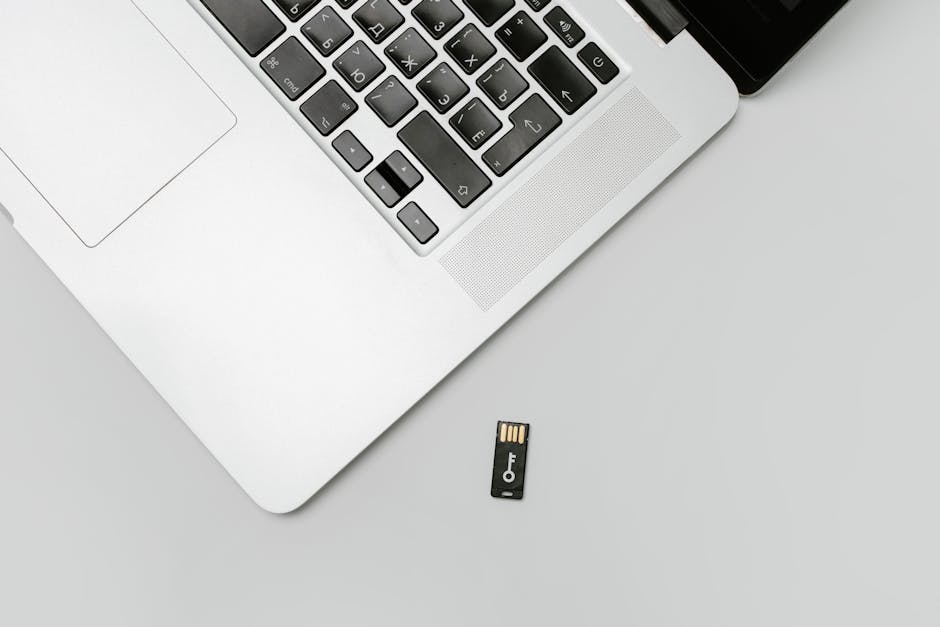
USB drives and memory cards are among the most common forms of flash storage. They are small, portable, and can store large amounts of data, making them perfect for on-the-go use. Have you ever lost a file just before a big presentation? With a USB drive, you can save backup copies of your work and carry them with you anywhere. Memory cards, often used in cameras and smartphones, are essential for storing photos and videos. Their compact size makes it easy to swap them between devices, ensuring you never run out of storage space.
Suitability For Mobile Devices
Flash storage is particularly suitable for mobile devices due to its compact size and power efficiency. It consumes less power compared to traditional hard drives, which helps prolong battery life—a crucial factor for mobile users. Consider your smartphone: the seamless experience of capturing photos, recording videos, and downloading apps is largely due to flash storage. Does your mobile device support memory expansion? Using a memory card can instantly boost your phone’s storage capacity, allowing you to store more apps and media without slowing down your device.
Lifespan Considerations
While flash storage is durable, its lifespan depends on usage patterns and data writing processes. Flash memory can wear out over time, especially if data is frequently written and erased. Are you aware of the write cycle limits of your USB or memory card? Choosing high-quality flash storage can mitigate the risk of data loss due to wear. Regularly backing up your data and using your flash storage responsibly can extend its lifespan, ensuring you get the most out of your investment. In a world where data is king, how you store it matters. Flash storage offers flexibility, speed, and durability, making it an excellent choice for many users. Whether you’re backing up important files or expanding your mobile device’s capacity, understanding the nuances of flash storage can help you make informed decisions. What role does flash storage play in your digital life?
Credit: study.com
Hybrid Storage Solutions
In the ever-evolving world of data storage, finding the right solution can be overwhelming. Hybrid storage solutions offer a unique blend of technologies to meet diverse needs. Whether you’re managing a business or handling personal data, understanding hybrid storage can be your key to unlocking enhanced performance and efficiency.
Combining Technologies
Hybrid storage solutions bring together the best of both worlds: traditional hard drives and solid-state drives (SSDs). This combination leverages the large capacity of hard drives with the speed and reliability of SSDs.
Imagine having the spaciousness of a library and the quick access of a digital database. You get ample space for all your files while accessing frequently used data swiftly.
Have you ever had to wait endlessly for a file to open? With hybrid storage, that wait becomes a thing of the past. It’s like having a supercharged engine powering your data access.
Performance And Efficiency
Hybrid solutions enhance performance by using SSDs for quick data access. They are designed to store frequently accessed files on faster drives, optimizing speed.
Think of it as having a private lane on a busy highway. You bypass congestion, reaching your destination in record time.
Efficiency isn’t just about speed; it’s about making smart use of resources. Hybrid storage balances the workload between different types of drives, ensuring seamless operation.
Cost Implications
While hybrid storage offers numerous benefits, it’s essential to consider the costs involved. SSDs can be more expensive than traditional hard drives, impacting your budget.
However, the investment can pay off in the long run. With increased speed and efficiency, your productivity improves, potentially saving time and money.
But is the cost worth it for you? Weigh the benefits against the price and consider how much you value speed and efficiency in your daily operations.
Hybrid storage solutions can transform how you store and access data. What’s your take on balancing cost with performance? Share your thoughts below!
Frequently Asked Questions
What Are Common Forms Of Data Storage?
Data storage takes various forms like hard drives, SSDs, cloud storage, and USB drives. Each offers unique benefits and limitations. Hard drives are cost-effective, while SSDs provide speed. Cloud storage offers accessibility, and USB drives are portable. Understanding these differences helps choose the right storage solution for your needs.
How Does Cloud Storage Work?
Cloud storage stores data on remote servers accessed via the internet. Providers manage and maintain the infrastructure, offering scalable storage options. Users can access files anytime, anywhere. It ensures data safety through encryption and backups, making it a popular choice for businesses and individuals alike.
What Is The Difference Between Hdd And Ssd?
HDDs use spinning disks to read/write data, while SSDs use flash memory. SSDs are faster, more durable, and energy-efficient compared to HDDs. However, HDDs offer larger storage capacities at lower costs. Choosing between them depends on your budget, storage needs, and performance requirements.
Why Choose External Hard Drives For Storage?
External hard drives offer portable and affordable storage solutions. They are ideal for backups and transferring large files. Unlike cloud storage, they don’t require an internet connection, providing offline accessibility. With varying capacities, they suit personal and professional use, ensuring data safety on the go.
Conclusion
Data storage offers many options to meet diverse needs. Hard drives store large amounts of data. Flash drives are portable and easy to use. Cloud storage provides access anywhere with internet. Each method has unique features and benefits. Consider your needs and budget before choosing.
Secure and reliable storage keeps your data safe. As technology evolves, so do storage solutions. Stay informed about new developments. This ensures you make the best choice. Remember, good data storage is essential. It protects your digital life.