

Unlocking your Blu smartphone can open up a world of possibilities and give you the freedom to switch carriers, use local SIM cards while traveling, or even boost its resale value. But how do you go about it without getting bogged down by tech jargon or making costly mistakes?
You might feel overwhelmed by the myriad of online solutions and unsure about which one to trust. Don’t worry; you’re not alone, and we’re here to help. In this guide, you’ll discover straightforward steps to unlock your Blu smartphone safely and efficiently.
With the right approach, you can enjoy the flexibility and functionality you deserve. Read on to learn how you can take full control of your device with confidence.
Credit: techycompany.com
Preparation Steps
Begin by gathering necessary materials such as a USB cable and computer. Ensure the smartphone is fully charged. Install required software for unlocking the device, following instructions carefully.
Unlocking your Blu smartphone can offer you freedom and flexibility, but it requires some preparation to ensure a smooth process. Proper preparation helps avoid common pitfalls and ensures that everything is in place before you begin. Let’s walk through the essential steps to get your device ready for unlocking.Check Phone Compatibility
Before diving into unlocking your Blu smartphone, verify its compatibility. Not all Blu models can be unlocked, and knowing this upfront saves time and effort. Check if your phone is already unlocked. Insert a SIM card from a different carrier. If it works, your phone is likely unlocked. Consider your phone’s age. Older models might have different unlocking requirements than newer ones.Gather Necessary Information
Having all required details on hand makes the process easier. You’ll need specific information related to your phone and carrier. Write down your phone’s IMEI number. This unique identifier is crucial for the unlocking process. You can find it by dialing 06. Know your account details with the carrier. This might include your account number and any related passwords or security questions. Think about your personal experiences with tech setups. Have you ever skipped a step, thinking it wasn’t important, only to find out it was critical? Avoid that mistake here by gathering everything first. Being prepared not only saves time but also reduces frustration. Are you ready to unlock your Blu smartphone with confidence?Unlock Methods
Discover simple techniques to unlock your Blu smartphone effortlessly. Follow step-by-step instructions to regain access to your device. Enhance usability with clear guidelines suitable for non-native English speakers.
Unlocking your Blu smartphone can be a game changer, opening up a world of possibilities for better usability and network flexibility. Whether you’re looking to switch carriers or just want more control over your device, there are several ways you can achieve this. Let’s dive into the various methods you can use to unlock your Blu smartphone, ensuring you can make the most out of your device. One of the most straightforward ways to unlock your Blu smartphone is through your network provider. Contact them directly and request an unlock code. You’ll need to meet certain requirements, like fulfilling your contract or clearing any outstanding payments. Most providers will offer this service free of charge if you meet their criteria. Imagine the freedom you gain by switching to a network that offers a better deal. It’s worth checking if your provider can help you unlock your device. If your network provider can’t help, consider third-party unlock services. These services specialize in providing unlock codes for a fee. Be cautious and research thoroughly to find reputable companies. Look for reviews and testimonials from other users to ensure reliability. It’s fascinating how many people have found success with these services, gaining the ability to use their phones in different regions without hassle. Unlocking your Blu smartphone with software is another option. There are various software tools available online that promise to unlock your device. This method can be risky and might void your warranty. Always follow instructions carefully and be aware of potential security risks. Is the potential risk worth the reward? Some users swear by software unlocking for its convenience, but it’s crucial to weigh the pros and cons. Each unlocking method offers its own set of advantages and potential downsides. Consider your specific needs and circumstances to choose the best option for you. Remember, unlocking your device can enhance your smartphone experience significantly. So, which method do you think suits you best?Using Network Provider
Unlocking your Blu smartphone through your network provider is common. It ensures a smooth transition if you want to switch networks. The process is straightforward, but it requires some steps. You need to contact your carrier, meet their requirements, and request an unlock code. Let’s dive into these steps.
Contacting Your Carrier
First, reach out to your network provider. You can call their customer service line. Or visit their website for contact information. Explain your need to unlock your Blu smartphone. The representative may ask for your phone’s details. Be prepared with your IMEI number and account information. This will speed up the process.
Meeting Carrier Requirements
Your carrier may have specific requirements. Ensure your phone is paid off. It should not be reported as lost or stolen. You might need to complete a contract period. Check with your carrier for details. Each provider has different rules and conditions. Meeting these requirements is essential for unlocking.
Requesting Unlock Code
Once you’ve met the requirements, request the unlock code. Your carrier will provide it if you are eligible. The code usually arrives via email or text. Follow any instructions given by the carrier. Enter the code on your Blu smartphone. This will unlock the device for other network use.
Third-party Unlock Services
Unlocking a Blu smartphone often involves third-party services that simplify the process. These services provide easy steps to free your device from network restrictions. Enjoy the flexibility of using any carrier without hassle.
Unlocking your BLU smartphone using third-party services can be a convenient option, especially if you’re exploring ways to switch carriers or travel internationally. While some may hesitate to use these services due to concerns about reliability, choosing a trustworthy provider can make the process seamless. Let’s dive into how you can find a reliable service, what information you need to provide, and how to apply the unlock code successfully.Choosing A Reliable Service
When selecting a third-party unlock service, it’s crucial to research thoroughly. Check online reviews and ratings to ensure the service has a positive track record. Opt for providers that offer a money-back guarantee, as this indicates confidence in their service quality. Ask yourself: Have you checked multiple sources for reviews? A good reputation is often reflected in consistent positive feedback across various platforms. Avoid sites that look poorly maintained or have many negative reviews.Providing Phone Details
Once you’ve chosen a reliable service, the next step is to provide your phone details. This typically includes the phone’s IMEI number, which you can find by dialing 06on your device. Double-check the information before submitting it. Incorrect details can lead to delays or errors in receiving your unlock code. Have you noted down the IMEI number correctly? Accuracy here can save you from unnecessary hassle.Receiving And Applying Unlock Code
After submitting your phone details, you will receive an unlock code. This may arrive via email within a few hours or days, depending on the service. To apply the unlock code, insert a SIM card from a different carrier into your phone. When prompted, enter the code exactly as provided. This simple step is all it takes to unlock your device. Did the code work on the first try? If not, recheck the number, as a small mistake can prevent the process from working. Unlocking your BLU smartphone using a third-party service can be both quick and effective. By choosing the right provider and carefully following the steps, you can enjoy the freedom to use your phone with any carrier. Wouldn’t it be great to have that flexibility without the constraints of a locked device?Unlocking With Software
Discover how software can facilitate unlocking a Blu smartphone efficiently. Follow simple steps to regain access without hassle. Ensure the device’s compatibility with the software for a seamless experience.
Unlocking your Blu smartphone using software can be a straightforward and efficient process. It offers you the freedom to switch carriers without changing your device. With a few simple steps, you can access an array of new features and possibilities. So, how do you get started with software unlocking?Downloading Unlock Software
Begin by searching for a reputable unlocking software compatible with your Blu smartphone model. Make sure to choose software with positive reviews and ratings. Download it directly from the provider’s official website to avoid malware.Connecting Phone To Computer
Once you have the software, connect your Blu smartphone to your computer using a USB cable. Ensure your phone is fully charged to prevent any interruptions. Your computer should recognize the device instantly; if not, check if the necessary drivers are installed.Following Software Instructions
Open the unlocking software and read the instructions carefully. Each software might have slightly different steps, so attention to detail is key. Usually, you will need to follow a few prompts and possibly input your IMEI number. Unlocking your phone can seem daunting, but it’s often simpler than you think. Have you ever wondered what new opportunities await once your phone is unlocked? Embrace the chance to explore different networks and utilize your device’s full potential.
Credit: techycompany.com
Troubleshooting Common Issues
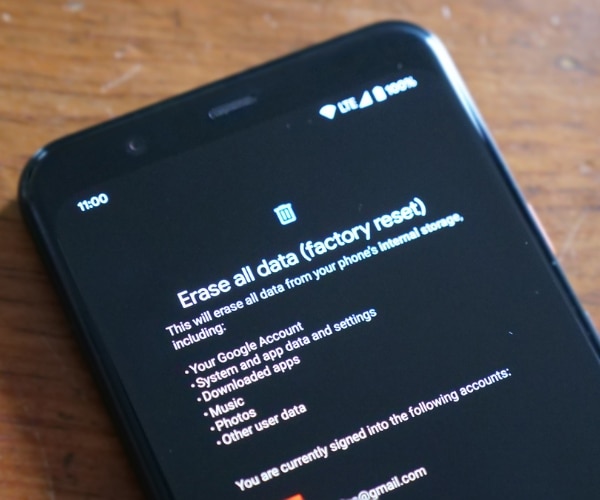
Facing challenges with your Blu smartphone? Reset settings to factory defaults through the settings menu for a fresh start. For locked devices, try entering the correct Google account details to regain access.
Unlocking your Blu smartphone can sometimes feel like a puzzle. You’ve followed the steps, entered the code, and yet, your phone remains locked. Don’t worry; you’re not alone. Many users encounter similar issues. The good news is, most of these problems have simple solutions. Let’s explore some common hiccups and how to tackle them effectively.Unlock Code Not Working
You’ve received your unlock code, but it’s not doing its job. First, double-check the number. It’s easy to mistype in the excitement of unlocking. Ensure you’re entering the code exactly as provided, without any spaces. If the code still doesn’t work, consider the possibility of an expired code. Contact your provider to confirm its validity. Sometimes, a new code might be needed. It’s also worth checking if your phone has been previously unlocked. Some models accept a limited number of attempts.Software Errors
Software issues can be sneaky. Your device might freeze, or apps may crash. Before panicking, restart your phone. This simple step often resolves minor glitches. Keep your software updated. Outdated software can interfere with unlocking processes. Check for updates in your settings. If problems persist, a factory reset might be necessary. Remember, this will erase your data, so back up important files first.Network Issues After Unlock
Your phone is unlocked, but now it’s struggling to connect to your network. Start by checking your SIM card. Is it inserted correctly? A loose SIM can cause connectivity problems. Verify your network settings. Sometimes, unlocking alters these settings. You might need to manually update your APN (Access Point Name) settings. Contact your network provider for the correct details. If your phone refuses to connect, try the SIM in another device. This helps determine if the issue is with your phone or the SIM itself. You could also test a different SIM in your unlocked Blu smartphone to see if it connects to another network. Have you faced any of these issues while unlocking your phone? How did you resolve them? Your experiences could help others in the same situation. Share your tips in the comments below.Post-unlock Considerations
Unlocking a Blu smartphone allows you to use different carriers and increase device compatibility. After unlocking, ensure your new SIM card is properly installed and check network settings for smooth connectivity. Consider backing up data regularly to avoid loss during transitions.
Unlocking your Blu smartphone is just the beginning of a new journey with your device. Once you’ve successfully unlocked it, there are several post-unlock considerations to ensure your phone runs smoothly and meets your needs. This is a crucial phase where you confirm everything is functioning correctly and optimized for your new network.Testing Phone Functionality
After unlocking, it’s vital to test your phone’s basic functions. Check if you can make calls, send texts, and access mobile data. Ensure Wi-Fi and Bluetooth are working properly. I remember the excitement when my friend unlocked his phone, only to find the camera wasn’t working. A quick functionality test saved him an unnecessary trip to the repair shop.Understanding New Network Settings
Switching to a new network requires some adjustments. You may need to update APN settings to ensure proper connectivity. Your new carrier will usually provide these settings, or you can find them on their website. Have you ever thought about how these small tweaks affect your phone’s performance? Keeping an eye on these settings ensures you’re getting the best out of your network.Updating Phone Firmware
Updating your phone’s firmware is another critical step post-unlock. Firmware updates can improve performance and security. Check if any updates are available by going to your phone’s settings. A friend once ignored these updates, only to face issues later. Regular updates can save you from unexpected glitches. Unlocking your Blu smartphone is a great step towards flexibility and freedom. But ensuring everything runs smoothly after the process is just as important. Have you checked your phone’s functionality and settings today?
Credit: www.youtube.com
Frequently Asked Questions
How Do I Unlock A Blu Smartphone?
To unlock a Blu smartphone, first check if it’s carrier-locked. Contact your carrier for an unlock code. Insert a new SIM card, enter the code, and your phone should be unlocked. Ensure your phone is compatible with the new network before proceeding.
Can I Unlock My Blu Phone For Free?
You can unlock your Blu phone for free if your carrier provides the unlock code. Most carriers offer this service for free after fulfilling certain conditions like contract completion or device payment. Always verify with your carrier for eligibility and requirements.
What Is The Blu Phone Unlock Process?
The Blu phone unlock process involves obtaining an unlock code from your carrier. Insert a new SIM card and enter the code when prompted. This will free your phone from carrier restrictions, allowing you to use it with other networks.
Will Unlocking Blu Phone Void Warranty?
Unlocking a Blu phone generally does not void the warranty. However, ensure the unlocking method is authorized by Blu or your carrier. Unauthorized unlocking methods may affect warranty coverage. Always consult your warranty terms or contact Blu support for clarification.
Conclusion
Unlocking your Blu smartphone is simple with the right steps. Follow the instructions carefully. Double-check each action. Ensure your phone’s settings are correct. This process enhances your phone’s usability. It also increases its flexibility. No need for technical skills. Just patience and attention.
Your phone will be ready for new features. Explore the possibilities. Enjoy the benefits of a fully functional device. Experience a better connection with your smartphone. Remember, careful handling prevents issues. Now, you’re equipped to maximize your Blu smartphone’s potential.
It’s all about ease and accessibility.



