

Are you thinking about moving your business operations to the cloud but not sure where to start? Cloud computing migration can seem daunting, but it doesn’t have to be.
With the right steps, you can unlock a world of benefits, including increased flexibility, cost savings, and enhanced collaboration. Imagine having access to your data and applications from anywhere, anytime, without the burden of maintaining physical servers. In this guide, we’ll walk you through the essential steps to ensure a smooth transition to the cloud.
By the end, you’ll feel confident and ready to harness the power of cloud computing for your business. Curious to learn more? Let’s dive into the steps that will transform your digital landscape.
Assess Current Infrastructure
Assessing the current infrastructure is a vital step in cloud migration. It helps organizations understand their existing systems and resources. With this knowledge, they can plan an efficient migration strategy. This process involves evaluating existing systems and identifying key applications. These steps ensure a smooth transition to the cloud.
Evaluate Existing Systems
Begin by examining your current IT systems. Identify all hardware and software components. Determine which parts are outdated or need upgrades. Analyze how these systems support your business operations. This evaluation helps pinpoint areas needing improvement for cloud readiness. Ensure you document every detail for future reference.
Identify Key Applications
List the critical applications used in your daily operations. Determine their role and importance within your organization. Identify any dependencies between these applications. Understanding these connections helps in planning the migration sequence. Prioritize applications based on their business impact.
Ensure compatibility with the cloud environment. Some applications may need modifications before migration. This step avoids potential issues in the new setup.
Define Migration Goals
Setting migration goals helps clarify what you want to achieve in cloud computing. Identify key objectives and desired outcomes. This guides the process and ensures successful transition.
Migrating to the cloud can transform your business operations, but the journey begins with defining clear migration goals. These goals act as a roadmap, guiding you through the complexities of cloud migration. Without specific objectives, you may find yourself lost in the vast digital landscape. Establishing clear goals ensures every step you take is purposeful and aligned with your business needs. Let’s delve into how you can define your migration goals effectively.Determine Business Objectives
Understanding your business objectives is crucial. Ask yourself: what do you hope to achieve with cloud migration? Is it about improving efficiency, reducing costs, or enhancing scalability? Consider your company’s growth plans. Are you looking to enter new markets or expand your services? Your migration goals should reflect these ambitions. You might want to improve customer experience or support remote work. Whatever your objectives, they should be specific and measurable, providing a clear focus for your migration efforts.Set Performance Benchmarks
Setting performance benchmarks is essential for tracking progress. Decide what success looks like for your migration. Is it faster application performance or improved data accessibility? Identify key metrics such as response times, uptime percentages, or transaction speeds. These benchmarks will help you assess if your migration is meeting its goals. Think about how you will measure user satisfaction. Will you conduct surveys or monitor feedback? Use these insights to ensure your migration delivers tangible benefits. Defining migration goals is not just a preparatory step; it’s a strategic move that can determine the success of your cloud journey. Have you set your goals yet?Choose The Right Cloud Model
Choosing the right cloud model is crucial for successful migration. Different models offer unique benefits. Each one has distinct features suited for various needs. Understanding these can streamline your transition and optimize resources.
Public Vs. Private Vs. Hybrid
Public cloud models provide scalability and flexibility. They are cost-effective with shared resources. Ideal for businesses with fluctuating demands.
Private clouds offer dedicated resources. These ensure higher control and security. Suitable for organizations with strict compliance requirements.
Hybrid models blend public and private clouds. These offer adaptability, balancing security with scalability. Perfect for businesses seeking tailored solutions.
Consider Security Requirements
Security is paramount in cloud migration. Assess your data sensitivity. Choose a model that offers robust security features.
Public clouds may have shared security protocols. Private clouds provide more control over security measures. Hybrid models can offer customized security solutions.
Evaluate compliance needs. Ensure chosen model meets industry standards. Protect sensitive information effectively.
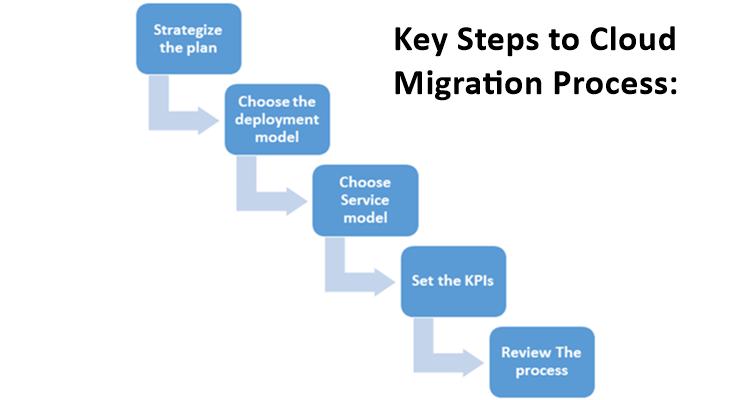
Credit: www.knowledgenile.com
Select A Cloud Provider
Choosing the right cloud provider is a crucial step in cloud migration. The provider you select will impact your business’s efficiency and costs. It’s essential to evaluate options carefully. Each provider offers different features and capabilities. Understanding these can help you make an informed decision.
Compare Service Offerings
Cloud providers offer a range of services. These include storage, computing power, and networking. Assess each provider’s offerings based on your needs. Consider their reliability and uptime guarantees. Some providers specialize in specific industries. Ensure their services align with your business goals.
Assess Cost Implications
Cost is a major factor in cloud provider selection. Providers have different pricing models. Some charge per usage, others offer fixed pricing. Calculate potential costs for each provider. Consider hidden fees for data transfer or support. Choose a provider that fits your budget without compromising quality.
Plan The Migration Strategy
Crafting a migration strategy involves assessing current systems, defining goals, and identifying resources for seamless cloud transition. Prioritize security and compliance to safeguard data integrity during the process.
Embarking on a cloud migration journey can feel overwhelming. Planning a migration strategy is crucial. It sets a clear path and ensures that all components of your system transition smoothly. You might be tempted to rush in, but careful planning helps you avoid pitfalls and unexpected costs. Think of it as preparing for a long road trip; you wouldn’t start without a map and itinerary.Prioritize Workloads
Not all workloads are created equal. Identify which applications and data are most critical to your operations. Prioritizing ensures these vital components are moved first, minimizing disruption. Consider factors like business impact, complexity, and dependencies. Ask yourself: What would happen if this workload fails during migration? Your answers will guide your priorities.Develop A Timeline
A detailed timeline keeps your migration on track. Break down the migration into manageable phases, setting clear deadlines for each. Be realistic with your time estimates. It’s better to under-promise and over-deliver than the other way around. Include time for testing and potential setbacks. Flexibility is key; adapt as you go based on real-world challenges. Remember, the goal is a seamless transition. How will you ensure your timeline meets this objective? Stay focused and adjust as needed.
Credit: www.researchgate.net
Execute Data Migration
The journey to the cloud is a significant step for any organization, and executing data migration is the heart of this process. This phase is about moving your data from on-premises or other systems to the cloud environment. It sounds straightforward, but the execution of data migration involves meticulous planning and a keen focus on accuracy to ensure a seamless transition.
Ensure Data Integrity
Data integrity is crucial during migration. You want your data to arrive in the cloud without any corruption or loss. One way to ensure this is by conducting a thorough data audit before migration.
Verify that all data is correct, complete, and ready for the move. You can use checksum and hashing methods to validate data consistency. Think of this step as ensuring all your belongings are packed securely before a move, so nothing gets damaged or lost.
Have you considered backing up your data? This precaution is essential. If anything goes wrong during migration, a backup ensures that you can restore your data without starting over.
Minimize Downtime
Downtime can be a major concern during data migration. Your goal should be to minimize it as much as possible to avoid disruption to your business operations. A well-planned migration strategy can help achieve this.
Consider migrating data in phases or during off-peak hours. This approach reduces the impact on your daily operations and allows for troubleshooting with minimal business disruption. Does your team have a contingency plan in place? Being prepared for unexpected issues can save valuable time.
Testing is another key factor here. Perform test migrations to identify potential problems. This proactive step can significantly reduce downtime during the actual migration process. Remember, the smoother the transition, the faster you can reap the benefits of cloud computing.
Executing a successful data migration is an achievable goal with the right approach. By focusing on data integrity and minimizing downtime, you ensure that your transition to the cloud is not only seamless but also sets a solid foundation for future growth.
Test And Validate
Testing and validating are crucial steps in cloud migration. These steps ensure the system works as expected. They help confirm that the migration process is successful. Testing identifies issues before they affect users. Validation ensures performance meets business needs.
Conduct Functional Testing
Functional testing checks if the system functions correctly. Test all features in your cloud environment. Ensure each feature works as it should. Simulate user actions to test functionalities. Document any issues found during testing. Fix these issues promptly to avoid future problems.
Verify Performance Metrics
Performance metrics show how well your system runs. Check response times and load handling. Ensure the system can manage expected user loads. Verify that resource usage stays within limits. Ensure data transfer rates meet requirements. Regularly monitor these metrics to maintain performance.
Training And Support
Training and support are crucial for successful cloud computing migration. They ensure everyone can use new systems effectively. Proper guidance reduces resistance and enhances productivity. This section covers key steps for training and ongoing support.
Educate Staff
Start with educating staff on cloud computing basics. Share the benefits and potential challenges. Use simple language to explain complex terms. Offer workshops for hands-on learning. Interactive sessions make concepts easier to grasp. Provide resources like guides and tutorials. Ensure everyone understands the migration process.
Provide Ongoing Assistance
Offer continuous support after initial training. Set up a helpdesk for immediate queries. Encourage feedback to improve training materials. Update staff on new features or changes. Regular check-ins keep everyone aligned. Consider appointing cloud champions within teams. They can assist peers and raise awareness. Ongoing assistance boosts confidence in using cloud tools.
Monitor And Optimize
After migrating to the cloud, monitoring is crucial. Optimization enhances performance. Careful tracking ensures your system runs smoothly. It helps identify issues early. Regular checks maintain efficiency and reliability. Optimization fine-tunes resources. It reduces costs and enhances user experience. This section explores key steps to monitor and optimize your cloud environment.
Track Performance
Use monitoring tools to track performance. They provide real-time insights. Identify bottlenecks quickly. Monitor CPU, memory, and network usage. Analyze data patterns. Detect unusual activity. Regular performance reviews ensure optimal operation. Tracking helps maintain service quality. It is vital for business success.
Implement Improvements
Once issues are identified, implement improvements. Adjust resources based on usage patterns. Scale resources to meet demand. Optimize data storage solutions. Use caching to speed up access. Adjust configurations for better performance. Regularly update software and security patches. Improvements enhance efficiency and security.
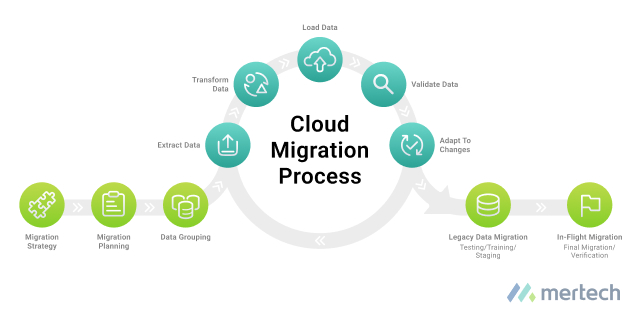
Credit: www.mertech.com
Frequently Asked Questions
What Is Cloud Migration?
Cloud migration involves transferring data, applications, or services to the cloud. It helps organizations reduce costs and improve scalability. The process includes planning, migrating, and optimizing. Proper execution ensures minimal disruption and maximizes benefits.
How To Prepare For Cloud Migration?
Preparation involves assessing current infrastructure and defining migration goals. Identify critical applications and data requirements. Create a detailed migration plan. Ensure security measures are in place. Engage stakeholders for seamless transition.
What Are Common Cloud Migration Challenges?
Challenges include data security, compatibility issues, and downtime. Ensuring data integrity and compliance is critical. Proper planning and testing can mitigate these risks. Choose a reliable cloud provider to avoid unexpected problems.
How Long Does Cloud Migration Take?
Migration duration varies based on complexity and scale. Small projects may take weeks, while larger ones months. Factors include data volume, application complexity, and testing needs. Proper planning accelerates the process.
Conclusion
Migrating to the cloud offers many benefits for businesses. Start with a clear plan and set specific goals. Assess your current infrastructure and choose the right cloud provider. Train your team for a smooth transition and address any security concerns.
Test each phase to ensure everything works as expected. Stay flexible and open to adjustments for better results. With these steps, your cloud journey becomes manageable and efficient. A careful approach ensures a successful migration, saving time and resources. Embrace cloud computing for improved operations and future growth.



