
Are you ready to transform your music into a mesmerizing visual experience? Imagine your favorite tunes coming alive with vibrant, dynamic visuals that dance and pulse in perfect harmony with the sound.
This isn’t just a dream—it’s entirely possible with an After Effects Audio Visualizer. If you’re passionate about music and love expressing creativity, this tool is your gateway to creating stunning audio-visual masterpieces. You’ll discover how you can harness the power of After Effects to captivate your audience and elevate your music projects to new heights.
Get ready to unleash your creativity and keep your audience hooked, beat by beat.
What Is An Audio Visualizer?
Transform sound into stunning visuals with After Effects Audio Visualizer. This tool syncs audio tracks with dynamic animations. Perfect for creating engaging music videos and presentations.
In the world of digital media, creating engaging content is key. One tool that has gained popularity among creators is the audio visualizer. If you’ve ever wondered how to make your audio content come alive with dynamic visuals, an audio visualizer might be your answer. It transforms sound into captivating graphics, making your content more immersive and enjoyable. An audio visualizer is a tool that converts audio signals into visual representations. It takes the beats, rhythms, and frequencies from your audio track and translates them into moving visuals. This can range from simple waveforms to complex, multi-colored animations. Imagine playing your favorite song and seeing its rhythm displayed as pulsing lines or vibrant geometric shapes. This visual representation not only enhances the listening experience but also grabs the viewer’s attention. It’s like giving your music a visual heartbeat.How Does It Work?
Audio visualizers work by analyzing the sound frequencies in your audio file. They then use these frequencies to drive animations. This process involves mathematical algorithms that map audio characteristics to visual elements. For example, bass frequencies might be represented as large, slow-moving visuals, while higher frequencies create fast, intricate patterns. This allows you to customize the look and feel of your visualizer to match your audio’s mood.Why Use An Audio Visualizer?
Using an audio visualizer can elevate your content, making it more engaging for your audience. Visuals can help convey emotions that audio alone might not capture. This added layer of engagement can keep viewers watching longer and increase the likelihood of sharing your content. If you’re a musician, podcaster, or content creator, an audio visualizer can showcase your work in a fresh, innovative way. It can transform a simple audio track into a visual story, enhancing the overall experience for your audience.Getting Started With After Effects Audio Visualizer
Adobe After Effects is a powerful tool for creating audio visualizers. It offers a range of templates and customization options to suit your needs. Whether you’re a beginner or a seasoned pro, After Effects provides the flexibility to create stunning visuals. Start by exploring the built-in presets or dive into creating your own custom visuals. You can experiment with different shapes, colors, and animations to find what best complements your audio. Don’t be afraid to try new things and see what resonates with your audience. Have you ever tried using an audio visualizer in your projects? How did it change your content’s impact? Share your experiences and insights in the comments below!Benefits Of Using Audio Visualizers
Audio visualizers are powerful tools that bring music to life. They transform sound into captivating visuals, enhancing the audience’s experience. With After Effects Audio Visualizer, the benefits are manifold. From engaging audiences to improving creativity, this tool offers substantial advantages for content creators.
Creating Engaging Content
Visualizers make music more appealing. They capture attention with dynamic visuals. This keeps the audience engaged longer. The combination of audio and visuals creates a memorable experience.
Enhancing Creative Expression
Audio visualizers offer a playground for creativity. Designers can experiment with colors and shapes. This freedom allows for unique visual storytelling. Every visualizer can be customized to match the music’s mood.
Improving Brand Recognition
Brands can use consistent visual themes. This helps in building recognition. Audiences start associating specific visuals with a brand. This reinforces brand identity effectively.
Increasing Audience Retention
Visuals help in holding the audience’s attention. They make content more immersive. Audio visualizers ensure that viewers watch till the end. Longer engagement boosts content reach.
Boosting Social Media Shares
Engaging visuals are more likely to be shared. They attract attention on social media platforms. This increases the potential for virality. Audio visualizers help in reaching a wider audience.
Key Features In After Effects
Adobe After Effects offers robust tools for creating audio visualizers. These features help artists bring music to life visually. Dive into the key features that make After Effects a top choice for audio visualization.
Audio Waveform
The Audio Waveform effect is essential for visualizing sound. It creates dynamic waveforms that move with the audio. Artists can customize colors and styles to match their project. This feature helps convey the mood and rhythm of the music.
Frequency Bands
Frequency Bands allow detailed sound analysis. They split audio into different frequency ranges. Each band reacts to specific sound frequencies. This results in a more intricate visualization. Users can adjust the bands to highlight certain sounds. The effect creates a rich audio-visual experience.
3d Animation Capabilities
3D animation in After Effects adds depth to visualizers. Artists can build complex 3D models that move with the beat. This feature enhances visual engagement and creativity. Users can rotate, scale, and animate objects in three dimensions. The result is a captivating and immersive audio-visual display.
Creating A Basic Visualizer
Designing a basic visualizer in After Effects transforms audio into captivating visuals. Start by importing the audio file and creating a new composition. Experiment with different effects and settings to sync visuals with sound. This process allows for unique and engaging animations that enhance the audio experience.
Creating a basic visualizer in After Effects can be rewarding. It allows you to blend audio with engaging visuals. This process can seem complex. But with a step-by-step approach, it becomes manageable. Start with a clear project setup. Then, smoothly integrate your audio files. Finally, enhance them with visualizer effects. Each step is crucial. Let’s dive into the process.Setting Up Your Project
Begin by launching After Effects. Create a new project. This involves selecting “New Composition” from the Composition menu. Choose a resolution that suits your needs. Standard HD (1920×1080) is a common choice. Set the duration to match your audio length. Name your composition for easy reference later. Save your project frequently to avoid data loss.Importing Audio Files
Next, bring in your audio file. Click on “File” in the menu. Select “Import” and then “File.” Choose your audio file from your computer. Drag and drop it into the timeline. Ensure it aligns correctly with your composition. You can play the audio to check if it plays smoothly. Adjust the audio levels if needed. This sets the base for your visualizer.Applying Visualizer Effects
Now, apply visualizer effects to your audio. Go to the “Effects & Presets” panel. Search for “Audio Spectrum” or “Audio Waveform.” Drag the effect onto a new solid layer. This creates the visual element tied to your audio. Adjust the effect settings in the Effect Controls panel. Change colors, frequencies, and amplitudes to match your vision. Preview your project regularly to see the changes. Fine-tune the settings for the best result. This completes your basic visualizer creation.Customizing Your Visualizer
Enhance your After Effects audio visualizer by adding personal touches. Adjust colors and shapes for a unique look. Create dynamic, engaging visuals that sync perfectly with your audio. Make your visualizer stand out with custom settings and effects.
Customizing your visualizer in After Effects is where creativity meets functionality. Tailoring your visualizer to match your vision can transform a simple audio track into a dynamic, engaging experience. It’s not just about the sound anymore; it’s about creating a visual story that captivates your audience. Whether you’re a seasoned designer or a beginner, customizing your visualizer can be both fun and rewarding.Color Schemes And Gradients
Choosing the right color scheme can set the mood of your visualizer. Warm colors like reds and oranges can create an energetic feel, while blues and greens can evoke a sense of calm. Experiment with different gradients to add depth and dimension. Use color to reflect the mood of your music. A fast-paced track might benefit from bold, contrasting colors. In contrast, a mellow tune could shine with soft, flowing gradients. Don’t be afraid to step out of your comfort zone. Try unexpected color combinations to surprise your audience and keep them engaged.Adding Text And Graphics
Incorporating text and graphics can enhance the storytelling of your visualizer. Consider adding the song title, artist name, or even lyrics to engage viewers more deeply. Graphics can be simple or complex. You might choose to add simple shapes or intricate designs that sync with the music. Think about what additional information or visuals will enhance the experience. Could an icon or symbol make your visualizer more memorable?Syncing With Music Beats
Syncing visuals with music beats can elevate your visualizer. It makes the experience more immersive and enjoyable for the audience. Use After Effects tools to align your visuals with the beat effortlessly. A simple shape expanding with each beat can add a dynamic layer to your visualizer. Pay attention to the rhythm and tempo of the music. Is there a particular part of the song where visuals could enhance the impact? Customizing your visualizer in After Effects is an exciting journey. So, what will your visual story look like?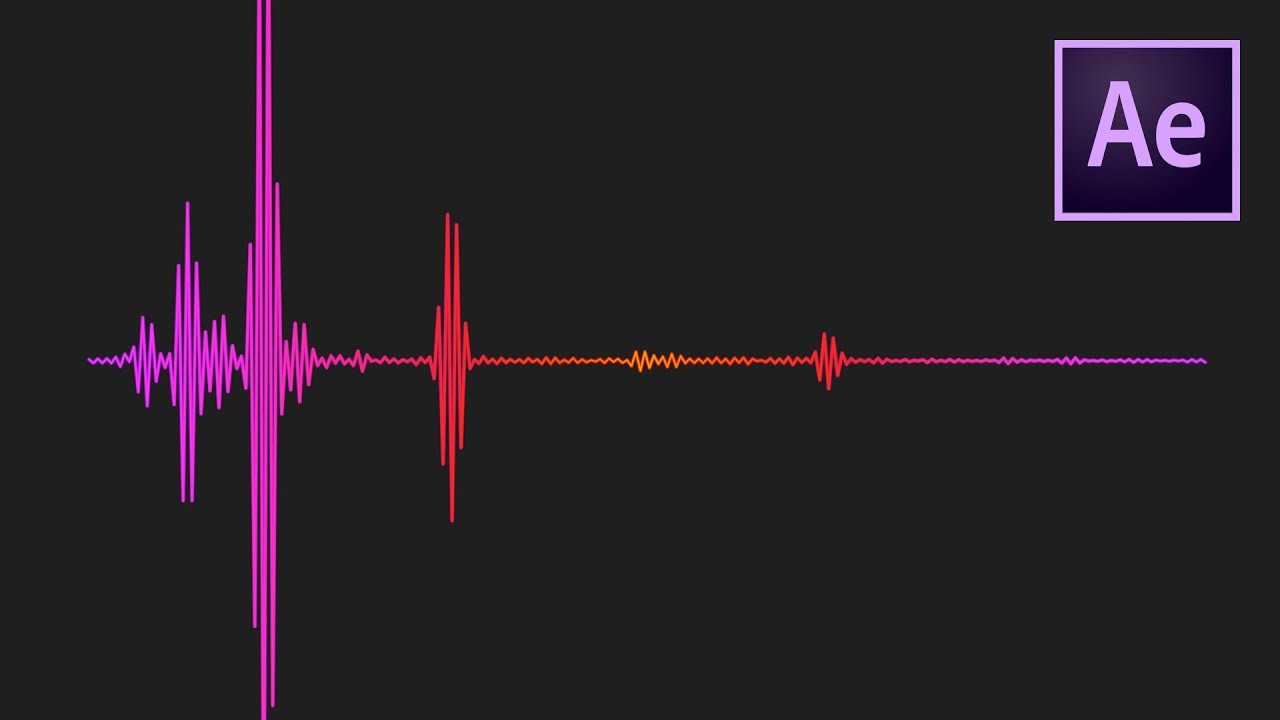
Credit: www.youtube.com
Advanced Techniques
Adobe After Effects offers powerful tools for creating stunning audio visualizers. With advanced techniques, your projects can reach new heights. These methods enhance creativity and make your visuals more dynamic. Here, we explore key advanced techniques to elevate your audio visualizer.
Using Expressions For Automation
Expressions add automation to your visualizer. They allow for dynamic changes without manual adjustments. Use simple code snippets to link properties together. For example, connect audio amplitude to scale. This creates a pulsating effect. Expressions save time and increase efficiency.
Incorporating 3d Elements
3D elements bring depth and realism to your visualizer. Convert layers to 3D and manipulate them in space. Add shadows and reflections for a more immersive look. Use lights to highlight key areas. This adds drama to your composition.
Dynamic Camera Movements
Camera movements add excitement to your visuals. Set keyframes to create smooth transitions. Zoom in to emphasize details. Pan across elements to guide the viewer’s eye. Use the camera to tell a story. This keeps the audience engaged.
Tips For Effective Sound Design
Creating a compelling audio visualizer in After Effects requires skillful sound design. Sound design can elevate your project, making it more immersive. This section offers tips for effective sound design. Enhance your visualizer by carefully choosing audio, balancing elements, and testing. Each step is crucial for a polished final product.
Choosing The Right Audio
Select audio that complements your visuals. Consider the mood and tone. Upbeat visuals pair well with energetic music. Calm visuals suit softer tunes. Choose audio that matches the project’s theme. This harmony creates a cohesive experience. Avoid overly complex tracks. Simplicity can be more effective. Ensure audio quality is high. Poor sound quality distracts viewers.
Balancing Visuals And Sound
Balance is key in audio-visual projects. Ensure neither sound nor visuals overpower the other. Adjust sound levels to fit the visual intensity. Sync key moments in the visuals with audio cues. This synchronization enhances impact. Use audio to guide the viewer’s attention. Subtle changes in sound can emphasize visual transitions. Keep the audio engaging but not overwhelming.
Testing Across Different Devices
Test your project on various devices. Sound may vary between speakers and headphones. Ensure consistent quality everywhere. Adjust sound levels for different environments. Some viewers might use mobile devices. Test audio clarity on smaller screens. This ensures a good experience for all users. Make necessary tweaks after testing. Aim for universal accessibility and quality.
Credit: borisfx.com
Popular Templates And Plugins
After Effects Audio Visualizer has become a favorite for creators. They add a dynamic layer to audio content. Popular templates and plugins make this process easier. They enhance the visual appeal and save time. Discover the top templates and essential plugins for stunning audio visualizations.
Top Audio Visualizer Templates
Templates are pre-made designs that simplify creation. Many creators use the Spectrum template. It offers vibrant, responsive visuals. The Equalizer template is another choice. It syncs perfectly with beats. Music Visualizer is popular for its sleek design. These templates provide customization options. Users can adjust colors and styles easily.
Essential Plugins For Enhanced Effects
Plugins add extra features to After Effects. Trapcode Suite is a popular plugin. It offers particle effects for audio. Plexus is great for connecting points and lines. It creates stunning 3D visualizations. Element 3D enhances 3D object rendering. These plugins elevate visual quality significantly.
Experiment with different plugins. They open up creative possibilities. A good plugin can transform your project. Keep your audience engaged with stunning visuals.
Showcasing Your Work
Explore the creative potential of After Effects Audio Visualizer. Transform sound into stunning visual displays. Share your dynamic projects with engaging animations that captivate audiences.
Showcasing your work with After Effects Audio Visualizer can open doors to new opportunities and collaborations. Once you’ve mastered the art of creating stunning visuals synced to audio, it’s time to share your creations with the world. Whether you’re aiming to grow your audience, attract clients, or simply connect with fellow creatives, sharing your work effectively is crucial. Let’s explore some practical ways to get your work noticed.Sharing On Social Media
Social media platforms are powerful tools for reaching a wide audience. Post your audio visualizer clips on Instagram, TikTok, and Facebook to capture attention. Short, captivating videos tend to perform well on these platforms. Use relevant hashtags to increase visibility and engagement. Consider joining groups or communities related to audio-visual content to connect with like-minded creators. Engaging with your audience through comments and direct messages can build meaningful relationships.Building A Portfolio
A portfolio is essential for showcasing your skills to potential clients and collaborators. Create a dedicated section on your website to display your best work. Organize your projects in a visually appealing manner, using thumbnails and short descriptions. Include a variety of styles and genres to demonstrate your versatility. Make sure your contact information is easy to find so interested parties can reach out. Regularly update your portfolio with new projects to keep it fresh and relevant.Collaborating With Musicians
Collaborating with musicians can enhance your audio visualizer projects and broaden your creative horizons. Reach out to local bands or musicians whose work resonates with you. Offer to create a visualizer for one of their tracks. This partnership can be mutually beneficial—musicians gain eye-catching visuals, and you gain exposure to their audience. Attend music events or join online forums to meet potential collaborators. Building these connections can lead to exciting new projects and opportunities. Have you ever considered how showcasing your work can transform your creative journey? Whether you’re aiming for more followers or your next big collaboration, the right approach can make all the difference.
Credit: www.blog.motionisland.com
Frequently Asked Questions
What Is After Effects Audio Visualizer?
An After Effects Audio Visualizer is a tool that converts audio into visual graphics. It helps create dynamic animations that sync with music. This enhances the viewer’s experience and adds a creative touch to video projects.
How Do I Use An Audio Visualizer?
To use an Audio Visualizer, import your audio file into After Effects. Apply a visualizer effect to the composition. Adjust settings to sync visuals with the audio. This creates engaging animations that respond to sound.
Can I Customize Audio Visualizer Effects?
Yes, After Effects allows customization of Audio Visualizer effects. You can adjust colors, shapes, and animation styles. Tailor the visualizer to match the theme of your project. This flexibility helps achieve the desired look.
Is After Effects Suitable For Beginners?
After Effects can be challenging for beginners, but it’s manageable with practice. Many tutorials are available online. Start with basic projects to build confidence. Gradually explore advanced features for complex visualizations.
Conclusion
Exploring After Effects audio visualizer tools can enhance your projects. These tools blend sound and visuals, creating engaging content. Simple designs or complex animations—options abound. Experiment and find the style that suits your vision. Adjust settings for the perfect sync.
Your audience will appreciate the dynamic experience. No need for complex skills; just creativity and practice. Dive into tutorials to refine your technique. Remember, creativity drives success. So, start transforming your audio into captivating visuals today. Your projects will shine with vibrant audio-visual harmony.
Keep exploring and innovating with After Effects.



