
Imagine trying to enjoy your favorite music or communicate on a video call, but all you hear is silence. Frustrating, right?
This is where audio device drivers come into play. They are the unsung heroes in your computer, translating digital data into the sound you hear. Without them, your speakers and headphones would be nothing more than stylish desk ornaments. You may not realize it, but these drivers are crucial for the seamless operation of your audio devices.
They ensure that every note, word, and sound effect reaches your ears exactly as intended. Yet, despite their importance, they often go unnoticed until something goes wrong. Understanding how they work and keeping them updated can make a world of difference in your daily tech experience. We’ll uncover what audio device drivers are, why they’re essential, and how you can ensure they’re always working in your favor. Whether you’re a tech novice or someone who loves diving deep into how things work, you’ll find valuable insights that could enhance your auditory adventures. Let’s make sure your sound experience is always at its best!
Credit: www.drivereasy.com
What Is An Audio Device Driver?
An audio device driver is a crucial software component. It acts as a bridge between the operating system and the audio hardware. Without it, your computer cannot produce sound. It translates instructions from the system to the audio device. This ensures smooth communication and sound output. Understanding its role helps in troubleshooting sound issues.
How Does An Audio Device Driver Work?
The driver converts digital signals into audio signals. These signals are then sent to your speakers or headphones. It manages audio input and output operations. This includes playing music, videos, and system sounds. It handles multiple audio tasks efficiently. The driver ensures audio quality and reduces sound distortion.
Importance Of Keeping Audio Drivers Updated
Outdated drivers can cause sound problems. They might lead to crackling or loss of sound. Updates often fix bugs and improve performance. They can add new features to enhance audio experience. Regular updates ensure compatibility with new software. Keeping them updated is vital for optimal sound quality.
Common Issues With Audio Device Drivers
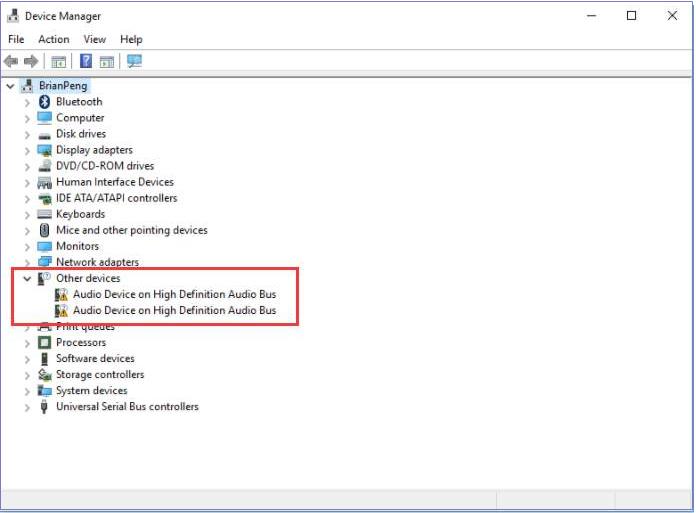
Sound problems can occur if the driver is missing. Incorrect driver installation can cause glitches. Conflicts with other software might disrupt sound. Sometimes, drivers may not recognize audio devices. Identifying these issues can help in fixing them. Troubleshooting drivers can restore sound functionality.
Credit: www.dell.com
Importance Of Audio Drivers
The importance of audio drivers often gets overlooked, but they play a crucial role in your computer’s sound system. Without them, your device might be as silent as a library. Imagine watching your favorite movie without sound or missing out on the beats of your favorite song. Audio drivers are the bridge that connects your hardware to the software, ensuring you enjoy crisp and clear sound. Let’s dive deeper into why these tiny pieces of software are so vital.
Audio drivers are essential for delivering high-quality sound to your ears. They translate data from your computer into sound waves you can hear. This process might seem simple, but it’s crucial for your daily activities. Whether you’re gaming, listening to music, or video chatting, audio drivers ensure you hear everything loud and clear.
The Role Of Audio Drivers In Sound Quality
Good audio drivers can make a significant difference in sound quality. They help your speakers or headphones produce clear and distortion-free sound. Picture this: you’re at a concert, but instead of being there in person, you rely on your computer. Without the right drivers, the experience might feel more like a muffled radio broadcast than a live performance. Investing in quality drivers can enhance your overall audio experience.
Why Regular Updates Matter
Keeping your audio drivers updated is key to maintaining sound performance. Updates often fix bugs, improve compatibility, and enhance features. Imagine missing out on new audio enhancements because your drivers are outdated. Regular updates ensure you have access to the latest improvements, keeping your sound system in top shape.
Audio Drivers And Device Compatibility
Audio drivers ensure your device is compatible with different audio equipment. Whether you’re using external speakers, headphones, or microphones, the right drivers make sure everything works seamlessly. Have you ever plugged in a new pair of headphones and heard nothing? The issue might be an incompatible driver. Checking compatibility can prevent these frustrating moments.
Personal Experience: Why I Value Audio Drivers
Once, during a virtual meeting, my audio suddenly cut out. After checking, I realized my audio drivers needed an update. It taught me the importance of keeping them current. Now, I always make sure my drivers are up to date before a big event or project. This small step has saved me from countless audio mishaps.
Are you aware of the impact audio drivers have on your daily digital interactions? Next time you enjoy a seamless audio experience, remember the small yet mighty drivers at work. How do you ensure your audio drivers are always ready to deliver the best sound?
Types Of Audio Drivers
Audio drivers are crucial for sound systems in computers. They ensure smooth communication between hardware and software. Different types serve different functions in this process. Understanding these types helps in optimizing audio performance. Each type has its unique characteristics and roles. Let’s explore the main types of audio drivers.
Kernel-mode Drivers
Kernel-mode drivers operate at a low level in the system. They directly interact with the hardware. This makes them fast and efficient. They handle core functions like sound processing. Kernel drivers are essential for real-time audio tasks. These drivers provide stability and speed. For critical audio applications, they are ideal. Their efficiency is unmatched.
User-mode Drivers
User-mode drivers work at a higher level than kernel-mode. They interact with user applications. This allows for easier updates and modifications. User-mode drivers are less risky to the system. They provide flexibility and ease of use. Developers prefer them for application-level audio tasks. These drivers are great for handling complex audio operations. Their versatility is their strength.
How Audio Drivers Work
Audio device drivers are essential for translating digital signals into sounds. They facilitate communication between the computer and audio hardware. By managing sound settings and ensuring seamless audio playback, they enhance the overall listening experience.
Understanding how audio drivers work can be quite fascinating, especially if you’ve ever wondered how sound magically travels from your computer to your ears. Imagine listening to your favorite song or the dialogue in a movie. It’s the audio driver that makes sure these sounds are heard as they should be. But how exactly does this happen? Let’s break it down.What Are Audio Drivers?
Audio drivers are small software programs that enable your operating system and applications to communicate with your audio hardware. Without them, your computer wouldn’t be able to produce any sound. Think of them as the translators between software and hardware.The Role Of Audio Drivers In Sound Production
When you play music or any audio file, your computer doesn’t naturally know how to interpret these signals into sound. The audio driver takes the digital audio data and converts it into analog signals that your speakers or headphones can understand. This conversion is crucial for producing the quality sound you hear.How Audio Drivers Handle Different Formats
Audio files come in various formats like MP3, WAV, or AAC. Each has its own way of storing sound data. Your audio driver must be versatile to handle these different formats effectively. It ensures that regardless of the file type, the sound output remains consistent and of high quality.Keeping Audio Drivers Updated
An outdated driver can cause numerous sound issues, including poor audio quality or no sound at all. Regular updates are essential as they fix bugs and enhance performance. They also ensure compatibility with new audio formats and devices. Have you checked your audio driver lately?Common Audio Driver Problems
Sometimes, you might experience issues like crackling noises or audio cutting out. These problems can often be traced back to faulty or outdated drivers. Troubleshooting these issues usually involves reinstalling or updating the driver. Have you ever faced such a problem?How To Install Or Update Audio Drivers
Installing or updating drivers can seem daunting, but it’s often a straightforward process. Most operating systems offer built-in tools for this purpose. Simply go to your device manager, find your audio device, and choose to update the driver. It’s a quick fix that can resolve many sound issues. Understanding the mechanics behind audio drivers can enhance your appreciation of the technology that powers your sound experience. Next time you adjust the volume or switch between headphones and speakers, remember the small but mighty driver working behind the scenes. Are you ready to explore more about your computer’s hidden talents?Installing Audio Drivers
Installing audio drivers is vital for the proper functioning of sound devices. Drivers act as a bridge between your hardware and operating system. Without them, your audio device might not work correctly or at all. This process can be performed automatically or manually. Each method has its own advantages and may suit different users.
Automatic Installation
Automatic installation is often the simplest way to install audio drivers. Most operating systems come with built-in support for automatic updates. These updates can detect and install the necessary drivers. Users can enable automatic updates in their settings. This method is convenient and requires minimal effort from the user. It ensures that the latest drivers are always installed.
Manual Installation
Manual installation requires more involvement from the user. This method is useful if automatic updates fail or are unavailable. Users must first identify their audio device model. The next step is visiting the manufacturer’s website. Here, users can find the correct driver for their device. Download the driver and follow the installation instructions. Manual installation gives users control over the process. It ensures compatibility and specific driver versions can be chosen.

Credit: www.avg.com
Common Audio Driver Issues
Audio device drivers are essential for transforming digital signals into sound, allowing us to enjoy music, movies, and more. Yet, many users encounter issues that can disrupt their auditory experience. Whether you’re a gamer, a music enthusiast, or just someone who loves streaming movies, understanding common audio driver issues can save you from frustration.
Compatibility Problems
Compatibility problems often arise when your audio driver and operating system aren’t on speaking terms. Have you ever updated your system only to find your sound vanished? This is a compatibility issue. It can be caused by outdated drivers or software that doesn’t play well with your current system.
Before pulling out your hair, check the manufacturer’s website for updates. Regularly updating your drivers can help prevent these silent standoffs. Is your device new but still silent? Ensure the driver supports your operating system version. Matching these components is crucial for harmony.
Sound Quality Issues
Sound quality issues can dampen your listening experience. Imagine watching your favorite movie, but the dialogue sounds muffled or distorted. These issues might stem from incorrect driver settings or software bugs.
Adjusting the audio settings can often clear up the fuzz. Experiment with equalizer settings or reinstall the driver. If you’re still not satisfied, consider if external factors, like speakers or headphones, might be the culprit. You deserve crystal-clear sound, so don’t settle for less.
Ever wondered if your audio struggles are due to driver issues? Next time you face sound troubles, consider if one of these common problems might be the cause. By staying proactive, you can ensure your audio device delivers the performance you expect.
Troubleshooting Audio Drivers
Audio drivers play a crucial role in sound performance. They help your device communicate with audio hardware. Sometimes, these drivers can cause issues. Sound problems may occur unexpectedly. You might face no sound, poor quality, or crackling noises. Troubleshooting audio drivers can solve these issues. Let’s dive into effective methods to fix these problems.
Updating Drivers
Keeping drivers updated is vital for smooth audio performance. Manufacturers release updates to fix bugs. Updates can enhance compatibility. Use the device manager to check for updates. Type “Device Manager” in the search bar. Find the “Sound, video and game controllers” section. Right-click on the audio device. Select “Update driver” to begin. Follow the prompts to complete the update. Always restart your system afterward.
Rollback To Previous Versions
Sometimes updates can cause new problems. Rolling back to a previous version can help. Open the Device Manager again. Find the audio device under “Sound, video and game controllers”. Right-click and choose “Properties”. Navigate to the “Driver” tab. Click on “Roll Back Driver” if available. This option reverts to the earlier version. Restart your computer to apply changes.
Enhancing Sound Quality
Improving sound quality is crucial for an immersive audio experience. Whether listening to music or watching a movie, sound clarity can transform the experience. Audio device drivers play a significant role in this enhancement. They bridge the gap between the hardware and the software, ensuring optimal performance. Let’s explore effective ways to boost sound quality through audio drivers.
Using Equalizers
Equalizers adjust different sound frequencies. They help tailor audio output to your liking. Most audio devices come with built-in equalizers. These tools allow you to tweak bass, mids, and treble levels. Experimenting with these settings can enhance sound clarity and depth. Always start with small adjustments. Gradual changes help find the perfect balance.
Configuring Audio Settings
Proper audio configuration can significantly improve sound quality. Access your device’s sound settings panel. Look for options to adjust sample rates and bit depth. Higher sample rates and bit depth offer richer audio detail. Ensure your audio driver is up-to-date. Updated drivers often come with performance improvements. Regular updates can resolve compatibility issues, ensuring optimal sound output.
Top Audio Drivers To Consider
Consider top audio drivers for your device to ensure high-quality sound. Reliable options enhance audio performance and compatibility. Choosing the right driver can significantly improve your listening experience.
When you’re setting up your computer’s audio, choosing the right audio driver is crucial. The driver acts as a bridge between your operating system and the sound card, ensuring smooth audio performance. Selecting the best driver can significantly improve your audio quality, whether you’re listening to music, playing games, or producing audio content.Realtek Hd Audio Drivers
Realtek HD Audio Drivers are among the most popular choices for many users. They offer a robust set of features for both basic and advanced audio needs. Whether you’re watching your favorite movie or engaging in a video call, Realtek ensures clear and crisp sound. One of the standout features is the user-friendly interface. Even if you’re not tech-savvy, you can easily navigate through its settings. The drivers also provide support for high-definition audio, making them suitable for high-quality audio playback. Consider Realtek drivers if you want reliability and ease of use. They are often pre-installed on many laptops and desktops, so you might already be using them without realizing it.Asio4all
ASIO4ALL is a universal audio driver that is often favored by musicians and audio producers. It provides low-latency audio, which is essential for recording and live performance. If you’re working in a digital audio workstation (DAW), ASIO4ALL can enhance your audio processing capabilities. Installation is straightforward, and it works with virtually any sound card. This flexibility makes it a great option if you’re on a tight budget but still want high performance. Have you ever experienced delays while recording? ASIO4ALL might be the solution you need. It allows you to bypass the limitations of your current audio setup, offering a smoother and more efficient experience. In choosing between these drivers, consider what matters most to you. Is it ease of use, or is it performance for professional audio work? Your answer will guide you to the right choice.Future Of Audio Drivers
The future of audio drivers is shaping up to be revolutionary, offering exciting possibilities for how we experience sound. You might be wondering how these changes will impact your everyday audio interactions. Imagine the ability to enjoy music, movies, and games with sound precision that feels like it’s tailored just for you. As technology advances, audio drivers are no longer just a bridge between your hardware and software. They are evolving into dynamic components that enhance immersion and personalization.
Integration With Ai
Artificial Intelligence is making waves across numerous industries, and audio drivers are no exception. AI can analyze your listening habits and environment to optimize sound settings automatically. Imagine your device adjusting audio levels for you during a phone call in a noisy café without you lifting a finger. This personalized touch can transform your audio experience, making every sound feel clearer and more vibrant. As developers continue to refine AI capabilities, you can expect future audio drivers to deliver sounds that resonate perfectly with your preferences.
Virtual Reality Sound
Virtual Reality (VR) is pushing boundaries, and sound is a crucial element of immersive experiences. Future audio drivers are set to play a pivotal role in creating realistic soundscapes within VR environments. Picture yourself standing in a bustling virtual city where you can hear conversations, footsteps, and ambient sounds as if you were physically there. These drivers can simulate sound direction and distance, enhancing your sense of presence and immersion. With VR gaining popularity, audio drivers that support 3D sound will become essential for developers and users alike.
As you look towards the future, consider how these advancements might change the way you interact with audio. What possibilities excite you the most? Whether it’s AI-driven personalization or experiencing life-like sound in virtual worlds, the future of audio drivers promises to redefine how you perceive sound.
Frequently Asked Questions
What Is An Audio Device Driver?
An audio device driver is software that allows your computer to communicate with audio hardware. It manages sound input and output for applications, ensuring proper functionality.
How Do I Update Audio Drivers?
To update audio drivers, visit your hardware manufacturer’s website for the latest version. Alternatively, use your operating system’s built-in update feature to automatically install updates.
Why Is My Audio Driver Not Working?
Audio driver issues can arise from outdated software, corrupted files, or hardware conflicts. To resolve, reinstall or update the driver and check connections.
Can Audio Driver Improve Sound Quality?
Yes, updated audio drivers can enhance sound quality by optimizing hardware performance and enabling new features. Always keep drivers up-to-date for the best experience.
Conclusion
Exploring audio device drivers helps improve sound quality. Understanding drivers increases your control over audio settings. Regular updates ensure optimal performance for your devices. Troubleshooting common issues becomes easier with basic knowledge. Clear sound enhances your entertainment and communication experiences.
Drivers act as a bridge between hardware and software. Investing time in learning about them pays off in the long run. Better sound quality leads to more enjoyable listening experiences. Keep your audio devices running smoothly by focusing on drivers.
Enhanced audio satisfaction awaits with proper driver management.



