
When it comes to choosing a laptop, one of the most critical factors you’ll want to consider is the CPU speed. But what exactly is the best CPU speed for your laptop?
Whether you’re a gamer, a student, or someone who works from home, getting the right CPU speed can make all the difference in your experience. Imagine breezing through tasks without lag, enjoying seamless gaming, or having the power to run demanding applications.
Sounds appealing, right? We’ll delve into what CPU speed means for you and how to choose the best one to suit your needs. Prepare to unlock the secrets of optimal laptop performance, ensuring you make an informed decision that enhances your digital experience.
Factors Affecting Cpu Speed
Choosing the right CPU speed for a laptop involves understanding factors like clock speed, core count, and thermal design. A balance between speed and battery life ensures optimal performance. Prioritize needs, whether gaming or multitasking, to find the best fit.
When you’re on the hunt for the best CPU speed for your laptop, several factors come into play. These elements are not just numbers on a spec sheet; they directly influence how smoothly your laptop runs and handles tasks. Understanding these factors can guide you in choosing the right laptop that matches your needs and lifestyle.Clock Speed And Its Role
Clock speed, measured in gigahertz (GHz), is like the pulse of your CPU. It dictates how fast your processor can execute tasks. A higher clock speed means your laptop can handle more instructions per second, making it better for intensive tasks like gaming or video editing. However, more isn’t always better. A high clock speed can drain your battery faster and cause more heat. Think about how you use your laptop daily. Do you need lightning-fast responses for demanding applications, or is battery life more critical for your long working hours?Impact Of Core Count
Core count refers to the number of independent units within a CPU that read and execute program instructions. More cores mean better multitasking. If you frequently run multiple applications simultaneously, a CPU with more cores will keep things running smoothly. Consider a quad-core processor if you often have several tabs or programs open. Dual-core might suffice if your usage is more basic like browsing or word processing. Remember, it’s about matching your processor’s capabilities to your usage patterns.Importance Of Cache Size
Cache size acts as a temporary storage area for your CPU, speeding up data access. Larger cache size helps your processor work more efficiently by reducing the time needed to retrieve data. While cache size might seem like a minor detail, it can significantly affect performance, especially for complex computing tasks. Picture it as having a larger workspace where your CPU can shuffle data around swiftly. When considering a laptop, ask yourself: how important is processing speed versus battery life or heat management? Balancing these factors can lead to a more satisfying laptop experience tailored to your needs.
Credit: softwareg.com.au
Optimal Cpu Speed For Different Tasks
Choosing the right CPU speed for your laptop can be challenging. Different tasks demand different CPU capabilities. Understanding what speed suits your needs can enhance performance and efficiency. Below, we’ll explore what CPU speed is optimal for various tasks.
Everyday Computing Needs
For daily tasks like browsing, a CPU speed of 2.0 GHz works well. This speed handles web surfing, email, and document creation efficiently. Basic media playback also runs smoothly. An entry-level processor can support these tasks without lag.
Gaming And High-performance Tasks
Gamers need higher CPU speeds for smooth gameplay. A speed of 3.5 GHz or above is ideal. It ensures fast processing for graphics-intensive games. Such speeds also benefit video editing and 3D rendering. A powerful CPU enhances frame rates and reduces load times.
Professional Software And Multitasking
Professionals often run multiple applications simultaneously. A CPU speed of at least 3.0 GHz is recommended. This speed supports software like CAD and Photoshop. It allows for seamless multitasking without performance dips. Fast processing ensures efficient work and productivity.
Balancing Power And Efficiency
Choosing the best CPU speed for a laptop involves finding the right mix of power and efficiency. A balanced speed ensures smooth multitasking without draining battery life quickly. Aim for processors with speeds between 2. 5 GHz and 3. 5 GHz for most daily tasks.
Balancing power and efficiency is crucial for laptop performance. Finding the right CPU speed ensures optimal usage. A faster CPU handles demanding tasks better. But it might drain the battery quickly. Efficient CPUs prolong battery life. They keep the laptop cooler. Choosing the right speed depends on individual needs. Consider your daily tasks and usage.Battery Life Considerations
High CPU speeds often consume more energy. This leads to shorter battery life. For portable use, efficient CPUs are better. They use less power, extending battery duration. Battery life is vital for users on the move. Adjust CPU settings to save energy. Lower speeds might be sufficient for basic tasks. Efficient CPU speeds offer a balance. They provide good performance without excessive drain.Heat Management And Cooling Solutions
Fast CPUs generate more heat. Excessive heat can damage components. Heat management is crucial for laptop longevity. Cooling solutions help reduce heat. Fans and heat sinks are common tools. Proper airflow is essential for cooling. Efficient CPUs produce less heat. They help maintain a stable temperature. Choosing a balanced CPU speed minimizes overheating. It ensures smooth and reliable performance.Latest Cpu Technologies
Choosing the right CPU speed for a laptop can be daunting. Latest CPU technologies offer improved performance. These advancements enhance speed and efficiency. Users can experience faster computing with these innovations.
Turbo Boost And Overclocking
Turbo Boost dynamically increases processor speed. It adapts to the workload and helps run demanding applications smoothly. Overclocking pushes the CPU beyond its default speed. This technique boosts performance but may generate more heat. Proper cooling systems are essential when overclocking.
Hyper-threading And Multithreading
Hyper-Threading allows a CPU to handle multiple tasks efficiently. It improves multitasking by making threads work simultaneously. Multithreading further enhances this capability. It divides processes into smaller threads, maximizing CPU usage. These technologies ensure smooth performance during complex tasks.
Future Trends In Laptop Cpus
Exploring future laptop CPU trends highlights the importance of optimal speed. Faster CPUs enhance multitasking and efficiency. These advancements cater to everyday needs, providing smoother and more responsive performance. Keeping up with CPU improvements ensures laptops meet modern demands effectively.
The world of laptop CPUs is evolving at a rapid pace, and understanding future trends can help you make informed decisions. As technology advances, we see notable shifts in how CPUs are designed and what they can achieve. From new architectures to integrating sophisticated technologies, the future of laptop CPUs promises exciting developments.Rise Of Arm Processors
ARM processors are gaining ground in the laptop world. These CPUs are known for their efficiency and power-saving capabilities. As someone who’s used both ARM and traditional processors, I noticed the battery life difference immediately. ARM processors can handle everyday tasks with ease while conserving energy. This makes them ideal for ultra-portable laptops, perfect for those always on the go. Consider your needs. Do you value extended battery life over raw power? ARM might be your answer.Integration Of Ai And Machine Learning
AI and machine learning are not just buzzwords. They are reshaping how CPUs work. Modern CPUs now integrate AI features to enhance performance and efficiency. I recently upgraded my laptop and was amazed at how it predicts my actions. It optimizes resources based on my usage patterns, making everything smoother. Think about how you use your laptop. Would smarter, adaptive performance benefit your workflow? If so, look for CPUs with AI capabilities. Future trends in laptop CPUs are not just about speed. They focus on efficiency, adaptability, and meeting user needs. Whether you choose ARM for its battery life or AI integration for smarter performance, understanding these trends is key to making the best choice for your next laptop. What’s your priority—power, efficiency, or intelligence? The future of CPUs offers options to match your unique needs.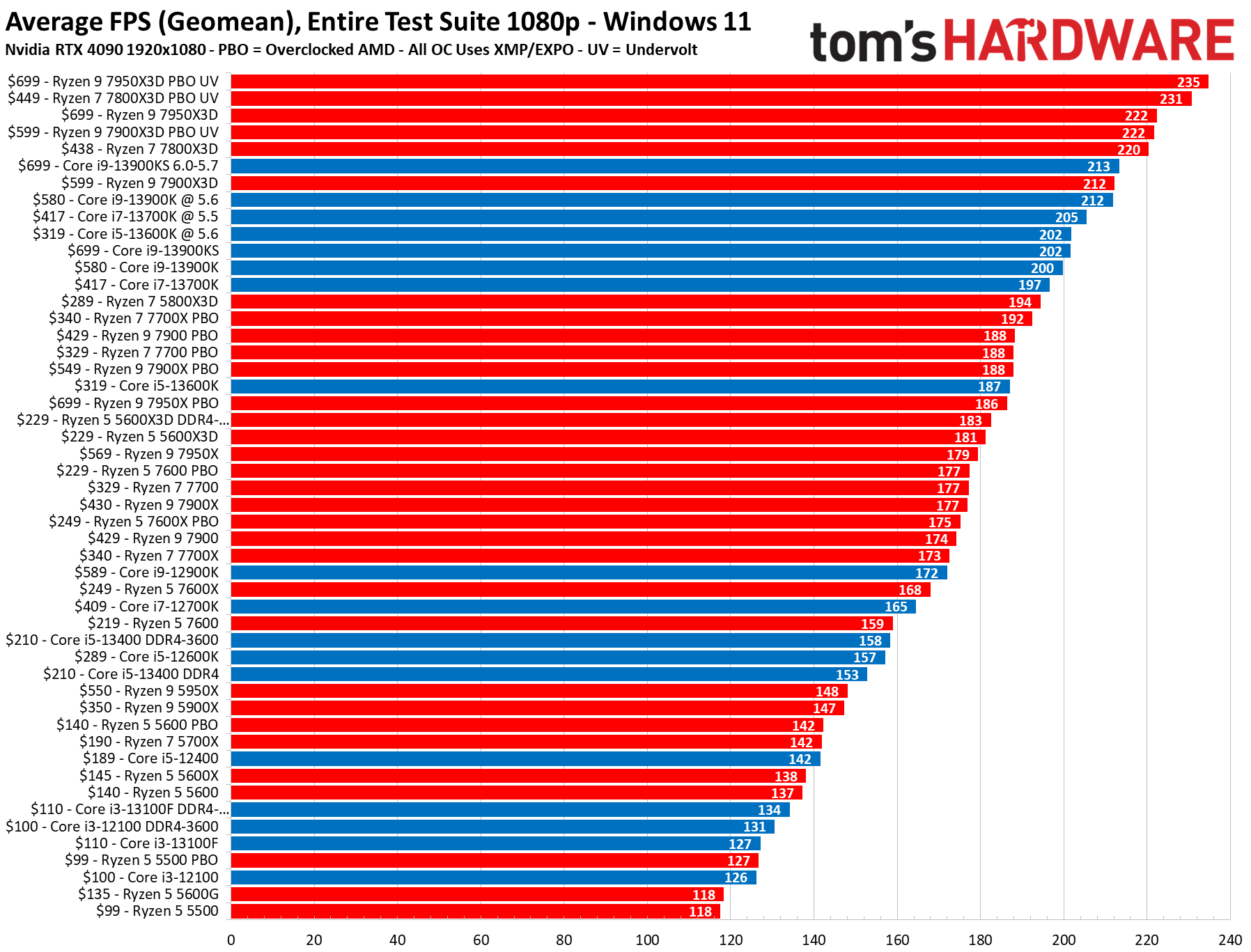
Credit: www.tomshardware.com
Choosing The Right Cpu For Your Needs
Selecting the ideal CPU speed for laptops involves balancing performance with power consumption. Faster CPUs handle complex tasks efficiently, but may drain battery life quicker. For everyday use, a mid-range speed offers good performance without compromising on battery longevity.
Choosing the right CPU for your laptop is crucial. It affects speed, performance, and overall user experience. Whether for work, gaming, or general use, the CPU dictates how well tasks are managed. Understanding different CPU options can help you make an informed decision.Budget-friendly Options
Not everyone needs a high-end CPU. Budget-friendly CPUs offer good performance for basic tasks. Intel’s Core i3 and AMD’s Ryzen 3 are solid choices. They handle web browsing, word processing, and streaming with ease. These CPUs are affordable and energy-efficient. Ideal for students and everyday users.High-end Performance Choices
Need more power? High-end CPUs deliver excellent performance. Intel’s Core i7 and AMD’s Ryzen 7 are top picks. They support gaming, video editing, and multitasking. Fast speeds and multiple cores enhance productivity. For professionals and gamers, these CPUs are worth the investment.Balancing Speed And Cost
Finding a balance is key. Mid-range CPUs offer good speed without breaking the bank. Intel’s Core i5 and AMD’s Ryzen 5 fit this category. They provide decent performance for most tasks. These CPUs are versatile and cost-effective. Perfect for those who need more than basic but less than extreme.
Credit: www.youtube.com
Frequently Asked Questions
What Is A Good Cpu Speed For Laptops?
A good CPU speed for laptops typically ranges from 2. 5 GHz to 4. 0 GHz. This range ensures smooth performance for everyday tasks and multitasking. Higher speeds are better for gaming or intensive applications, while lower speeds are suitable for basic use.
Does Cpu Speed Affect Laptop Performance?
Yes, CPU speed significantly affects laptop performance. Faster CPU speeds result in quicker data processing and improved multitasking. A higher speed is crucial for demanding applications and gaming. However, for basic tasks, a moderate speed is sufficient.
How To Choose The Right Cpu Speed?
Choose the right CPU speed based on your usage needs. For gaming or heavy tasks, opt for speeds above 3. 0 GHz. For general use, speeds between 2. 5 GHz and 3. 0 GHz are adequate. Consider energy efficiency if battery life is important.
Is Higher Cpu Speed Always Better?
Higher CPU speed isn’t always better, as it can lead to increased heat and power consumption. While it improves performance, it may reduce battery life. Balance your choice with efficiency and your specific usage requirements.
Conclusion
Choosing the right CPU speed boosts laptop efficiency. Faster CPUs run tasks smoothly. They handle more applications simultaneously. Consider your usage needs. Casual users may prefer mid-range speeds. Gamers and professionals might need high-speed processors. Balance speed with budget. Higher speeds often cost more.
Efficient cooling systems are also crucial. They prevent overheating during heavy tasks. Research different brands and models. Read reviews and compare performance. A wise decision enhances your computing experience. Remember, the best CPU speed depends on your specific needs. Choose wisely for an optimal laptop experience.



