
Have you ever wished for a way to transform your regular speakers into a smart audio system without spending a fortune? Imagine streaming your favorite tunes wirelessly, with crystal-clear sound quality, right from your smartphone.
Enter the Chromecast Audio device—a small, yet powerful gadget designed to revolutionize your listening experience. Picture yourself controlling your music from any room in your house, effortlessly. With Chromecast Audio, you can do just that, and more. Curious about how this tiny device can make a big difference in your everyday life?
Stick around, and you’ll discover why it might just be the missing piece in your audio setup puzzle.

Credit: www.pcmag.com
What Is Chromecast Audio?
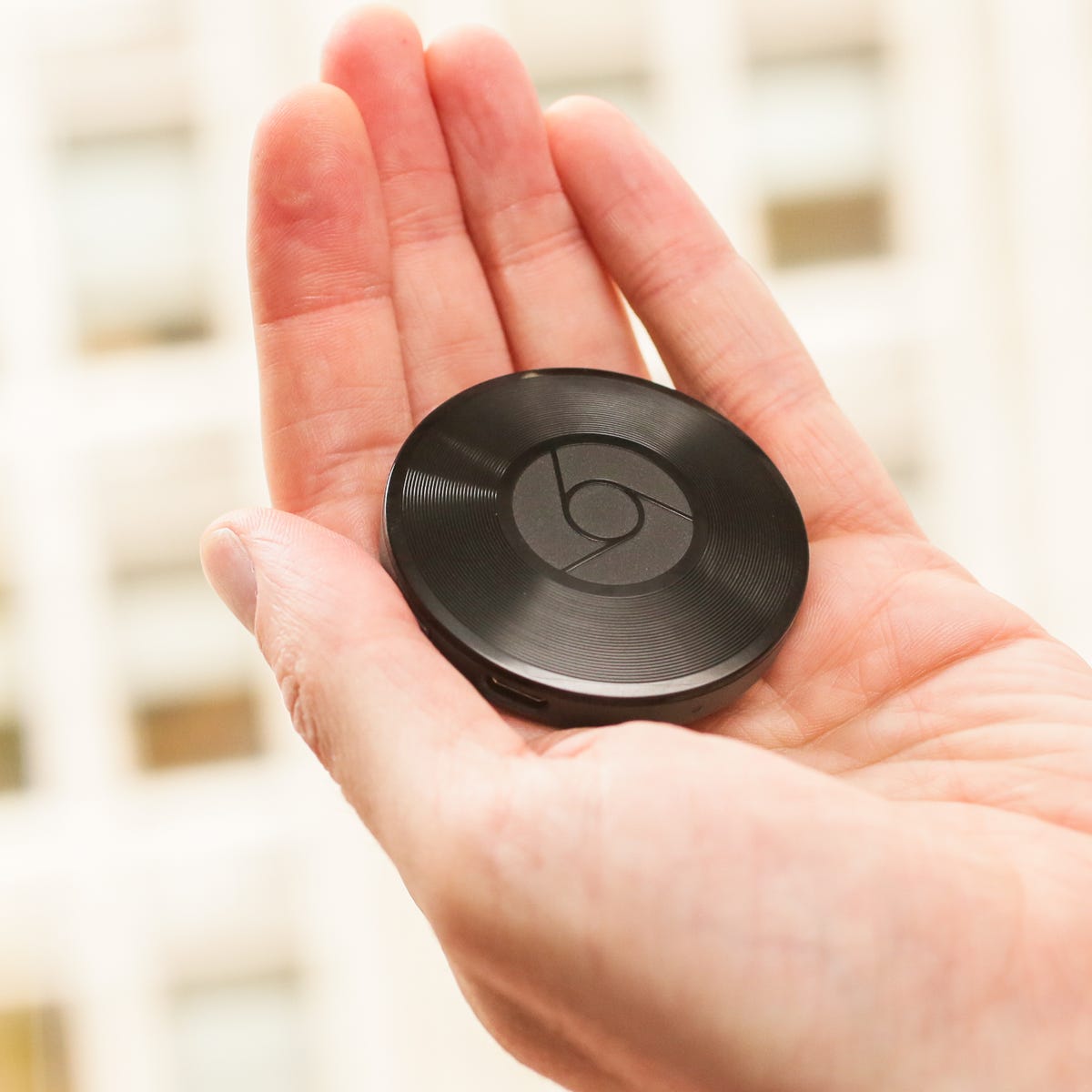
Chromecast Audio is a device that streams music from your smartphone to speakers. It connects through Wi-Fi for better sound quality. You can play music from apps like Spotify and Google Play Music.
Chromecast Audio is a nifty device that revolutionized how we listen to music. Imagine being able to stream music to your speakers without the hassle of tangled wires. If you’ve ever wished to transform your ordinary speakers into a smart audio system, Chromecast Audio is your go-to gadget. Chromecast Audio is a small device developed by Google to stream audio from your device to any speaker. It allows you to connect your smartphone, tablet, or computer to your speakers wirelessly. With this device, you can enjoy high-quality sound without needing a Bluetooth connection. It comes with a 3.5mm audio cable that plugs into your speaker, turning it into a smart speaker. You only need a Wi-Fi connection and a device to control the music. Its simplicity and ease of use make it a favorite among music lovers.How Does Chromecast Audio Work?
Chromecast Audio works by connecting to your home Wi-Fi network. Once connected, you can cast music, podcasts, or any audio content from your device to your speakers. It’s like having a personal DJ that plays your favorite tunes on demand. You can control the music using apps like Spotify, Google Play Music, and more. Simply tap the cast button in the app, and your music will start playing through the speakers. It’s as easy as flipping a switch. One of the key benefits is the ability to stream high-quality audio. Unlike Bluetooth, which can compress audio, Chromecast Audio supports lossless audio formats. This means your music sounds exactly as the artist intended. Another advantage is the multi-room feature. You can group multiple Chromecast Audio devices to play the same music across different rooms. Imagine walking through your home with the same song playing seamlessly from room to room. Setting up Chromecast Audio is a breeze. Start by plugging it into your speaker and power source. Download the Google Home app on your device, and follow the on-screen instructions to connect it to your Wi-Fi. Once setup is complete, you can start casting audio from your favorite apps. It’s a straightforward process that takes just a few minutes. You’ll wonder how you ever lived without it.Why Consider Chromecast Audio?
If you value sound quality and convenience, Chromecast Audio is a must-have. It’s perfect for parties, relaxing at home, or even for creating an immersive home theater experience. Have you ever thought about how technology can enhance your listening experience? Chromecast Audio is a testament to how simple innovations can make a big difference. Whether you’re an audiophile or just someone who loves music, this device is a game-changer. It bridges the gap between traditional audio systems and modern streaming services.How Chromecast Audio Works
Chromecast Audio connects to speakers, streaming music wirelessly from devices. It uses Wi-Fi to deliver high-quality sound. Compatible with various apps, it allows users to control playback from phones, tablets, or computers.
Are you tired of tangled wires and complicated audio setups? Chromecast Audio might be your solution. This nifty device transforms your regular speaker into a smart one, enabling wireless music streaming. Understanding how Chromecast Audio works can make your audio experience seamless and enjoyable. Let’s dive into the mechanics.Streaming Technology
Chromecast Audio uses Wi-Fi to stream music directly to your speakers. Unlike Bluetooth, which compresses audio, Wi-Fi allows for high-quality sound. When you play a song, your phone or tablet sends a signal to Chromecast Audio. The device then pulls the audio directly from the internet. This means your music plays in high resolution, and your phone is free for calls or texts without interrupting the sound. Have you ever tried this and noticed the difference in sound quality?Device Compatibility
Chromecast Audio is compatible with a wide range of devices. Whether you have an Android phone or an iPhone, you can easily connect and stream music. The device works with apps like Spotify, Pandora, and Google Play Music. All you need is the Google Home app to set it up. Imagine having a party and playing DJ with your phone, controlling what plays next without any hassle. Is your speaker ready for a smart upgrade? With Chromecast Audio, turning any speaker into a smart speaker is simple. Just connect the device using the standard 3.5mm audio jack, and you’re all set. It’s compatible with various speaker brands, making it versatile. Isn’t it great to revive your old speakers and give them new life? Chromecast Audio simplifies audio streaming, making it accessible and efficient. How will you enhance your listening experience today?Setting Up Chromecast Audio
Setting up your Chromecast Audio is a breeze. This device transforms your speakers into smart ones. You’ll stream music without hassle. Let’s dive into the setup process.
Requirements
To start, gather your essentials. You’ll need a Chromecast Audio device. A speaker or audio system is necessary. Ensure you have a stable Wi-Fi connection. A smartphone or tablet is required. Install the Google Home app on your device. These are the basics for setup.
Installation Steps
Plug the Chromecast Audio into your speaker. Use the included audio cable. Connect to a power source using the USB cable. Turn on your speaker system. Open the Google Home app on your device. Follow the on-screen instructions. Connect your Chromecast Audio to Wi-Fi. Name your device for easy identification. Test the connection by playing music. Enjoy streaming on your speaker.
Features Of Chromecast Audio
Chromecast Audio is a unique device that upgrades your audio experience. It connects easily to speakers and lets you stream music from your phone or tablet. This device has features that enhance sound quality and make listening enjoyable.
Multi-room Audio
Chromecast Audio lets you play music in every room of your home. Group speakers together using the Google Home app. This feature creates a seamless audio experience across different spaces.
High-resolution Sound
Experience clear sound with Chromecast Audio’s support for high-resolution audio. It delivers crisp and detailed sound quality. This feature ensures music sounds vibrant and lifelike.
Control With Voice And Apps
Use your voice or apps to control music on Chromecast Audio. Compatible with Google Assistant and music apps. This feature offers easy control over playlists and volume.
Benefits Of Using Chromecast Audio
Imagine transforming your home audio experience without breaking the bank. The Chromecast Audio device offers a seamless, affordable way to enhance your music listening journey. Whether you’re hosting a party or relaxing with your favorite tunes, this small gadget can amplify your audio experience in surprising ways.
Enhanced Audio Quality
Chromecast Audio supports high-resolution audio. This means you can stream music with more detail and clarity. Say goodbye to the compressed sound you often get with Bluetooth speakers.
Have you ever noticed how your favorite song sounds different on various devices? With Chromecast Audio, your music maintains its original quality. Your playlists will sound as intended, rich and full of life.
Wouldn’t you love to hear the crisp highs and deep lows of your favorite tracks? Chromecast Audio allows you to enjoy a sound experience that’s closer to studio quality.
Seamless Integration
Chromecast Audio works effortlessly with multiple apps. You can play music from Spotify, Google Play Music, and many more. It’s like having all your favorite music sources in one place.
Setup is straightforward. Connect the device to your speaker and link it to your Wi-Fi. No complex wires or confusing installations. Just plug, connect, and play.
Are you tired of juggling different devices for music? With Chromecast Audio, your phone becomes a control center. Adjust the volume, skip tracks, or create playlists—right from your palm.
Choosing Chromecast Audio isn’t just about better sound; it’s about convenience and quality. How will you transform your audio experience today?

Credit: variety.com
Comparing Chromecast Audio To Other Devices
Chromecast Audio is a device that streams music to speakers. It connects through Wi-Fi, offering high-quality audio. Many users compare it with other audio streaming options. Let’s explore how Chromecast Audio stands against its competitors.
Chromecast Vs Bluetooth
Chromecast Audio offers superior sound quality compared to Bluetooth. It uses Wi-Fi, which provides a clearer and more stable connection. Bluetooth, on the other hand, may lose quality over longer distances. Chromecast supports multiple devices streaming music simultaneously. Bluetooth connects one device at a time. Wi-Fi streaming ensures minimal sound delay. Bluetooth might experience lag, especially with video content. Chromecast Audio is ideal for home use. Bluetooth suits on-the-go listening.
Chromecast Vs Smart Speakers
Smart speakers often include built-in voice assistants. Chromecast Audio focuses solely on streaming music. Many smart speakers limit music sources. Chromecast Audio supports a variety of apps and services. Chromecast connects to any speaker with an auxiliary input. Smart speakers come with integrated speakers, which vary in quality. Users can upgrade sound systems with Chromecast Audio. Smart speakers require buying a new device for better sound. Chromecast Audio works well for those who value flexibility in speaker choice.
Troubleshooting Common Issues
Chromecast Audio devices offer great wireless sound. But sometimes, problems arise. These issues can disrupt your listening experience. Don’t worry. Many common problems have simple fixes. This section will cover some typical issues. We will explore connectivity and sound quality concerns.
Connectivity Problems
The Chromecast Audio device might not connect to Wi-Fi. Check your internet connection first. Ensure your router is working well. Restart your router and the Chromecast device. This often solves the problem. Verify that your device is on the same network. Both should share the same Wi-Fi.
Sometimes, the device needs a reset. To reset, hold the button on the side. Release after the LED light flashes. Set up the Chromecast again through the Google Home app. This can fix persistent connectivity issues.
Sound Quality Issues
Poor sound quality can be frustrating. First, check the audio cables. Make sure they are connected properly. Loose connections can cause problems. Test with different cables if needed.
Adjust the volume settings on your device. Ensure it is not too low. Sometimes, the issue lies in the streaming app. Make sure the app is up to date. Restart the app to see if that helps.
If sound distortion persists, try repositioning the device. Ensure it is not near any other electronics. These can interfere with audio signals. Move it away from other devices for better sound.
Future Of Chromecast Audio
The Chromecast Audio device offers exciting possibilities for music lovers. As technology evolves, so does the potential of audio streaming devices. The future of Chromecast Audio looks promising with advancements in technology and changing market trends.
Technological Advancements
Chromecast Audio is keeping pace with innovations. Improved sound quality enhances the listening experience. Wireless technology makes connections faster and more stable. Voice integration allows hands-free control. Users can enjoy seamless streaming across multiple devices.
Market Trends
The demand for smart audio devices is growing. Consumers want convenience and quality in their audio experiences. Chromecast Audio adapts to these needs. It fits into smart home ecosystems. The market for streaming devices continues to expand. Chromecast Audio remains competitive with its features.
Credit: www.cnet.com
Frequently Asked Questions
What Is Chromecast Audio Device?
Chromecast Audio is a streaming device by Google. It allows users to stream music to speakers via Wi-Fi. Simply connect it to your speaker’s AUX input, and enjoy music from apps like Spotify and Google Play Music without using Bluetooth.
How Does Chromecast Audio Work?
Chromecast Audio connects to speakers using a 3. 5mm jack. It streams audio over Wi-Fi, providing high-quality sound. Users can control music from their smartphones or tablets. It supports multi-room playback, allowing synchronized music across multiple speakers.
Can Chromecast Audio Stream Online Music?
Yes, Chromecast Audio can stream online music. It supports popular music apps like Spotify, Pandora, and Google Play Music. Stream directly from your phone or tablet using Wi-Fi. Ensure your device and Chromecast Audio are on the same network for seamless streaming.
Is Chromecast Audio Compatible With All Speakers?
Chromecast Audio works with any speaker with a 3. 5mm AUX, RCA, or optical input. Make sure your speaker has one of these inputs. It doesn’t support Bluetooth connectivity. Check your speaker’s specifications for compatibility before purchasing Chromecast Audio.
Conclusion
Chromecast Audio offers a simple way to enjoy music at home. Setup is easy, making it accessible for everyone. Stream your favorite songs with clear sound quality. Compatible with various apps, it fits different preferences. Enhance your listening experience without complicated devices.
This small gadget brings big convenience to daily life. Perfect for music lovers wanting straightforward solutions. Affordable and effective, it meets basic audio needs. Explore new tunes or revisit classics effortlessly. Chromecast Audio simplifies the connection between devices and speakers.
A practical choice for enhancing home entertainment. Enjoy music with simplicity and ease.



