
Are you feeling overwhelmed by the endless options when choosing a desktop computer? You’re not alone.
With so many different form factors available, it can be tough to know which one is right for you. Whether you’re setting up a new home office, upgrading your gaming setup, or simply curious about the latest tech trends, understanding desktop computer form factors is essential.
Picture this: a computer that fits seamlessly into your lifestyle, maximizing your workspace and boosting your productivity. Sounds great, right? We’ll simplify the complexities of desktop computer form factors, helping you make an informed decision that meets your unique needs. Stick with us, and you’ll have the knowledge to pick the perfect fit in no time.
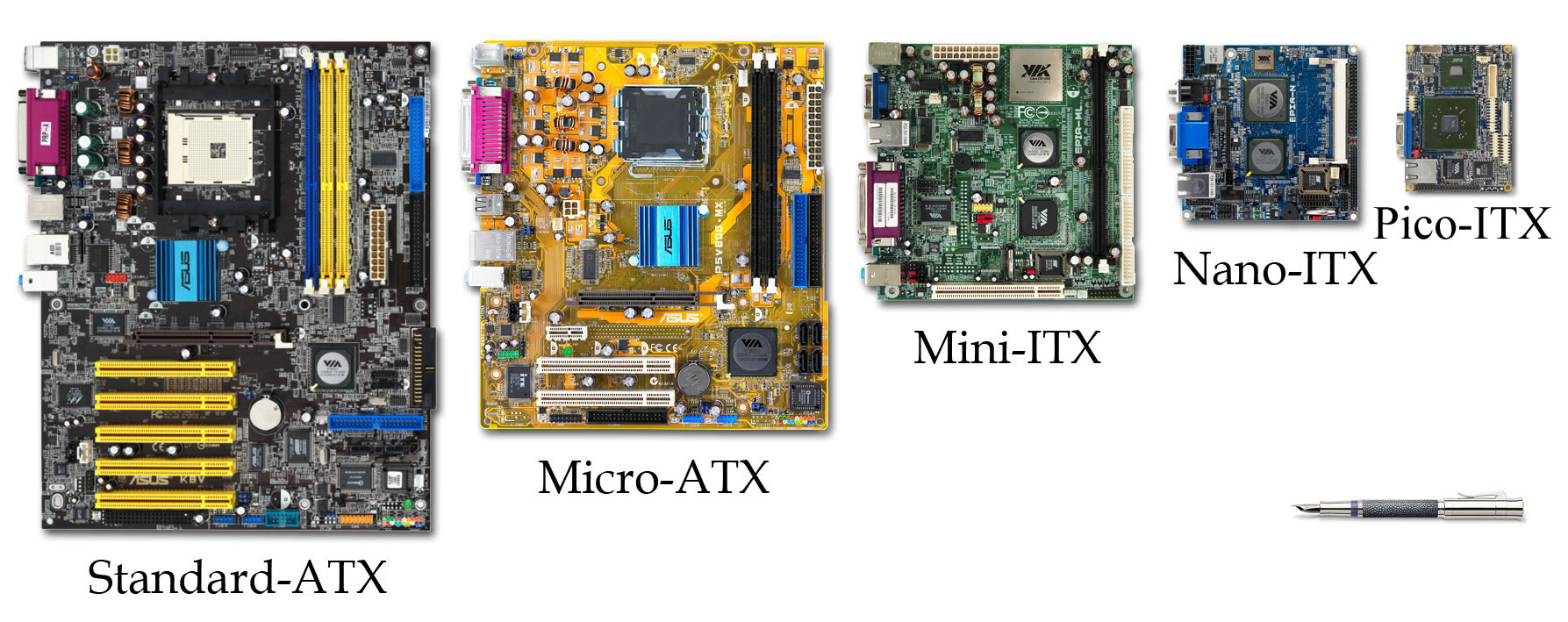
Credit: en.wikipedia.org
Traditional Tower Desktops
Traditional tower desktops have been the cornerstone of personal and professional computing for decades. Their robust design and expansive space make them a favorite for those who need powerful performance and flexibility. But not all tower desktops are created equal. Let’s take a closer look at the different sizes: full-sized towers, mid-sized towers, and mini towers.
Full-sized Towers
Full-sized towers are the giants in the world of desktop computers. They offer the most room for components, making them ideal for gamers and professionals who need maximum power.
With a full-sized tower, you can easily add extra RAM, multiple graphics cards, or additional storage drives. These towers often have better cooling systems, crucial for high-performance tasks.
Have you ever wanted to upgrade your machine without worrying about space? A full-sized tower is your best bet. However, keep in mind that they also take up more space in your workspace.
Mid-sized Towers
Mid-sized towers strike a balance between size and expandability. They are popular among users who want more power than a mini tower but don’t need the full capabilities of a full-sized tower.
These towers can accommodate most components, although there may be some limitations on the number of slots available. It’s a suitable choice if you foresee some upgrades but not an extensive overhaul.
Have you ever thought about how often you actually upgrade your PC? If the answer is not very often, a mid-sized tower might perfectly suit your needs.
Mini Towers
Mini towers are compact and space-saving, perfect for small desks or minimalist setups. They typically have fewer slots for upgrades, making them less suitable for heavy gaming or professional tasks.
However, mini towers are more energy-efficient and easier to move around. They are great for users who prioritize a clean, clutter-free workspace over extensive computing power.
Do you need a computer that fits seamlessly into a tight space? A mini tower could be the right choice for you.
Each type of tower has its unique benefits and potential drawbacks. Reflect on your computing needs and available space when choosing your next desktop tower. Which tower do you think aligns with your goals and lifestyle?
Small Form Factor Pcs
Have you ever felt overwhelmed by the size of traditional desktop computers? If yes, you’re not alone. Many people are turning to Small Form Factor PCs for a more compact, efficient computing experience. They are perfect for those who want to save space without compromising on power. Whether you’re setting up a workstation at home or looking for a sleek setup at the office, these smaller PCs are game-changers.
Mini Pcs
Mini PCs have gained popularity for their ability to balance size and performance. Imagine having all the power of a full-sized desktop in a box not much bigger than a book. They can fit neatly on your desk, and some models are even mountable behind your monitor, freeing up valuable desk space. With options like Intel NUC and Apple Mac Mini, you can choose from a variety of specifications tailored to your needs.
Micro Pcs
Micro PCs take compactness to the next level. Picture a device that can fit in your hand, yet still handle everyday computing tasks. Perfect for streaming, browsing, and basic office applications, these PCs are ideal for minimalist setups. A friend of mine uses a Micro PC connected to his TV for streaming, and he swears by its efficiency. Wouldn’t you love to declutter your space with such a tiny powerhouse?
Nano Pcs
Nano PCs are the epitome of portability and efficiency. These ultra-small devices can be carried in your pocket, making them perfect for professionals on the go. They’re often used in smart home setups and IoT applications due to their size and versatility. One might wonder, could the future of computing be as small as a thumb drive? With Nano PCs, it seems increasingly plausible.
As you consider Small Form Factor PCs, think about your needs and the space you have available. Could one of these compact solutions be the perfect fit for you?
All-in-one Desktops
All-in-One desktops offer a sleek and efficient computing experience. These computers combine all essential components into a single unit. Users enjoy a clutter-free and modern setup. This design appeals to those who value simplicity and aesthetics.
Integrated Monitor And Cpu
The monitor and CPU are housed in one device. This integration reduces the number of cables and peripherals. It makes setup easy and fast. Users appreciate the streamlined look and feel.
Touchscreen Capabilities
Many All-in-One desktops come with touchscreen features. This adds a layer of convenience and interaction. Users can navigate with simple taps and swipes. It enhances the overall user experience.
Space-saving Design
These desktops are designed to save space. They fit well in small offices or home environments. The compact form factor maximizes desk space. Users enjoy more room for other tasks and activities.
Compact And Portable Desktops
Compact and portable desktops are gaining popularity in the tech world. They offer powerful performance in a small package. These desktops are ideal for users with limited space. Their compact design makes them easy to move around. Despite their size, they do not compromise on power or functionality.
Portable Workstations
Portable workstations provide a solution for professionals on the go. They are equipped with high-end processors and ample RAM. These features make them perfect for tasks like video editing and 3D rendering. Their lightweight design allows easy transport between locations. Users can enjoy powerful computing without being confined to one place.
Miniature Gaming Pcs
Miniature gaming PCs bring great gaming experiences in compact forms. They pack powerful graphics cards and fast CPUs in small cases. This makes them ideal for gamers with limited space. These PCs offer flexibility and convenience for gaming enthusiasts. Enjoy high-quality graphics and smooth gameplay anywhere.
Modular Desktop Options
Explore modular desktop options with various computer form factors. These allow easy customization and upgrades. Perfect for tailoring to specific needs without replacing the whole system.
When considering upgrading your desktop computer, modular desktop options present a compelling choice. These systems allow you to customize and upgrade specific components without needing to replace the entire setup. Imagine being able to swap out parts to meet your changing needs, just like adding new toppings to your favorite pizza.Customizable Components
The beauty of modular desktops lies in their customizable components. You can choose each part, from the processor to the graphics card, ensuring your system perfectly matches your needs. Think about the freedom to select the best RAM for multitasking or the fastest SSD for quicker boot times. Is your current setup struggling with graphic-intensive applications? Simply replace the graphics card with a more powerful one.Upgrade Flexibility
Modular desktops offer significant flexibility when it’s time to upgrade. Instead of buying a new computer, you can update individual components, saving both time and money. Consider the possibilities: as technology advances, you can keep your system current by upgrading only what’s necessary. This flexibility allows you to stay on top of tech trends without breaking the bank. Have you ever felt limited by your current desktop’s capabilities? With modular options, you can overcome these limitations with targeted upgrades. This approach ensures your system evolves alongside your computing needs. By choosing a modular desktop, you maintain control over your technology. What would you upgrade first to improve your computing experience?
Credit: www.hp.com
Specialized Form Factors
Desktop computer form factors determine the size and shape of the system’s components. Popular types include ATX, microATX, and mini-ITX, each catering to specific space and performance needs. These form factors influence compatibility, cooling, and expandability of the computer system.
When it comes to desktop computer form factors, specialized types often cater to unique needs and environments. Unlike the typical desktop that graces most home offices, these specialized machines are designed with specific functionalities in mind. Whether you need a computer that can withstand harsh conditions or one that can handle demanding tasks, there’s likely a specialized form factor to meet your needs.Rugged Pcs
Rugged PCs are built to endure extreme conditions. Imagine working in a dusty construction site or a freezing research station; these PCs are made to operate where others might fail. They feature durable casings, shock-resistant components, and often water-resistant designs. You might wonder if you need such a sturdy machine. If your work environment is unpredictable or harsh, a rugged PC can save you from frequent repairs and replacements. Think of them as the all-terrain vehicles of the computing world.Workstation Pcs
Workstation PCs are powerhouses designed for intensive tasks. These machines are the go-to for professionals in fields like 3D modeling, video editing, and scientific simulations. They boast higher-end processors, large amounts of RAM, and advanced graphics capabilities. Do you find your current PC struggling with heavy applications? A workstation PC might be the answer. These computers are like having a personal assistant that never tires, handling complex tasks with ease. Choosing the right form factor can dramatically impact your computing experience. Do you need a machine that can withstand the elements, or one that can tackle the most demanding applications? Understanding specialized form factors can help you make an informed decision that aligns with your needs.Choosing The Right Form Factor
Choosing the right form factor for a desktop computer is crucial. It determines the machine’s performance, space usage, and overall cost. With numerous options available, finding the perfect match for your needs is essential. Let’s explore key aspects to consider.
Performance Needs
Performance varies with different form factors. Tower desktops offer high performance. They are perfect for gaming and heavy software. Mini PCs provide moderate power for everyday tasks. All-in-ones are compact but offer balanced performance. Understanding your needs helps in selecting the right option.
Space Considerations
Space is an important factor in choosing a form factor. Tower desktops require more space. They need room for cooling and expansion. Mini PCs fit in tight spots. They are ideal for small desks or crowded spaces. All-in-ones save space with their integrated design. Assess your space before deciding.
Budget Constraints
Budget plays a key role in form factor choice. Towers can be pricey due to components. Mini PCs are budget-friendly with basic features. All-in-ones offer mid-range pricing. They balance cost with performance. Knowing your budget helps narrow down choices.
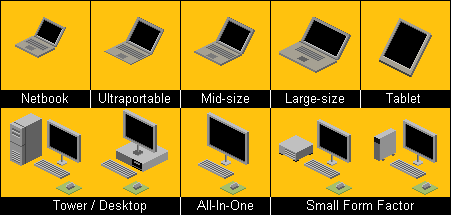
Credit: www.ximix.biz
Frequently Asked Questions
What Are Desktop Computer Form Factors?
Desktop computer form factors refer to the physical size, shape, and layout of the computer. Common types include tower, mini, and all-in-one. Each form factor offers different benefits in terms of space, performance, and upgradeability. Choosing the right form factor depends on your space and computing needs.
How Do Form Factors Affect Performance?
Form factors impact performance by determining space for components and cooling solutions. Larger form factors like towers allow for more powerful hardware and better cooling. Smaller form factors may have limited space for upgrades. Consider your performance needs when choosing a desktop form factor.
Why Choose A Mini Desktop Form Factor?
Mini desktops are compact, saving space and offering portability. They suit users with limited space or those needing a clutter-free setup. Despite their size, they can deliver decent performance for everyday tasks. They’re ideal for those prioritizing space over high-end computing power.
Are All-in-one Desktops Worth It?
All-in-one desktops integrate the monitor and computer into one unit, saving space. They offer a sleek design and are easy to set up. However, they may limit upgrade options. They’re ideal for users seeking simplicity and minimal setup without high-end performance requirements.
Conclusion
Understanding desktop computer form factors helps you make better choices. Each form factor offers unique benefits for different needs. Space-saving designs fit small desks, while larger setups offer more power. Consider what suits your requirements and budget. Stay informed about technology trends to find the right fit.
Exploring options leads to smarter purchasing decisions. Prioritize your needs to enjoy a seamless computing experience. Evaluate your workspace and daily tasks to find the perfect match. Knowledge about form factors empowers you to choose wisely. Make your computer setup efficient and tailored to your lifestyle.



