
Ever found yourself puzzled about whether you need a desktop or a workstation computer? You’re not alone.
Choosing the right computer can be a daunting task, especially when faced with the myriad of options available. But don’t worry, we’re here to simplify the decision-making process for you. Imagine the peace of mind knowing you’re investing in a device that perfectly aligns with your needs.
Whether you’re aiming for smooth daily computing or handling demanding tasks like 3D rendering or data analysis, understanding the difference between desktop and workstation computers is crucial. This article will break down the essentials, giving you the clarity you need to make an informed choice. So, if you want to avoid costly mistakes and ensure your tech investment is spot-on, keep reading. Your ideal computer setup might be closer than you think.
Purpose And Usage
Desktop computers are ideal for everyday tasks such as browsing and office work. Workstations handle complex tasks like 3D modeling and scientific computations. They are powerful and often more expensive due to their advanced capabilities.
When choosing between a desktop and a workstation computer, understanding their purpose and usage is crucial. Both devices have their unique strengths and are designed to cater to different needs. Let’s dive into their distinct purposes and how they align with your specific computing requirements.General Use Vs. Specialized Tasks
Desktops are perfect for everyday tasks. Whether it’s browsing the internet, streaming videos, or using office applications, they handle these with ease. They offer a balanced performance suitable for general use, making them a go-to choice for home and office environments. Workstations, on the other hand, are built for specialized tasks. They are the powerhouse behind complex computations, rendering 3D models, and running simulations. Their robust hardware is tailored for heavy-duty applications in fields like engineering, graphics design, and scientific research. Have you ever struggled with slow rendering times on your desktop? That’s where a workstation shines, offering the speed and efficiency needed for such demanding tasks.Target Audience
Desktops cater to a broad audience. They are ideal for students, families, and professionals who need a reliable machine for standard applications. Their affordability and versatility make them accessible to a wide range of users. Workstations, however, target a niche market. They are crafted for professionals who require superior performance and reliability. Think of architects, video editors, and data analysts who need to run resource-intensive software without a hitch. Are you part of a creative team needing to push boundaries with your projects? A workstation might be the right fit for you, offering the capability to handle intricate tasks efficiently. When deciding between a desktop and a workstation, consider what you need your computer to achieve. Are you looking for a machine for everyday tasks, or do you need something that can handle more demanding applications? Your answer will guide you to the right choice, ensuring you get the most out of your investment.
Credit: www.velocitymicro.com
Hardware Specifications
Desktop computers are suitable for everyday tasks, while workstation computers are designed for heavy-duty professional applications. Workstations offer enhanced processing power, superior graphics capabilities, and increased memory compared to desktops. Ideal for engineers and designers needing advanced computing performance.
When choosing between a desktop and a workstation computer, hardware specifications play a crucial role. They determine performance, speed, and capability. Different needs require different hardware. Let’s delve into these key aspects.Processor Power
Processor power is vital for both desktops and workstations. Desktops often feature consumer-grade processors. These are suitable for everyday tasks. Workstations, in contrast, boast high-performance processors. They handle intensive computing and multitasking. Think data analysis or 3D rendering. A workstation’s processor can have multiple cores. This allows for parallel processing. It enhances efficiency in demanding applications.Graphics Capabilities
Graphics capabilities differ significantly between these two types. Desktops usually have integrated or entry-level graphics. They work well for basic tasks and casual gaming. Workstations, on the other hand, use advanced graphics cards. These cards are designed for specialized tasks. Examples include video editing or CAD software. They ensure smoother visuals and faster rendering. Workstations often support multiple monitors too.Memory And Storage
Memory and storage are essential for performance. Desktops typically come with sufficient RAM for general use. Storage is usually in the form of HDDs or basic SSDs. Workstations, however, require more memory. They support large RAM capacities for demanding tasks. Storage solutions are often faster SSDs. This results in quicker data access and retrieval. Workstations may also have RAID configurations for data redundancy. Understanding these differences helps make an informed decision. Choose based on your specific needs and tasks.Performance And Reliability
When comparing desktop and workstation computers, performance and reliability are crucial. These factors determine the capability and dependability of your computer system. Each type offers unique advantages that cater to different user needs.
Speed And Efficiency
Desktop computers provide decent speed for daily tasks. They’re suitable for browsing, streaming, and light gaming. Workstations boast superior speed, ideal for demanding software and complex computations. Their processors handle multiple tasks swiftly, ensuring efficient workflows.
Error Correction And Stability
Desktops may occasionally face errors. They are less equipped to handle critical data issues. Workstations offer advanced error correction features. These features enhance stability, reducing data corruption risks. They ensure reliable performance under heavy loads.
Cost Considerations
Understanding cost differences is crucial. Desktop computers generally cost less, serving everyday tasks efficiently. Workstations, designed for complex applications, come with higher prices, reflecting their superior performance and durability. Choosing the right option depends on specific needs and budget constraints.
When deciding between a desktop and a workstation computer, cost is a crucial factor. Understanding the financial implications of each option can guide you to a choice that aligns with your needs and budget. Whether you’re a student, a professional, or a business owner, the right decision can save you money and enhance productivity.Initial Investment
The initial cost of a desktop computer is generally lower compared to a workstation. Desktops are designed for everyday tasks, making them more affordable for the average consumer. You might find that a desktop meets your needs if you’re using basic software for tasks like web browsing or word processing. Workstations, on the other hand, are built for high-performance tasks. These machines are equipped with advanced hardware such as powerful CPUs, extensive RAM, and high-end graphics cards. This makes them ideal for professionals in fields like graphic design, 3D rendering, or data analysis. However, this advanced hardware comes at a premium, significantly increasing the initial investment.Long-term Value
While desktops may have a lower upfront cost, workstations often provide better long-term value. Workstations are designed to handle demanding applications for years without needing upgrades. If you require consistent performance over time, the durability of a workstation can justify the higher initial cost. Desktops may require more frequent upgrades to keep up with new software and technological advancements. This can add to the total cost over time, potentially closing the gap between the initial savings and long-term expenses. Think about how often you’ll need to upgrade and the potential downtime that could affect your productivity. Are you willing to spend more now for a machine that lasts longer, or do you prefer to save initially and upgrade as needed? Understanding your priorities will help you make an informed decision.Customization And Upgradability
Customization and upgradability are key aspects that differentiate desktop computers from workstations. Both offer unique advantages, but their flexibility varies. Understanding these differences can help you make informed decisions.
Component Flexibility
Desktops offer great flexibility in component selection. You can choose from various brands and models. This allows for a personalized setup. Workstations, on the other hand, focus on specific tasks. They often include high-performance components. These are tailored for professional needs. This might limit some flexibility. But it ensures compatibility and reliability.
Future-proofing Options
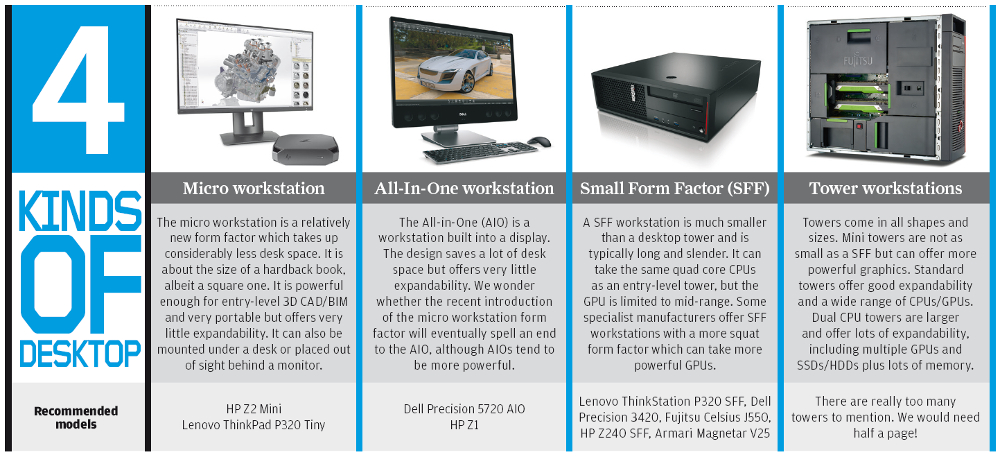
Future-proofing is easier with desktops. They support a wide range of upgrades. You can easily replace or add components. This includes RAM, storage, and graphics cards. Workstations also offer future-proofing. But, their specialized nature might limit options. Upgrades often require specific parts. This ensures high performance. Yet, it can be costlier than desktop upgrades.
Credit: aecmag.com
Use Cases And Scenarios
Understanding the difference between desktop and workstation computers is crucial. Each serves different needs and scenarios. Desktops suit general tasks. Workstations handle more demanding applications. Let’s explore their specific uses.
Everyday Computing
Desktops are perfect for everyday tasks. These include browsing, emailing, and media consumption. They offer sufficient power for home and office settings. Desktops handle word processing and spreadsheets with ease. They meet the needs of students and general users. Reliable and cost-effective, desktops are a common choice.
They provide a familiar interface. Users enjoy flexibility in software choices. With ample storage and peripherals, desktops remain practical. Gaming enthusiasts also find entry-level gaming feasible on desktops. Their versatility makes them ideal for routine computing tasks.
Professional And Industrial Applications
Workstations cater to professionals with intensive computing needs. Engineers, architects, and designers require their power. Workstations support complex simulations and 3D modeling. They excel in rendering large graphics and video editing. Designed for reliability, they handle heavy workloads consistently.
Workstations also support scientific and data analysis tasks. Researchers and analysts benefit from their computational strength. They are crucial in industries demanding precision and speed. Enhanced processing and memory capabilities set them apart. Workstations ensure seamless performance in demanding environments.
For industries like healthcare and finance, workstations offer robust solutions. Specialized software runs efficiently on these machines. Their durability and performance are unmatched. Workstations provide the backbone for critical operations. Essential in fields where time and accuracy matter most.
Market Trends
The debate between desktop and workstation computers continues to evolve. Market trends offer insight into their current positions. Understanding these trends can guide your next tech purchase.
Technological Advances
Desktops and workstations show different technological advances. Desktops focus on general computing needs. They integrate faster processors and enhanced graphics. This makes them suitable for everyday tasks. Workstations, on the other hand, cater to specialized demands. They include advanced GPUs and more RAM. This supports complex computations and 3D rendering.
Machine learning and AI have impacted both sectors. Desktops incorporate AI for smarter user interfaces. Workstations use AI for heavy data analysis. Cloud computing also influences both. It allows desktops to offload tasks. Workstations benefit from scalable resources.
Consumer Preferences
Consumer preferences shape market trends. Many choose desktops for cost-effectiveness. They are budget-friendly and meet basic needs. Desktops offer flexibility with upgrades. Users can easily swap components to boost performance.
Workstations attract professionals. They need power for intensive tasks. Engineers and designers prefer workstations. They offer reliability and speed. Creative professionals demand seamless performance. Workstations deliver this consistently.
Portability influences consumer choices. Desktops remain stationary. Workstations, though larger, offer mobility options. Portable workstations cater to traveling professionals. This trend meets the need for power on the go.

Credit: www.eetindia.co.in
Frequently Asked Questions
What Is A Desktop Computer?
A desktop computer is a personal computer designed for regular use at a single location. It typically includes components like a monitor, keyboard, and mouse. Desktops are versatile and suitable for general computing tasks, such as browsing the internet, office work, and gaming.
How Does A Workstation Differ From A Desktop?
A workstation is a high-performance computer designed for professional tasks requiring significant computing power. It is optimized for tasks like 3D rendering, scientific simulations, and complex data analysis. Workstations often feature advanced hardware components, such as powerful processors and large memory capacities.
Can A Desktop Replace A Workstation?
A desktop can handle basic tasks, but lacks the power for specialized applications. Workstations are designed for demanding tasks in professional environments. If your work involves heavy computing or requires specific hardware capabilities, a workstation is the better choice.
Which Is More Expensive: Desktop Or Workstation?
Workstations are generally more expensive than desktops due to their advanced hardware. They are built for high-performance tasks and often feature components like powerful processors, large RAM, and specialized graphics cards. Desktops, being more versatile, are often more affordable.
Conclusion
Choosing between a desktop and a workstation depends on your needs. Desktops suit everyday tasks and casual users. They are affordable and easy to use. Workstations, on the other hand, are for professionals needing more power. They handle complex tasks, like 3D modeling, efficiently.
Both have their unique strengths. Consider your budget and task requirements. This helps in making an informed decision. Whether it’s simple or demanding tasks, there’s a computer for you. Your choice impacts productivity and satisfaction. Take time to evaluate which one fits your purpose best.



