
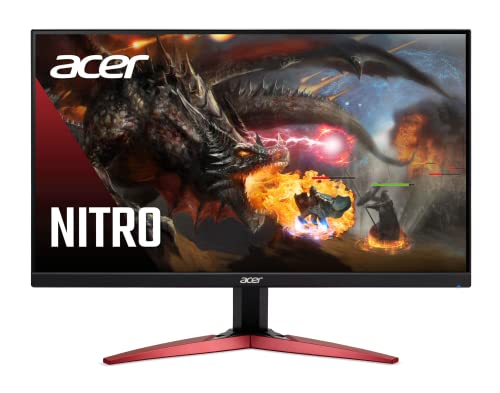
Choosing the best monitor colour settings boosts gaming visuals and improves your reaction time. Proper settings help you see details clearly and reduce eye strain.
Gamers need sharp, vibrant colours for an immersive experience. Monitors like the Acer Nitro KG241Y and Sceptre Curved 24. 5-inch offer high refresh rates and accurate colours. Adjusting brightness, contrast, and colour temperature makes games look natural. Using presets like sRGB or DCI-P3 can enhance colour accuracy.
Also, syncing settings with AMD FreeSync or Adaptive-Sync reduces screen tearing. Each monitor has unique features, so fine-tuning settings to match your model matters. This guide covers top gaming monitors and how to set their colours for the best gameplay and comfort. Simple tweaks can make a big difference in your gaming performance and enjoyment.
Acer Nitro Kg241y Sbiip

The Acer Nitro KG241Y Sbiip 23.8” Full HD Gaming Monitor is ideal for gamers and content creators who demand smooth visuals and fast response times without breaking the bank. If you want a monitor that supports competitive gaming with minimal motion blur and crisp image quality, this display is tailored for you. Its combination of a 165Hz refresh rate and 1ms VRB response time makes it perfect for fast-paced games and immersive experiences.
Pros:
- 165Hz refresh rate ensures ultra-smooth gameplay and reduced screen tearing
- AMD FreeSync Premium Technology provides synchronized frame rates for flicker-free visuals
- 1ms VRB response time minimizes motion blur for crisp and clear images during fast action
- ZeroFrame design offers an immersive viewing experience and is great for multi-monitor setups
- Multiple connectivity options including 1 x DisplayPort 1.2 and 2 x HDMI 2.0 ports for versatile device compatibility
Cons:
- The VA panel may have narrower viewing angles compared to IPS alternatives
- Limited adjustability in stand height and tilt options
- No built-in speakers, requiring external audio solutions
The Acer Nitro KG241Y utilizes a 23.8-inch Full HD (1920 x 1080) VA panel that offers deep contrast ratios and vibrant colors, enhancing both gaming visuals and everyday content consumption. Its AMD FreeSync Premium capability works seamlessly to reduce screen tearing and stuttering by synchronizing the monitor’s refresh rate with your graphics card’s output. This feature is particularly beneficial during fast-paced gaming sessions, providing a smooth and immersive experience.
Additionally, the monitor’s 165Hz refresh rate and 1ms VRB response time significantly reduce motion blur and input lag, which are critical factors for competitive gaming. The ZeroFrame design not only looks sleek but also maximizes screen real estate, making it easier to set up multi-monitor configurations. Connectivity is robust with multiple ports, including DisplayPort 1.2 and dual HDMI 2.0 connections, allowing users to connect various devices effortlessly. Overall, this monitor balances performance and affordability, making it a great choice for gamers seeking high-quality visuals and responsiveness.
To buy this product, click here.
Acer Kb272 G0bi 27″ Ips Full Hd Gaming Office Monitor

The acer KB272 G0bi 27″ IPS Full HD Gaming Office Monitor is ideal for gamers and office professionals who seek a high-performance and versatile display solution. With its Adaptive-Sync Support and FreeSync Compatibility, this monitor is perfect for those who require smooth visuals and consistent performance during gaming or intensive work tasks.
Pros:
- Adaptive-Sync Support for smooth gameplay
- 120Hz Refresh Rate for faster frame transitions
- 1ms (VRB) response time for minimal ghosting
- sRGB 99% coverage for accurate color reproduction
- Tilt functionality for personalized viewing angles
Cons:
- Limited resolution to Full HD (1920 x 1080)
- Basic connectivity with HDMI and VGA ports
The acer KB272 G0bi 27″ IPS Full HD Monitor offers an impressive 120Hz refresh rate, which is a significant advantage for both gamers and professionals who require seamless visuals and responsive screen transitions. The 1ms (VRB) response time further enhances the experience by reducing motion blur, making fast-paced games and videos appear smoother and more dynamic.
Additionally, the monitor’s sRGB 99% coverage ensures vivid and true-to-life colors, which is particularly beneficial for graphic designers and photographers who need accurate color representation. The tilt functionality allows users to adjust the screen to their preferred angle, providing comfort during extended usage. Despite its basic connectivity options, the monitor remains a solid choice for those prioritizing performance and color fidelity.
To buy this product, click here.
Acer Nitro Gaming Monitor Kg271u N3bmiipx

The Acer Nitro 27 Inch WQHD 2560 x 1440 IPS Gaming Monitor is perfect for avid gamers and creative professionals seeking a high-performance display that delivers stunning visuals and smooth gameplay. If you want a monitor that supports fast refresh rates, vibrant colors, and low latency, this model is an excellent choice to enhance your gaming or multimedia experience.
Pros:
- WQHD 2560 x 1440 resolution provides sharp and detailed images
- IPS panel ensures wide viewing angles and accurate color reproduction
- Up to 180Hz refresh rate offers ultra-smooth motion for competitive gaming
- 0.5ms response time minimizes motion blur and ghosting
- AMD FreeSync support reduces screen tearing and stuttering
- DCI-P3 95% color gamut delivers vibrant and true-to-life colors
- HDR 10 support enhances contrast and brightness for immersive visuals
- Multiple connectivity options with One Display Port 1.2 and Two HDMI 2.0 ports
Cons:
- Heavier weight (~13.75 pounds) may require a sturdy desk or mount
- Limited ergonomic adjustments compared to some premium gaming monitors
The Acer Nitro KG271U N3bmiipx features a large 27-inch screen with a crisp 2560 x 1440 WQHD resolution that provides exceptional clarity and detail, making it ideal for both gaming and content creation. Its IPS panel technology offers wide viewing angles and consistent color accuracy across the display, ensuring every image looks vibrant from any position. This monitor’s 180Hz refresh rate combined with an ultra-fast 0.5ms response time significantly reduces motion blur and ghosting, giving gamers a competitive edge with smoother gameplay.
Equipped with AMD FreeSync technology, the Acer Nitro monitor synchronizes the display’s refresh rate with compatible graphics cards to eliminate screen tearing and stuttering during fast-paced action. Additionally, the support for HDR 10 and a wide DCI-P3 95% color gamut enhances brightness, contrast, and color vibrancy, delivering an immersive visual experience whether you are gaming, watching movies, or editing photos. Its versatile connectivity options, including one DisplayPort 1.2 and two HDMI 2.0 ports, allow seamless connection to multiple devices for maximum convenience.
To buy this product, click here.
Sceptre Curved 24.5-inch Gaming Monitor

The Sceptre Curved 24.5-inch Gaming Monitor is an ideal choice for avid gamers and tech enthusiasts seeking a high-performance display that enhances gameplay with smooth visuals and quick response times. This monitor is perfect for those who demand a competitive edge, thanks to its 240Hz refresh rate and 1ms response time, making it suitable for fast-paced games and immersive experiences.
Pros:
- High 240Hz refresh rate for ultra-smooth gaming visuals
- 1ms response time reduces motion blur and ghosting
- Curved 24.5-inch display offers enhanced immersion
- Multiple connectivity options including 2 DisplayPorts and 2 HDMI ports
- Blue Light Shift technology reduces eye strain during extended gaming sessions
- Built-in speakers provide decent audio without extra peripherals
- Compact and lightweight design with machine black finish fits well in any setup
Cons:
- 1080p resolution may not satisfy users looking for higher 1440p or 4K displays
- No adjustable stand options for height or swivel adjustments
- Built-in speakers lack bass depth compared to external audio solutions
The Sceptre Curved 24.5-inch Gaming Monitor (C255B-FWT240) combines a sleek, machine black design with a curved display to create an engaging and visually appealing experience. Its 240Hz refresh rate ensures that fast-moving images are rendered smoothly, which is crucial for competitive gaming where every millisecond counts. The 1ms response time further minimizes lag and motion blur, helping users react faster during gameplay.
Equipped with dual DisplayPort and HDMI inputs, this monitor offers versatile connectivity options for multiple devices, such as gaming consoles and PCs. The inclusion of Blue Light Shift technology helps reduce eye fatigue during long gaming sessions, making it a practical choice for users who spend hours in front of the screen. Additionally, the built-in speakers provide a convenient audio solution, ideal for casual gaming or multimedia use without the need for external speakers.
To buy this product, click here.
Sansui 24 Inch Gaming Monitor

The SANSUI 24 Inch Gaming Monitor is perfect for gamers and professionals seeking a high-performance display that combines speed, clarity, and vibrant colors. Ideal for users who demand a smooth gaming experience with minimal lag, this monitor is well-suited for competitive gamers, content creators, and anyone looking for an immersive viewing experience with advanced features like 180Hz refresh rate and 1ms response time.
Pros:
- 180Hz refresh rate for ultra-smooth gameplay
- 1ms response time minimizes motion blur
- FreeSync technology reduces screen tearing
- 110% sRGB coverage delivers accurate and vibrant colors
- Frameless design enhances multi-monitor setups
- Eye Care technology reduces eye strain during long sessions
- Multiple connectivity options including HDMI and DP ports
- VESA mount compatibility for flexible mounting options
- Included HDMI cable for easy setup
- Cable management system keeps your workspace tidy
Cons:
- Limited to Full HD 1080P resolution, which may not satisfy users seeking 4K displays
- No built-in speakers, requiring external audio devices
- Stand offers limited ergonomic adjustments
The SANSUI 24 Inch Gaming Monitor offers a remarkable combination of speed and visual quality. The 180Hz refresh rate paired with a 1ms response time ensures that fast-moving scenes are rendered smoothly, making it an excellent choice for first-person shooters and fast-paced games. Additionally, the inclusion of FreeSync technology helps eliminate screen tearing and stuttering, providing a seamless gaming experience that enhances user immersion.
Beyond gaming, the monitor’s 110% sRGB color gamut and HDR support deliver vibrant, accurate colors, which are beneficial for graphic designers and video editors. The frameless design not only looks sleek but also makes it easy to set up multi-monitor configurations. Features like eye care technology help reduce eye fatigue during extended use, making this monitor a well-rounded option for both work and play.
To buy this product, click here.
Sceptre New 24-inch Gaming Monitor

The Sceptre New 24-inch Gaming Monitor is ideal for gamers and creative professionals who demand smooth performance and vibrant visuals. If you are looking for a reliable monitor that offers fast refresh rates, accurate colors, and built-in features to reduce eye strain, this model is tailored for you. Its compact size and sleek design also make it suitable for home offices and multi-monitor setups.
Pros:
- 100Hz refresh rate ensures fluid gameplay and reduces motion blur.
- 1ms response time minimizes input lag, perfect for competitive gaming.
- Dual HDMI ports and DisplayPort offer versatile connectivity options.
- 100% sRGB color accuracy delivers vibrant and true-to-life colors for content creators.
- AMD FreeSync technology eliminates screen tearing and stuttering.
- Built-in speakers provide convenient audio without extra peripherals.
- Eye Care technology reduces blue light and flicker for comfortable long sessions.
- Frameless design creates an immersive viewing experience and a modern look.
Cons:
- Speakers may not satisfy users seeking high-quality audio output.
- Limited to 24-inch screen size, which might be small for some multitasking needs.
- No adjustable stand options such as height or swivel.
The Sceptre 24-inch Gaming Monitor combines a 100Hz refresh rate with a lightning-fast 1ms response time, making it an excellent choice for gamers who want smooth and responsive gameplay. The inclusion of AMD FreeSync technology further enhances the visual experience by synchronizing the monitor’s refresh rate with the graphics card, effectively reducing screen tearing and input lag. This combination ensures that fast-paced games run flawlessly, providing users with a competitive edge.
Beyond gaming, this monitor excels in delivering stunning color accuracy thanks to its 100% sRGB coverage. This feature benefits digital artists, photographers, and video editors who require precise and consistent colors. Additionally, the Eye Care technology helps reduce eye fatigue by minimizing blue light and flickering, making it comfortable to use during extended sessions. With multiple input options including DisplayPort and two HDMI ports, users can easily connect various devices, while the framelss design adds a sleek aesthetic that fits well in any modern setup.
To buy this product, click here.
Gawfolk 24.5 Inch Ips Pc Gaming Monitor

The Gawfolk 24.5 Inch IPS PC 200Hz Gaming Monitor is ideal for avid gamers and creative professionals who demand a high-performance display with vibrant colors and ultra-smooth visuals. Those seeking a monitor that delivers fast response times and wide viewing angles for competitive gaming or detailed graphic work will find this model a perfect fit. Additionally, users who value sleek design and versatile connectivity options will appreciate its modern features.
Pros:
- 200Hz refresh rate for ultra-smooth gameplay and reduced motion blur.
- 1ms response time ensures minimal input lag, perfect for fast-paced gaming.
- IPS panel offering accurate colors and wide 178° viewing angles.
- 99% sRGB color gamut for vibrant and true-to-life colors, ideal for creative work.
- FreeSync technology reduces screen tearing and stuttering during gameplay.
- FHD 1080p resolution provides crisp and clear visuals.
- Compatible with wall mounting (75 x 75mm) for flexible setup options.
- Multiple connectivity options: HDMI and DisplayPort support.
Cons:
- The 24.5-inch screen size might be small for users preferring ultra-wide or larger displays.
- Does not support 4K resolution, which may limit detail for some professional users.
- No built-in speakers, requiring external audio solutions.
The Gawfolk 24.5 Inch IPS Gaming Monitor boasts a remarkable 200Hz refresh rate combined with a rapid 1ms response time, delivering exceptionally smooth and fluid visuals. This makes it highly suitable for competitive gamers who need to react quickly and accurately. The IPS panel technology enhances color accuracy and ensures consistent image quality across wide viewing angles up to 178°, so the picture remains vibrant whether viewed head-on or from the side.
Additionally, the monitor covers an impressive 99% of the sRGB color gamut, providing rich and true-to-life colors that benefit not only gamers but also graphic designers and video editors. The inclusion of FreeSync technology minimizes screen tearing and stuttering, resulting in a smoother gaming experience. Its sleek, bezel-less design maximizes screen real estate while maintaining a modern aesthetic, and with support for both HDMI and DisplayPort inputs, users enjoy versatile compatibility with a wide range of devices. Wall mounting compatibility further adds to its flexibility in various setups.
To buy this product, click here.
Z-edge Ug25s Gaming Monitor

The Z-Edge 24.5 inch 300Hz 280Hz 240Hz Gaming Monitor UG25S is ideal for competitive gamers and PC enthusiasts who demand ultra-smooth gameplay and fast response times. If you’re looking to gain an edge in fast-paced games such as first-person shooters or racing titles, this monitor’s impressive refresh rates and quick 1ms MPRT response make it a perfect choice.
Pros:
- Ultra-fast refresh rates up to 300Hz for buttery smooth visuals
- 1ms MPRT response time reduces motion blur and ghosting
- IPS panel technology delivers vibrant colors and wide viewing angles
- Multiple connectivity options with 2 DisplayPorts and 2 HDMI ports
- Full HD 1080p resolution ensures crisp and clear images
Cons:
- Limited to 24.5-inch screen size, which may feel small for some users
- No built-in speakers, requiring external audio solutions
- Design is quite basic with a thick bezel compared to premium models
The Z-Edge UG25S gaming monitor boasts an impressive combination of speed and visual quality. Its 300Hz refresh rate significantly reduces screen tearing and input lag, giving gamers a noticeable advantage in competitive play. Coupled with the 1ms MPRT response time, fast-moving images remain sharp and clear, enhancing the overall gaming experience.
Equipped with a 24.5-inch IPS panel, the monitor provides rich and accurate colors along with consistent brightness across wide viewing angles. This makes it suitable not only for gaming but also for content creation and everyday use. The inclusion of multiple HDMI and DisplayPort inputs ensures compatibility with various devices, enabling seamless switching between gaming consoles and PCs without hassle.
To buy this product, click here.
Koorui Gaming Monitor

The KOORUI Gaming Monitor is ideal for gamers and professionals who demand high performance and vivid visuals from their display. If you are looking for a fast, responsive screen with excellent color accuracy and a sleek design, this 24-inch monitor offers a perfect balance of speed and image quality. It is especially suited for competitive gamers and content creators who want smooth gameplay and vibrant colors.
Pros:
- 200Hz Fast IPS panel ensures ultra-smooth motion and quick response times
- 1ms response time minimizes input lag for competitive gaming
- 90% DCI-P3 color gamut delivers rich and accurate colors
- HDR400 support enhances contrast and brightness for immersive visuals
- Adaptive Sync technology reduces screen tearing and stuttering
- Ultra slim frame offers a modern and sleek aesthetic
- VESA mountable for flexible installation options
- Multiple connectivity options including HDMI 2.0 and DisplayPort 1.4
Cons:
- Limited to 24-inch screen size, which might feel small for some users
- No built-in speakers, requiring external audio solutions
- Black color may show fingerprints easily
The KOORUI Gaming Monitor features a Fast IPS panel with a blazing 200Hz refresh rate and 1ms response time, making it perfect for fast-paced games where every millisecond counts. This combination significantly reduces motion blur and input lag, giving players a competitive edge. The 90% DCI-P3 color gamut ensures colors are vibrant and true to life, which is also beneficial for creative professionals working with color-sensitive projects.
With HDR400 support, the monitor can display a wider range of brightness and contrast levels, improving the overall viewing experience by making scenes look more dynamic and realistic. The inclusion of Adaptive Sync technology helps prevent screen tearing and stuttering, ensuring smooth gameplay across various frame rates. Additionally, the monitor’s ultra slim frame and VESA mount compatibility provide flexibility in setup, whether you want a minimalist desk look or a multi-monitor configuration. Connectivity is robust, featuring both HDMI 2.0 and DisplayPort 1.4, allowing easy connection to modern PCs and gaming consoles.
To buy this product, click here.
Sceptre Curved 24-inch Gaming Monitor

The Sceptre Curved 24-inch Gaming Monitor 1500R is ideal for avid gamers and multimedia enthusiasts who seek a visually immersive experience with fast response times. Those who prioritize eye comfort during long gaming sessions or work hours will also find this monitor highly suitable due to its built-in eye care technology. Additionally, users looking for a stylish and compact monitor with versatile connectivity options will benefit from this model.
Pros:
- 1500R Curved Display enhances immersion and reduces eye strain.
- Fast 1ms response time ideal for competitive gaming.
- High 100Hz refresh rate ensures smooth visuals.
- Wide color coverage with 100% sRGB for vibrant and accurate colors.
- Multiple connectivity options including DisplayPort and dual HDMI ports.
- Built-in speakers for convenient audio without extra peripherals.
- Eye care technology reduces blue light and flicker for comfortable viewing.
- Compact Machine Black design fits well in various setups.
Cons:
- Limited screen size at 24 inches may not suit users wanting larger displays.
- Built-in speakers may lack depth compared to dedicated audio systems.
- Not designed for professional color grading despite good sRGB coverage.
The Sceptre Curved 24-inch Gaming Monitor 1500R features a deeply curved screen that wraps around your field of view, delivering an immersive experience that draws you into your games or media content. The curvature also helps reduce glare and eye fatigue during extended use, which is enhanced further by integrated eye care technology that filters harmful blue light and minimizes flickering. This ensures comfort for gamers and professionals who spend long hours in front of the screen.
Equipped with a blazing fast 1ms response time and a smooth 100Hz refresh rate, this monitor offers crisp, tear-free visuals that give gamers a competitive edge. The inclusion of 100% sRGB color coverage means colors are vibrant and true to life, benefiting creative users and casual viewers alike. Multiple input options like DisplayPort and dual HDMI ports provide flexibility for connecting gaming consoles, PCs, or other multimedia devices, while the built-in speakers add convenience without cluttering your desk with extra hardware.
To buy this product, click here.
Frequently Asked Questions
What Are The Best Color Settings For Acer Nitro Kg241y Gaming?
For Acer Nitro KG241Y, set brightness around 75%, contrast 70%, and gamma to 2. 2. Enable AMD FreeSync for smooth visuals. Adjust color temperature to “Warm” for better gaming immersion and reduce eye strain during long sessions.
How To Optimize Color On Acer Kb272 G0bi For Gaming?
Set Acer KB272 G0bi’s brightness to 80% and contrast to 65%. Use sRGB mode for accurate color reproduction. Enable Adaptive-Sync for tear-free gaming. Adjust sharpness to medium and color temperature to neutral for balanced visuals.
Which Color Profile Suits Acer Nitro 27 Inch Wqhd Best?
Use the DCI-P3 95% color profile for vivid colors on Acer Nitro 27 Inch WQHD. Enable HDR10 support for enhanced contrast. Set brightness at 85% and contrast at 75% for clear details in games.
What Is Ideal Color Setting For Sceptre Curved 24.5-inch Monitor?
For Sceptre Curved 24. 5-inch, set brightness to 70% and contrast to 60%. Use Blue Light Shift to reduce eye fatigue. Enable FreeSync and set color temperature to “Warm” for vibrant and comfortable gaming visuals.
How To Set Color For Sansui 24 Inch Gaming Monitor?
Set brightness at 80% and contrast to 70% on SANSUI 24 Inch Monitor. Enable HDR and FreeSync for better color and smooth gameplay. Use 110% sRGB mode for sharp and vivid colors in games.
What Color Settings Improve Gaming On Koorui 24″ Fast Ips?
Adjust KOORUI 24″ Fast IPS brightness to 85% and contrast to 70%. Use HDR400 mode for richer colors. Enable Adaptive Sync for tear-free visuals. Set color temperature to “Standard” for balanced and clear gaming images.
Conclusion
Choosing the right color settings can greatly improve your gaming experience. Each monitor on the list offers unique features like fast refresh rates, low response times, and good color accuracy. Adjusting brightness, contrast, and color temperature helps you see details clearly.
Using presets like sRGB or HDR modes can also enhance visuals. Remember to test different settings based on your game type and lighting conditions. Monitors such as the Acer Nitro KG241Y and Sceptre curved models provide excellent balance between speed and color quality.
In the end, the best color settings depend on your preferences and setup. Take time to fine-tune your monitor for sharp images and vibrant colors. This way, gameplay becomes more immersive and enjoyable. Experiment with settings and enjoy smoother, clearer visuals every time you play.











