
Have you ever wondered how your computer, smartphone, or tablet keeps all your data safe? Whether it’s your favorite music playlist, vacation photos, or important work documents, storage devices are the unsung heroes that make it all possible.
Understanding the different categories of storage devices can empower you to make smarter choices about how you manage your data. Imagine having the confidence to choose the right device that aligns perfectly with your needs, ensuring your information is stored efficiently and securely.
Dive into this article to explore the fascinating world of storage devices, and discover which ones can enhance your digital life.
Credit: medium.com
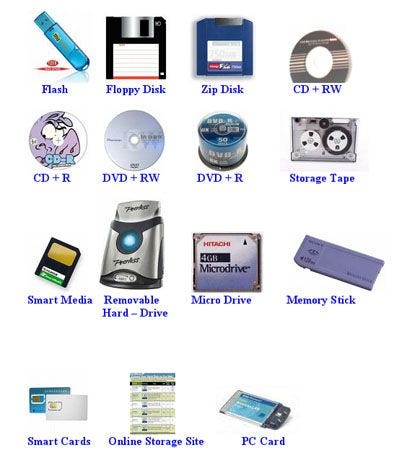
Primary Storage Devices
Primary storage devices are crucial components in your computer that temporarily hold data and instructions for the CPU to process. Unlike secondary storage, which is used for long-term data retention, primary storage is all about speed and efficiency. Imagine it as the brain of your computer, enabling it to think and work quickly. Let’s dive into some of the key types of primary storage devices.
Ram
Random Access Memory (RAM) is like your computer’s short-term memory. It’s where the operating system, applications, and current data in use are kept so they can be quickly accessed by the computer’s processor. The more RAM you have, the more applications you can run simultaneously without slowing down your system.
Think of RAM as your workspace. If you have a small desk, you can only work on a few things at once. But if you have a large desk, you can spread out your work and be more productive. Do you often find your computer lagging with multiple tabs open? Upgrading your RAM might be the solution you need.
Cache Memory
Cache memory is a smaller, faster type of volatile memory that provides high-speed data storage. It’s designed to speed up the data retrieval processes by storing frequently accessed information closer to the CPU. This means your computer doesn’t have to go back to the slower main memory (RAM) as often.
Think of cache memory as a mini-assistant for your CPU, fetching the most commonly used data and instructions. Next time you marvel at how quickly your browser loads frequently visited sites, remember that cache memory plays a big role in that speedy performance. Have you ever wondered why your computer seems to slow down after a while? Clearing the cache could give your system the boost it needs.
Understanding these primary storage devices can help you make better decisions when upgrading your computer. Consider how you use your device daily. Are you maximizing its potential with the right amount of RAM and efficient cache memory management?
Secondary Storage Devices
Secondary storage devices include hard drives, USB drives, and DVDs. They store data permanently and offer large storage capacity. These devices are crucial for backing up files and ensuring data safety.
Secondary storage devices are crucial for storing data permanently. They keep data safe even when the computer is off. These devices offer larger storage capacity compared to primary storage. They are essential for both personal and business use. Understanding secondary storage devices helps choose the right option for your needs.Hard Disk Drives (hdd)
Hard Disk Drives are traditional storage devices. They use spinning disks to read and write data. HDDs offer large storage capacity at a lower cost. They are suitable for storing large files and backups. HDDs are slower than SSDs, but reliable for long-term storage. They are often used in desktops and servers.Solid State Drives (ssd)
Solid State Drives are modern storage devices. They use flash memory to store data. SSDs have no moving parts, making them faster. They provide quick access to data and faster boot times. SSDs are more durable and consume less power. They are ideal for laptops and mobile devices. Though more expensive, they improve system performance significantly.External Storage Devices
External storage devices are like your personal digital assistant, ready to help when your internal storage is running out of space. They’re portable, easy to use, and incredibly versatile. Whether you’re backing up files, transferring data between devices, or just keeping your digital life organized, external storage devices can be a lifesaver. But which type is right for you? Let’s dive into two popular options: USB flash drives and external hard drives.
Usb Flash Drives
USB flash drives are the pocket-sized heroes of the storage world. They’re compact, affordable, and can store a surprising amount of data. Have you ever found yourself frantically looking for a way to transfer a presentation at the last minute? A USB flash drive can be your best friend in such a scenario. Just plug it into your computer’s USB port, and you’re good to go.
These little gadgets are perfect for quick data transfers and carrying important files around. They don’t require an external power source, and most of them are durable enough to withstand daily use. The downside? Their storage capacity is limited compared to other devices. However, for everyday tasks, they’re an excellent choice.
External Hard Drives
If you’re looking for something more robust, external hard drives might be what you need. These devices offer significantly larger storage capacities, making them ideal for backing up large amounts of data. Imagine having all your photos, videos, and documents stored safely in one place.
External hard drives often require a separate power source, but that’s a small trade-off for the vast storage they offer. They can be a bit bulky, but they’re perfect if you need to store a lot of information securely. Ever considered the peace of mind that comes with knowing your data is safely backed up?
Choosing the right external storage device depends on your specific needs. Are you constantly on the move? Then a USB flash drive might be your best bet. Do you need to store tons of data for long-term use? An external hard drive could be the solution. So, how will you decide which device to add to your digital toolkit?
Credit: medium.com
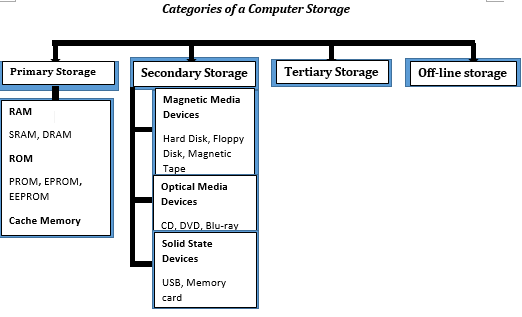
Optical Storage Media
Optical storage media is a fascinating category of storage devices that have revolutionized how we store and access data. As the name suggests, these devices use light, typically lasers, to read and write data. They are portable, durable, and often used for music, movies, and data storage. Whether you’re reminiscing about making mix CDs or wondering if Blu-ray discs are still relevant, optical storage media has a rich history and diverse applications worth exploring.
Cds
Compact Discs, commonly known as CDs, were a game-changer in the ’90s. They provided a new level of convenience for music lovers. You probably remember burning your favorite playlists onto CDs, a ritual that brought friends together.
CDs can store up to 700MB of data, which was a leap from floppy disks. Despite their age, CDs are still used for software distribution and music albums. They’re easy to use and have a nostalgic charm.
Dvds
DVDs took the optical storage concept further, offering more storage space and better quality. With 4.7GB of storage, DVDs transformed home entertainment, allowing you to enjoy movies with improved sound and picture quality.
If you’ve ever spent a weekend organizing your DVD collection or hosting a movie night, you know their value. DVDs are still widely used for video content and are a staple in many households.
Blu-ray Discs
Blu-ray discs are the next step in optical storage evolution, providing high-definition video and audio quality. They can store up to 25GB of data on a single-layer disc, making them ideal for HD movies and large data files.
As streaming becomes more popular, you might wonder if Blu-ray is still necessary. Yet, for those who cherish quality and collecting physical media, Blu-ray offers unmatched clarity and depth.
Have you ever considered how optical storage media impacts your daily life? Whether you’re preserving memories or enjoying entertainment, these devices offer practical benefits. What’s your favorite optical storage memory?
Cloud Storage Solutions
Cloud storage solutions offer diverse categories of storage devices. Choose from options like public, private, and hybrid clouds. Each provides unique features tailored to different storage needs and preferences.
When you think about storing your files safely without cluttering your devices, cloud storage solutions often come to the rescue. These digital storage options allow you to keep your data online, accessible from anywhere with an internet connection. Whether you are a business owner needing robust data protection or an individual looking to safely store family photos, cloud storage offers versatile solutions to meet your needs.Public Cloud
Public cloud services are like renting space in a massive warehouse. You share the infrastructure with many others, making it a cost-effective option. Companies like Google Drive, Dropbox, and Amazon Web Services offer such solutions. They handle maintenance and updates, freeing you to focus on your tasks. However, sharing resources means you might have limited customization options. Does this trade-off work for your needs?Private Cloud
A private cloud is akin to having your own storage building. Only you or your organization use the space, offering greater control and security. This setup is ideal for businesses dealing with sensitive data. While more secure, it requires a more significant investment in terms of cost and maintenance. You’ll need IT expertise to manage it effectively. Can your organization support such an infrastructure?Hybrid Cloud
The hybrid cloud combines the best of both worlds. It uses both public and private clouds, allowing you to store sensitive data privately and less critical information publicly. This flexibility can optimize costs and resources. Imagine the ease of storing massive amounts of data without compromising security. It’s a smart choice for businesses with varying data sensitivity levels. How can a hybrid approach benefit your data strategy?When considering cloud storage solutions, think about your specific needs, budget, and the level of control you require. The right choice can enhance efficiency while keeping your data secure. What will you choose for your storage needs?
Network Attached Storage (nas)
Network Attached Storage (NAS) is a powerful tool that allows you to store and share data within a network. It’s essentially a dedicated file storage device that provides centralized and accessible data storage solutions. Whether you’re managing files at home or running a business, NAS systems offer flexibility and control over your data.
Home Nas Systems
Imagine having all your family photos, videos, and important documents securely stored in one place. Home NAS systems make this a reality. They are user-friendly and can be easily connected to your home network.
With a NAS system, you can stream movies directly to your smart TV or access files from your smartphone. It’s like having a personal cloud service, but with the added security and privacy of keeping your data at home. Plus, setting up automated backups ensures that your cherished memories are safe from unexpected data loss.
Consider the convenience it brings: no more searching through multiple devices for that one elusive file. Everything is stored in an organized manner, making retrieval a breeze. Do you have the peace of mind knowing your data is protected and easily accessible?
Business Nas Solutions
For businesses, NAS solutions are a game-changer. They provide centralized data storage that supports multiple users, making collaboration seamless. With the ability to handle large volumes of data, NAS systems ensure that your business operations run smoothly.
Businesses can benefit from features like user permissions and remote access. This means employees can work from anywhere, accessing files as if they were in the office. NAS systems also support redundancy, ensuring that your critical business data is never lost.
Investing in a NAS solution can lead to increased productivity and cost savings. With the right setup, you can focus on growing your business instead of worrying about data management. Are you ready to enhance your business’s efficiency and security?
Whether for home or business, NAS systems offer practical solutions to common data storage problems. Their flexibility, security, and ease of use make them an ideal choice for anyone looking to optimize their data storage strategy.
Choosing The Right Storage
Storage devices come in various categories, each designed for specific needs. Hard drives offer large capacity for storing files, while solid-state drives provide faster access times. Flash drives are portable and convenient for transferring data. Understanding these categories helps in selecting the right device for your requirements.
Choosing the right storage device can be a game-changer in how effectively you manage your data. Whether you’re storing cherished family photos or critical work files, the storage device you pick matters. The right choice ensures your data is safe, accessible, and easy to manage. But with so many options, how do you decide? Let’s break it down into performance, budget, and scalability to help you make an informed decision.Performance Needs
Understanding your performance needs is crucial. Are you someone who edits videos or plays high-end games? Then speed is your best friend. A Solid State Drive (SSD) might be the perfect match due to its quick data access times. But if your tasks are mostly word processing or browsing the web, a Hard Disk Drive (HDD) can suffice. Ask yourself what activities you engage in most often. This insight will guide your choice.Budget Considerations
Budget often dictates the feasible options. SSDs offer speed but come at a higher price. If you’re on a tight budget, HDDs offer more storage for less money. But remember, they are slower. Consider hybrid drives as a middle ground—they offer a mix of SSD speed and HDD capacity at a moderate price. Make a list of what’s essential for you and allocate your budget accordingly. You might find that a little extra investment is worth the performance boost.Scalability Options
Think long-term when choosing storage. Is your data growing rapidly? Scalable solutions like Network Attached Storage (NAS) or cloud storage may be worth considering. NAS can be expanded by adding more drives. Cloud storage offers flexibility but depends on internet speed. Evaluate how much data you generate and how quickly it grows. It’s better to choose an option that can expand as your needs increase. Choosing the right storage device involves weighing performance, budget, and scalability. What’s more important to you now, and what might be critical in the future? Make sure your choice aligns with your lifestyle and data habits.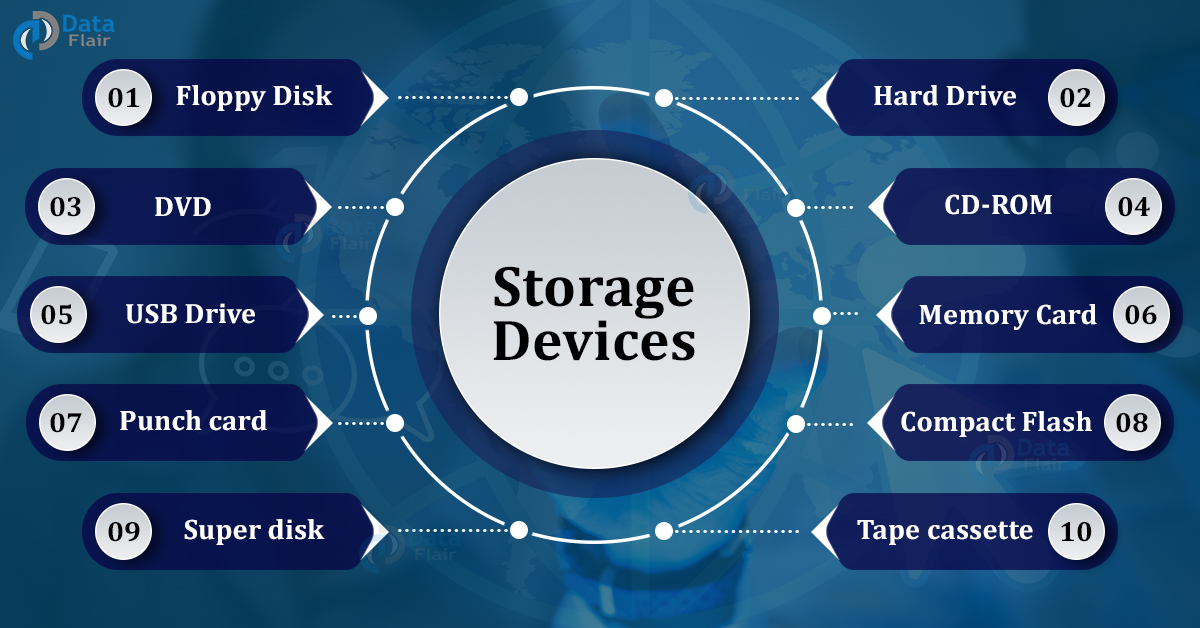
Credit: data-flair.training
Frequently Asked Questions
What Are Storage Devices?
Storage devices are hardware used to store data. They can be internal like hard drives or external like USB drives. Storage devices vary in capacity and speed. They are essential for saving files, applications, and system information. Understanding different types helps choose the best device for your needs.
How Do Storage Devices Work?
Storage devices work by saving data using magnetic, optical, or electronic methods. Hard drives use magnetic disks, while SSDs use flash memory. Data is read and written through specific processes. These devices interact with the computer’s operating system to manage data efficiently.
Speed and reliability vary among device types.
What Is The Purpose Of Storage Devices?
The purpose of storage devices is to store and retrieve digital information. They keep data safe and accessible. Users rely on them for saving files, software, and backups. They also help in improving system performance. Choosing the right device enhances storage efficiency and data security.
Are Ssds Better Than Hdds?
SSDs are faster and more durable than HDDs. They use flash memory, offering quicker data access. HDDs are cheaper and provide more storage space. SSDs have no moving parts, making them less prone to damage. The choice depends on budget and specific storage needs.
Conclusion
Storage devices play a crucial role in our digital lives. They help us store, manage, and access data. Different types fit different needs. Hard drives offer vast storage at low cost. SSDs provide speed and reliability. USB drives are portable and easy to use.
Cloud storage offers convenience and access from anywhere. Understanding these categories helps in choosing the right one. Make informed decisions for efficient data storage. Stay updated with technology trends to meet future needs. Explore options, compare features, and select wisely.
Your data deserves the best storage solution.



