

Ever found yourself hunching over your laptop, rubbing a sore neck, or battling a headache after hours of work? You’re not alone.
As you spend more time on your laptop, whether for work, school, or leisure, comfort and health can take a back seat. But here’s the good news: you can easily change that by making a few adjustments to your laptop setup.
Imagine working smarter, not harder, while feeling good in your own skin. You’ll discover practical tips and tricks to transform your laptop experience. These tips could save you from future aches and pains, improve your productivity, and help you enjoy every minute you spend on your device. Curious to learn how? Keep reading to unlock the secrets of laptop computer ergonomics that your body will thank you for.
Ergonomic Basics
Understanding laptop ergonomics can boost your comfort and health. Many people work long hours on laptops. This often leads to discomfort and strain. Ergonomics helps create a better work setup. This reduces pain and increases productivity. It’s about making your workspace fit you, not the other way around.
Importance Of Posture
Good posture is crucial for avoiding strain. Sitting up straight helps keep your spine aligned. It reduces pressure on your neck and shoulders. Adjust your screen to eye level. This prevents neck bending. Keep your feet flat on the floor. It supports your body balance. Proper posture can also improve your focus.
Common Ergonomic Issues
Poor ergonomics can lead to many issues. Back pain is common from bad posture. Wrist strain happens with improper keyboard use. Eye strain results from screen glare or wrong angles. These problems can affect your daily life. Simple changes can prevent these ergonomic issues.
Choosing The Right Laptop
Choosing the right laptop can significantly impact your comfort and productivity. It’s not just about picking the most powerful machine; it’s about finding one that fits your needs and feels good to use. You might not realize how much the wrong laptop can affect your posture and overall health. Let’s look at some essential features that can help you make the best choice.
Screen Size And Resolution
The screen is your portal to the digital world. A larger screen, like 15 inches or more, can reduce eye strain by displaying larger text and images. But if portability is key, a 13-inch screen might be ideal. Make sure the resolution is high enough to keep things crisp, especially if you work with graphics.
Think about where you’ll use your laptop most. A high-resolution screen is great for detailed work and watching movies. You don’t want to squint at tiny text or blurry images. I’ve found that opting for a Full HD screen or better makes a noticeable difference in clarity.
Keyboard And Trackpad Design
The keyboard and trackpad are your main points of contact with the laptop. A comfortable keyboard can make typing a breeze, while a poorly designed one can slow you down. Look for keyboards with good key travel and spacing. You’ll appreciate this after long typing sessions.
Consider the trackpad’s responsiveness and size. Does it allow for smooth navigation and gestures? It’s frustrating to deal with a jittery cursor or cramped space. Try it out if you can, and see if it feels natural to use.
Remember, your laptop should be an extension of you, not a hindrance. How does your current laptop measure up? If you’re constantly adjusting or feeling discomfort, it might be time for a change.
Optimal Desk Setup
Creating an optimal desk setup for laptop computer ergonomics is crucial. It ensures comfort and boosts productivity. A well-arranged workspace reduces strain. It can prevent long-term health issues. Let’s explore the key elements of an ergonomic desk setup.
Desk Height And Chair Position
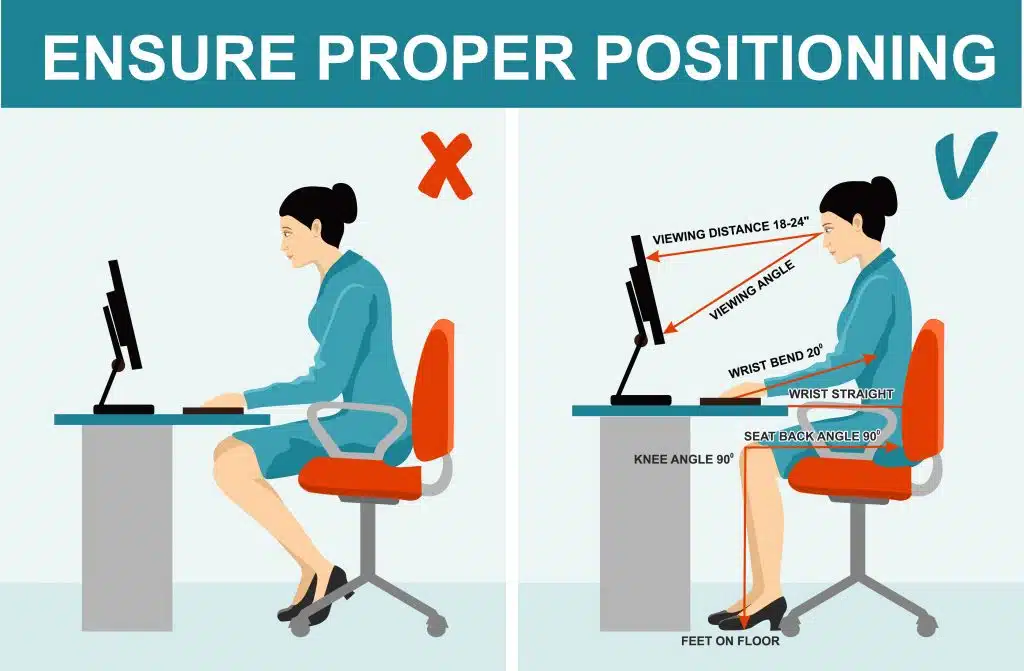
Your desk height should match your elbows. Keep them at a 90-degree angle. This reduces shoulder and neck strain. Adjust your chair so your feet rest flat. Use a footrest if needed. This supports your back and legs. Ensure your lower back is supported by the chair. Proper chair position enhances comfort and focus.
Monitor Placement
Position your laptop screen at eye level. This prevents neck strain. Use a laptop stand or stack books if necessary. The screen should be about an arm’s length away. This minimizes eye strain. Adjust the screen angle to reduce glare. Proper monitor placement promotes better posture. It keeps you comfortable during long hours.
Credit: ispineclinics.com
Accessories For Comfort
Choosing the right accessories enhances your laptop experience. Comfort is key for long hours at a desk. Ergonomic accessories help you maintain a healthy posture. They also reduce physical strain. Here, we explore some essential accessories.
Laptop Stands
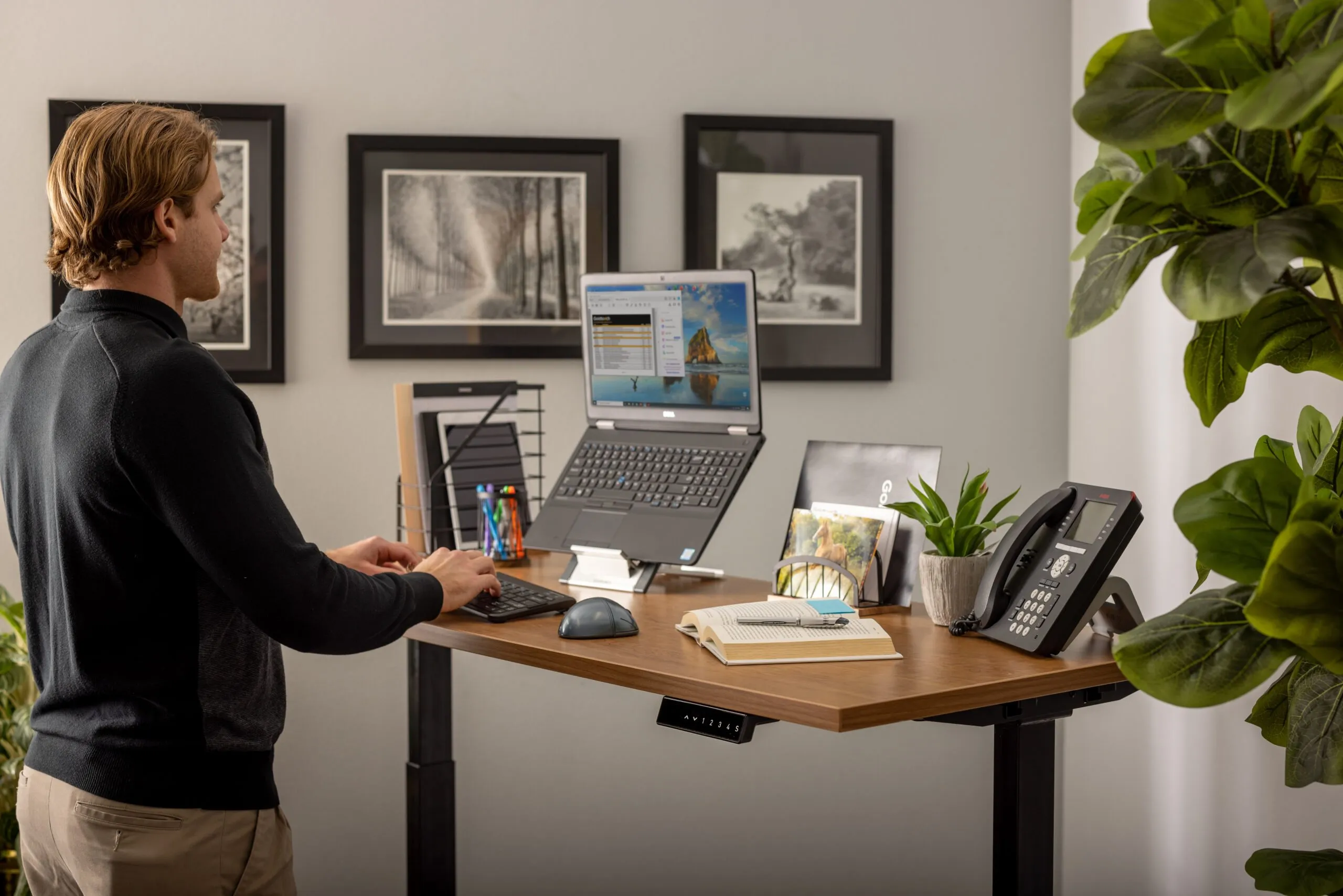
Laptop stands lift your screen to eye level. This reduces neck and shoulder strain. Adjustable stands offer flexibility for different heights. They also improve airflow around your laptop. This keeps your device cool during use. Lightweight and portable stands are perfect for travelers.
External Keyboards And Mice
External keyboards offer better typing comfort. They reduce wrist strain. A separate mouse allows more precise control. It’s more comfortable than a touchpad. Wireless options offer freedom from tangled cords. Look for ergonomic designs. They fit the natural curve of your hand.
Maintaining A Healthy Work Environment
Working on a laptop for long hours can strain your body. To stay productive and comfortable, create a healthy work environment. This involves several factors. Pay attention to lighting, temperature, and air quality. These elements can greatly impact your well-being.
Lighting And Glare Reduction
Good lighting reduces eye strain and fatigue. Natural light is best, but ensure your screen is not directly facing a window. This prevents glare, which can cause headaches. Use blinds or curtains to control light intensity. Artificial lighting should be soft and even. Avoid placing lamps directly behind or above your laptop. This minimizes reflections on the screen.
Temperature And Air Quality
Comfortable temperature enhances focus and concentration. Keep your workspace cool but not too cold. Around 22 degrees Celsius is ideal for most people. Fresh air is crucial for mental clarity. Open windows to let air circulate. Use fans or air purifiers if needed. This helps reduce pollutants and allergens in your workspace.
Credit: www.goldtouch.com
Breaks And Exercise
Working long hours on a laptop can strain your body. Regular breaks and simple exercises can help you feel better. This section explores why breaks are important and easy exercises you can do at your desk.
Importance Of Regular Breaks
Breaks refresh your mind and body. They prevent fatigue and improve focus. Short breaks every hour can reduce stress and improve productivity. Moving away from your screen relaxes your eyes and mind. Deep breathing during breaks calms your nerves.
Simple Desk Exercises
Desk exercises are easy and effective. Stretch your arms above your head. Roll your shoulders backward and forward. Twist your torso gently to each side. Stand up and march in place for a minute. These movements boost blood circulation and reduce stiffness.
Technology Aids
Laptop ergonomics enhance comfort and reduce strain during long usage. Adjust screen height to maintain eye level. Use a separate keyboard for better posture.
When you’re hunched over your laptop for hours, it can feel like your body is rebelling against you. Fortunately, technology offers some handy aids to improve your posture and comfort. Let’s dive into how ergonomic software and posture correction apps can transform your workspace into a healthier environment.Ergonomic Software
Many of us spend long hours at our laptops, sometimes losing track of time and neglecting our posture. Ergonomic software acts like a guardian angel, reminding you to take breaks and adjust your posture. Some programs will alert you to stretch or change positions every 30 minutes, helping to prevent strain and discomfort. For example, software like Workrave can be a game-changer for your routine, offering exercises and break reminders tailored to your needs. Consider this: a friend of mine used a similar software during a tight project deadline. Not only did it improve her posture, but she noticed less tension in her shoulders and neck. Could this tool make a difference in your daily work life?Apps For Posture Correction
Posture correction apps are like having a personal trainer in your pocket. They guide you to sit, stand, and move in ways that keep your body aligned. Such apps often use your phone’s camera to analyze your posture in real time, offering instant feedback. Apps like Upright Pose and Nekoze can motivate you to maintain a good posture, even during those late-night work sessions. Imagine this: you’re working from home, and your posture app buzzes, nudging you to straighten your back. It’s a gentle push towards healthier habits. Are you ready to let technology aid your posture journey? The right technology can make all the difference in how your body feels after a day at the computer. By embracing these aids, you can foster a work environment that supports your health and productivity.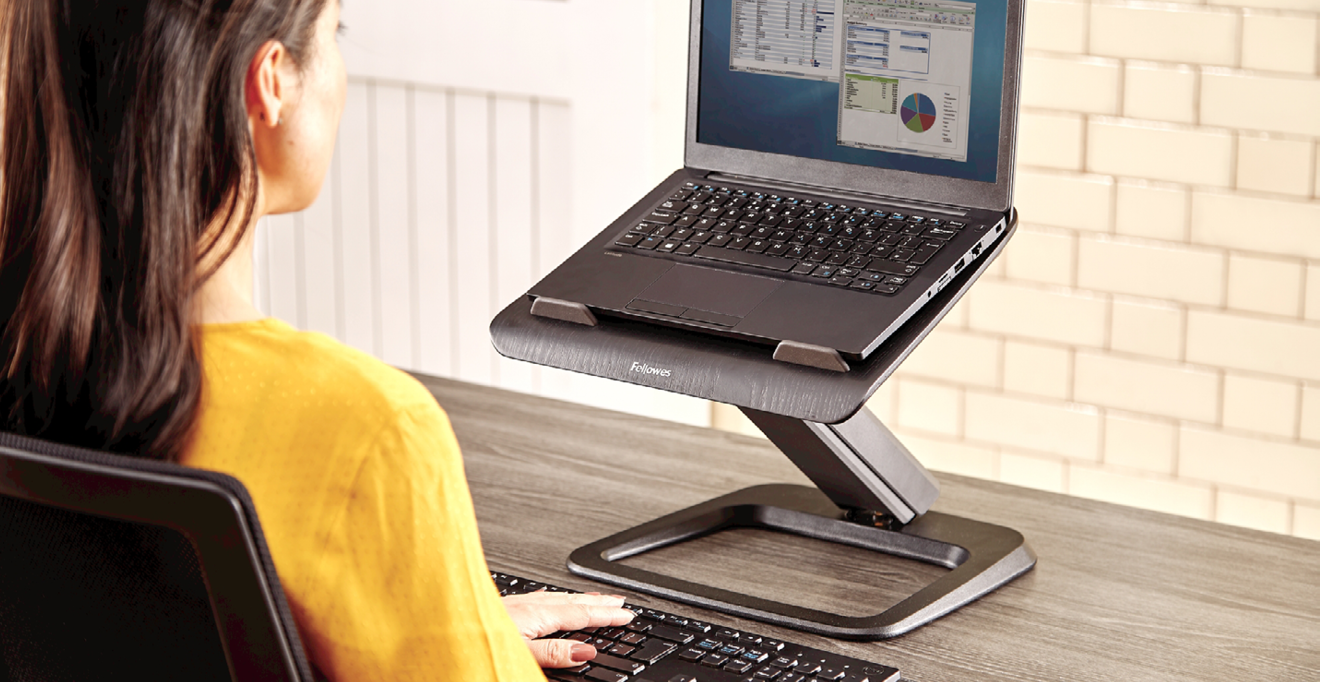
Credit: www.posturite.co.uk
Frequently Asked Questions
What Is Laptop Computer Ergonomics?
Laptop computer ergonomics involves designing workspaces to fit users comfortably. Proper ergonomics reduce strain and enhance productivity. Key elements include monitor height, chair support, and keyboard placement. Adopting good ergonomics can prevent repetitive stress injuries and improve overall well-being.
How Can I Improve Laptop Ergonomics?
To improve laptop ergonomics, adjust your screen to eye level. Use an external keyboard and mouse for better wrist positioning. Ensure your chair supports your back properly. Consider using a laptop stand to achieve optimal screen height. Regularly stretch to alleviate any muscle tension.
Are Ergonomic Accessories Necessary For Laptops?
Ergonomic accessories can greatly enhance comfort and reduce strain. Items like laptop stands, ergonomic chairs, and external keyboards help maintain proper posture. These accessories are particularly beneficial if you spend long hours on your laptop. Investing in ergonomic tools can prevent long-term health issues.
Can Poor Ergonomics Cause Health Issues?
Yes, poor laptop ergonomics can lead to health problems like neck pain, carpal tunnel syndrome, and eye strain. Incorrect posture and repetitive movements are common culprits. Maintaining proper ergonomics is crucial to avoid these issues. Regular breaks and stretching can also help mitigate risks.
Conclusion
Laptop ergonomics matter for health and comfort. Small changes can prevent pain. Adjust screen height to avoid neck strain. Keep wrists straight while typing. Use a separate keyboard if needed. Take breaks to rest your eyes and stretch. Improving workspace can boost productivity.
Invest time in setting up your laptop. Prioritize ergonomic practices to stay healthy. Make your work environment work for you. Simple adjustments lead to greater comfort. Your body will thank you over time. Stay mindful of posture and positioning. Enjoy a healthier, more productive day.



