
Affiliate Disclosure: This post may contain affiliate links. If you purchase through links on our site, we may earn an affiliate commission at no extra cost to you.
Imagine a world where all your precious memories, important documents, and favorite music are stored safely and ready at your fingertips. This is made possible by data storage devices.
But what exactly are these devices that silently safeguard your digital life? Understanding the definition of data storage devices is crucial in a time when information is power. If you’ve ever wondered how your smartphone holds thousands of photos or how your laptop remembers your last opened file, you’re in the right place.
By exploring what data storage devices are, you’ll uncover the secrets behind the technology that shapes your everyday interactions with the digital world. Keep reading to discover how these devices work and why they are essential in maintaining the flow of information you rely on daily.
Types Of Data Storage Devices
Understanding the types of data storage devices can significantly impact how efficiently you manage your digital information. Whether you’re working on a personal project or managing a business, knowing the right storage solution can save you time and hassle. Let’s dive into the world of data storage and explore the primary, secondary, and tertiary storage options available to you.
Primary Storage
Primary storage, often referred to as main memory, includes devices that are directly accessible by the CPU. It is usually faster and more expensive than other types of storage. Examples include RAM (Random Access Memory) and cache memory.
Think about the last time your computer slowed down because too many applications were open. That’s your primary storage reaching its limit. RAM temporarily holds data and instructions that your computer needs quick access to, allowing you to multitask efficiently.
Wouldn’t it be frustrating if your computer had to retrieve data from a slower storage every time you clicked a new tab? That’s why primary storage is crucial—it keeps things running smoothly.
Secondary Storage
Secondary storage refers to devices that store data long-term. These devices are not directly accessible by the CPU and need to be loaded into primary storage for access. Common examples are hard drives (HDDs), solid-state drives (SSDs), and USB flash drives.
Remember the last time you backed up photos from your phone to a USB drive? That’s secondary storage in action. It’s perfect for storing data that doesn’t need immediate access but is essential for long-term retention.
Secondary storage provides the space to keep all your important files safe, even if your computer crashes. How often do you ensure your data is backed up on a secondary storage device?
Tertiary Storage
Tertiary storage involves devices used for archiving and backup. These are often slower and used less frequently. Examples include tape drives and optical discs like CDs and DVDs.
Think of tertiary storage as a digital attic—it’s where you keep things you might need later but don’t use often. Remember when you found old DVDs in a drawer? Those are your tertiary storage devices.
It’s not just about keeping data; it’s about preserving memories and important documents. Do you have a strategy for archiving your data for future access?
By understanding these types of data storage devices, you can make informed decisions that suit your needs. From quick access to long-term storage, each type plays a vital role in managing data effectively. What storage solutions work best for you? Consider your needs and explore the possibilities.
Credit: en.wikipedia.org
Storage Device Technologies
Understanding storage device technologies is crucial in the digital age. These technologies vary widely, each offering unique benefits and drawbacks. They play a vital role in how data is saved and accessed.
Magnetic Storage
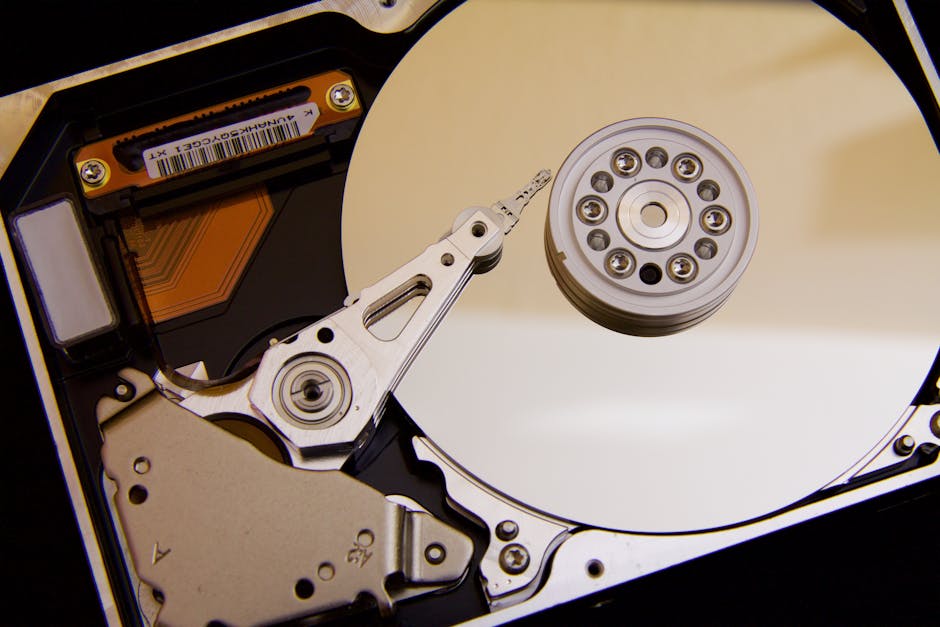
Magnetic storage uses magnetism to store data. Hard disk drives are a common example. They have spinning disks coated with magnetic material. Data is read and written by a moving head. This technology is reliable and cost-effective. It has been used for decades.
Optical Storage
Optical storage uses lasers to read and write data. CDs, DVDs, and Blu-rays are part of this category. These discs store data on a shiny surface. Lasers read the data by reflecting off the disc. Optical storage is great for media files. It offers durability and longevity.
Solid State Drives
Solid State Drives (SSDs) use flash memory. They have no moving parts. SSDs are faster than magnetic storage. They offer quick data access. SSDs are silent and consume less power. This makes them ideal for laptops and mobile devices.
Data Storage Capacity
Data storage devices hold digital information, allowing easy access and retrieval. They range from small USB drives to large cloud servers. Capacity varies, impacting how much data can be stored and managed.
Data storage capacity is essential in today’s digital world. It refers to the amount of data a device can hold. Understanding it helps in choosing the right device for your needs. Devices vary in capacity, affecting their performance and usability. Knowing the details can help you make informed decisions.
Measurement Units
Data storage is measured in bytes. Bytes are the basic unit for measuring data. Larger units include kilobytes (KB), megabytes (MB), gigabytes (GB), and terabytes (TB). KB is 1,024 bytes; MB is 1,024 KB. GB is 1,024 MB and TB is 1,024 GB. Understanding these units helps in gauging storage needs.
Factors Affecting Capacity
Several factors influence data storage capacity. Device type plays a major role. Hard drives generally offer more capacity than flash drives. Technology advancements increase storage capabilities. Newer devices often have larger capacities. File types also affect storage needs. Videos and images require more space than text files. Compression technologies can reduce file sizes, affecting capacity.
Data Storage Performance
Data storage devices are crucial for storing and retrieving digital information efficiently. They impact the speed of accessing data. Choosing the right device ensures optimal performance in data management tasks.
Understanding Data Storage Performance is crucial if you want your computer to work efficiently. Whether you’re storing family photos or running complex business applications, how your device reads and writes data can significantly impact your experience. Let’s dive into what makes data storage performance tick.
Read And Write Speeds
The speed at which data is read from or written to a storage device is a key measure of its performance. Faster read and write speeds mean quicker access to your files and applications. For example, a solid-state drive (SSD) generally offers much faster speeds compared to a traditional hard disk drive (HDD). Consider what happens when you open a large file. If your device has high read speeds, you’ll notice the file loads almost instantly. This quick access can make everyday tasks feel seamless. So, if speed matters to you, pay attention to the read and write speeds of your storage device.
Latency Considerations
Latency is the delay before a transfer of data begins following an instruction. Lower latency means quicker response times, which is especially important for tasks that require real-time data access. Imagine playing an online game or editing a video. You want the least delay possible between your actions and the system’s response. High latency can cause frustrating lags and disrupt your workflow. Therefore, choosing a storage device with low latency can improve your computing experience significantly. When was the last time you were frustrated by a slow loading application? Think about the device’s latency and speed. What if you upgraded your storage device—could it make your life easier? Understanding these aspects of data storage performance can help you make informed decisions. Whether you’re buying a new device or optimizing the one you have, focus on these key areas to enhance your technology experience.
Security And Reliability
Data storage devices offer security and reliability by safeguarding information from unauthorized access and potential loss. These devices ensure data integrity, providing a trustworthy solution for storing valuable information.
Security and reliability are crucial aspects of data storage devices that every user should consider. With the increasing amount of sensitive data stored digitally, ensuring that your information is safe from unauthorized access and protected against data loss is essential. Let’s dive into how data encryption and redundancy can enhance the security and reliability of your data storage solutions.
Data Encryption
Data encryption is like a digital lock and key for your information. It transforms your data into a code to prevent unauthorized access, ensuring that only those with the correct decryption key can read it. Imagine storing your personal diary in a secret language that only you understand. This is similar to how encryption works. By encrypting your data, you safeguard it from prying eyes and potential cyber threats. Many modern storage devices come with built-in encryption features. These features are often user-friendly, making it easy for even non-tech-savvy individuals to secure their data.
Redundancy And Backup
Redundancy and backup are your best friends when it comes to data reliability. They ensure that your data is not lost even if a device fails. Think of redundancy like having an extra tire in your car. If one tire bursts, you have a spare ready to keep you moving. Similarly, storing copies of your data in multiple locations ensures it’s always accessible. Regularly backing up your data is vital. It protects you against data loss due to hardware failure, accidental deletion, or cyberattacks. Many storage devices offer automatic backup options, making the process hassle-free. Have you ever considered how losing all your important files could impact your daily life or business? Implementing redundancy and backup strategies can save you from these headaches. By focusing on data encryption and redundancy, you can significantly enhance the security and reliability of your data storage solutions. Take proactive steps today to protect what matters most.
Future Of Data Storage
Data storage devices hold digital information securely. They range from hard drives to cloud-based systems. Future advancements promise faster, more reliable, and larger capacity solutions, transforming how data is accessed and stored.
The future of data storage is a fascinating topic that’s constantly evolving, driven by rapid technological advancements. As we generate more data than ever before, finding efficient, reliable, and secure ways to store this data becomes crucial. Whether you’re a tech enthusiast or a business owner, understanding where data storage is headed can help you make informed decisions for the future.
Emerging Technologies
Quantum computing is one of the most exciting developments in data storage. Unlike traditional computers that use bits, quantum computers use qubits, which can represent both 0 and 1 at the same time. This could potentially lead to massive increases in storage capacity and processing speed. Another promising technology is DNA data storage. Scientists are exploring how DNA can be used to store vast amounts of data in a very small space. Imagine holding the entire internet in the palm of your hand—this might not be science fiction for much longer. Cloud storage continues to grow with innovations in encryption and accessibility. Many businesses are moving to the cloud for its scalability and cost-effectiveness. Are you ready to make the shift, or do you still rely on traditional methods?
Trends In Data Storage
The trend towards decentralization is gaining momentum. Blockchain technology is not just about cryptocurrencies; it’s now being used to create decentralized storage networks, offering more security and redundancy. Could this be the answer to the growing concerns about data breaches? Sustainability is another trend shaping the future of data storage. With increasing environmental concerns, there is a push towards greener storage solutions. Companies are investing in energy-efficient data centers and exploring renewable energy sources to power them. Moreover, edge computing is becoming a significant trend. By processing data closer to its source, edge computing reduces latency and bandwidth use. This is particularly useful for IoT devices, which are rapidly increasing in number. How can you leverage edge computing to enhance your data strategies? As these technologies and trends evolve, staying informed is key. Are you ready to adapt and thrive in the ever-changing landscape of data storage?
Frequently Asked Questions
What Is A Data Storage Device?
A data storage device is hardware used to store digital information. It can be internal or external and varies in capacity. Common types include hard drives, SSDs, USB drives, and cloud storage. These devices are crucial for data management and retrieval.
How Does A Data Storage Device Work?
Data storage devices work by recording data in a digital format. They use magnetic, optical, or electronic methods to store information. Accessing stored data involves reading and writing processes. These devices ensure data integrity and security during storage and retrieval.
Types Of Data Storage Devices?
There are several types of data storage devices available. They include hard disk drives (HDDs), solid-state drives (SSDs), USB flash drives, CDs/DVDs, and cloud storage. Each type offers different capacities and performance levels to suit various needs and applications.
Why Use External Data Storage Devices?
External data storage devices offer portability and expand storage capacity. They are easy to use and connect via USB or wireless interfaces. These devices provide backup solutions, prevent data loss, and enable sharing between devices without internet dependency.
Conclusion
Data storage devices are vital in our digital world. They keep our information safe and accessible. From small flash drives to large servers, each device serves a purpose. Choosing the right one depends on your needs. Consider factors like capacity and speed.
Reliability matters too. As technology evolves, storage options grow. So, stay informed and choose wisely. Good storage ensures your data remains secure. Embrace the tools that fit your lifestyle. Keep learning about storage solutions. Your data deserves the best care.



