
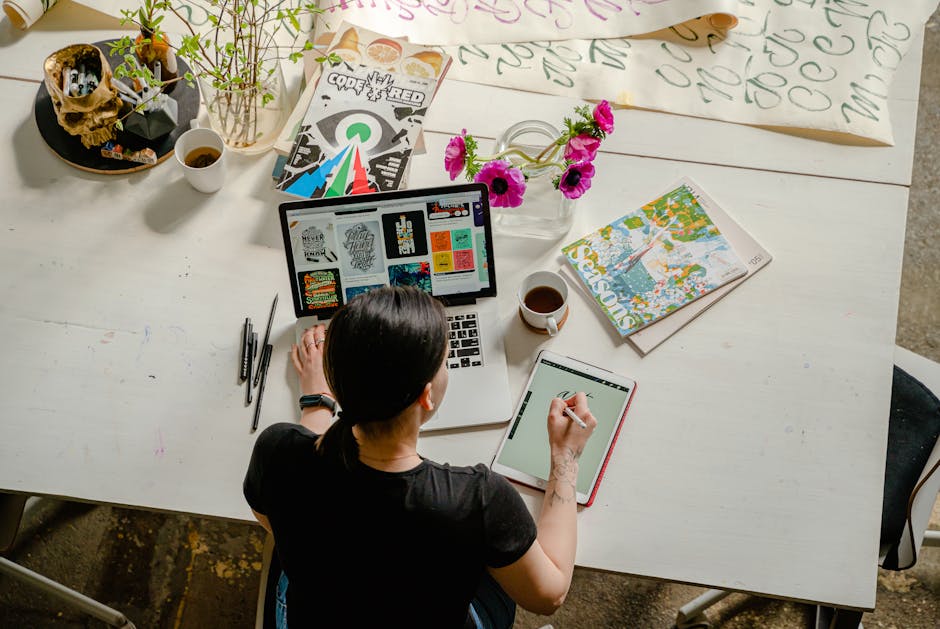
Tablets with pen input offer precision and creativity, perfect for artists, students, and professionals. This blog post explores the best options available.
Finding the ideal tablet with pen input can enhance your digital experience significantly. Whether you’re sketching a masterpiece or jotting down notes, these tablets offer responsive, high-pressure sensitivity, and customizable features to fit various needs. From compact options like the XPPen StarG640 and XPPen G430S to larger models like the HUION Inspiroy H1060P, each tablet provides unique benefits.
They are compatible with various operating systems, including Windows, Mac, and Android, making them versatile for different tasks. The Samsung Galaxy Tab S6 Lite stands out with its full-feature tablet capabilities. Explore the range to discover which tablet best suits your requirements for drawing, teaching, or remote working.
Drawing Tablet Xppen Starg640

The Drawing Tablet XPPen StarG640 is ideal for artists, students, and professionals who require a reliable and compact tool for digital art, e-learning, and remote working. This tablet is especially suited for users who appreciate precision and ease of use in their creative and work endeavors.
Pros:
- Battery-Free Stylus allows uninterrupted usage without the need for recharging.
- Compact Size makes it easy to carry and use in various environments.
- Compatibility with Mac, Windows, and Chromebook ensures versatility across different platforms.
- Affordable Price makes it accessible for beginners and professionals alike.
Cons:
- Limited Active Area might not be suitable for users requiring larger drawing spaces.
- Basic Features may not meet the needs of advanced digital artists looking for high-end options.
The XPPen StarG640 features a 6×4 inch drawing area, which is ideal for users who prefer a compact and portable device. Despite its size, it provides precision and accuracy, essential for creating detailed artwork. The battery-free stylus enhances the drawing experience by eliminating the hassle of constant charging, allowing users to focus entirely on their work without interruptions.
Additionally, its wide compatibility with Mac, Windows, and Chromebook makes it a versatile choice for different users, whether they are using it for professional work, educational purposes, or casual drawing. The affordable price point is a significant advantage, providing a high-quality option for those who are new to digital art or require a dependable tool without breaking the bank. Overall, the XPPen StarG640 offers a great balance between functionality and cost-effectiveness.
To buy this product, click here.
Drawing Tablet Xppen G430s Osu

The XP-Pen G430S is a perfect choice for both amateur digital artists and professional graphic designers looking for a compact and reliable tool. It’s also ideal for OSU players who need precision and responsiveness in their gameplay. Moreover, if you’re an educator or student engaged in online teaching, this tablet provides an excellent platform to interact and communicate effectively.
Pros:
- 8192 Levels of Pressure Sensitivity
- Battery-Free Stylus
- Compact Size – easy portability
- Compatibility with Windows and Mac
Cons:
- Small drawing area
- No wireless functionality
The XP-Pen G430S boasts 8192 levels of pressure sensitivity, allowing users to achieve varying levels of thickness and opacity in their strokes, offering a natural and precise drawing experience. This feature is particularly beneficial for artists who require fine control over their designs. The battery-free stylus means you never have to worry about recharging, ensuring uninterrupted creativity.
Its ultrathin design makes it incredibly portable, perfect for artists on the go or teachers needing to transport their tools between classrooms. The tablet’s compact size doesn’t compromise its functionality, offering a reliable drawing surface that fits into any workspace easily. Compatibility with both Windows and Mac makes it a versatile choice for users across different platforms, ensuring a seamless integration into your existing system.
To buy this product, click here.
Gaomon S620 Drawing Tablet

The GAOMON S620 Drawing Tablet is ideal for digital artists, painters, and OSU players looking for an affordable yet efficient tool to enhance their creativity and productivity. With its compact size, this tablet is perfect for individuals who require portability without sacrificing functionality. Whether you’re a beginner exploring digital art or a seasoned artist seeking a reliable graphics tablet, the GAOMON S620 offers the features you need to create stunning artwork and improve your gaming performance.
Pros:
- 8192 levels of pen pressure sensitivity for precise control
- 4 customizable express keys for quick access to frequently used functions
- Compatible with Windows PC and Mac, ensuring versatility
- Lightweight and portable design, easy to carry
- Passive pen technology eliminates the need for charging
Cons:
- Limited drawing area compared to larger tablets
- Lacks wireless connectivity options
- May require additional software for customization
The GAOMON S620 Drawing Tablet features a compact design with dimensions of 6.5 x 4 inches, making it a convenient choice for artists who are always on the go. Its lightweight build ensures that you can easily slip it into your bag without adding extra bulk. Despite its smaller size, the tablet boasts 8192 levels of pen pressure sensitivity, providing users with the ability to create nuanced and detailed artwork effortlessly. This feature is particularly beneficial for artists who rely on precision in their work, allowing them to achieve the desired effect with ease.
Another standout feature of the GAOMON S620 is its customizable express keys, which can be tailored to suit individual preferences and streamline the creative process. These keys enable quick access to frequently used functions, enhancing productivity and minimizing disruptions during your creative sessions. Additionally, the tablet is compatible with both Windows PC and Mac, ensuring flexibility and broad usability across different operating systems. The passive pen technology is a notable advantage, as it eliminates the hassle of charging, ensuring uninterrupted use whenever inspiration strikes.
To buy this product, click here.
Xppen Updated Deco 01 V3 Drawing Tablet

The XPPen Updated Deco 01 V3 Drawing Tablet is ideal for artists, designers, and educators who are looking for a versatile and high-performance drawing pad. This tablet is perfect for anyone involved in digital art, animation, or remote teaching who requires a reliable and responsive tool for their creative or instructional needs.
Pros:
- High 16384 Pressure Sensitivity for precise and detailed artwork
- 8 Custom Shortcuts for improved workflow and efficiency
- Compatible with Android, Windows, and macOS for versatile use
- Lightweight and portable design weighing only 1.2566348934 pounds
- 220 Report Rate for smooth and lag-free performance
Cons:
- Limited to black color option only
- May require additional setup for optimal use on certain Android devices
The XPPen Updated Deco 01 V3 stands out with its impressive 16384 pressure sensitivity, allowing artists to create with incredible precision and detail. This feature is particularly beneficial for those who specialize in intricate artwork or detailed designs. The high sensitivity ensures that every stroke is captured accurately, enhancing the overall drawing experience.
Another notable feature of this tablet is its 8 custom shortcuts, which significantly improve productivity by allowing users to customize their workflow. These shortcuts enable quick access to frequently used tools and functions, saving time and streamlining the creative process. Additionally, the tablet’s compatibility with Android, Windows, and macOS makes it a versatile choice for a wide range of users, from professional artists to educators conducting remote classes.
To buy this product, click here.
Wacom Intuos Small Bluetooth Graphics Drawing Tablet

The Wacom Intuos Small Bluetooth Graphics Drawing Tablet is an ideal choice for teachers, students, and creators looking for a portable and versatile tool to enhance their digital art or teaching experience. With its compact size and Bluetooth connectivity, it’s perfect for anyone who needs to work on the go without compromising on functionality. Whether you’re a teacher preparing digital lesson plans, a student exploring digital art, or a creator seeking a reliable drawing tablet, this device caters to a wide range of users.
Pros:
- Compact and portable, making it easy to carry around and use anywhere.
- Bluetooth connectivity allows for wireless freedom and flexibility in setup.
- Compatible with Chromebook, Mac OS, Android, and Windows, ensuring broad device compatibility.
- 4 Customizable ExpressKeys offer personalized shortcuts for efficiency.
Cons:
- Limited size may not be suitable for users who prefer larger drawing areas.
- Battery life might require frequent recharging for heavy users.
The Wacom Intuos Small Bluetooth Graphics Drawing Tablet stands out for its ease of use and customization features. The 4 Customizable ExpressKeys allow users to set up shortcuts tailored to their workflow, enhancing productivity and simplifying complex tasks. This feature is particularly beneficial for teachers who need quick access to tools while navigating digital teaching platforms, and for creators looking to streamline their creative process.
Additionally, the tablet’s compatibility with various operating systems such as Chromebook, Mac OS, Android, and Windows makes it a versatile tool for users who switch between different devices. Its compact design not only makes it portable but also ensures that users can carry it effortlessly alongside their laptops or sketchbooks. Despite its small size, it delivers precise and responsive performance, making it a valuable asset for anyone engaged in digital work.
To buy this product, click here.
Huion Inspiroy H1060p Graphics Drawing Tablet

The HUION Inspiroy H1060P Graphics Drawing Tablet is an excellent choice for digital artists, illustrators, and graphic designers who demand precision and versatility in their creative tools. This tablet is ideal for both professionals and aspiring artists who want to enhance their digital art skills without breaking the bank.
Pros:
- 8192 Pressure Sensitivity for precise and detailed artwork.
- Battery-Free Stylus ensures uninterrupted work sessions.
- 12 Customized Hot Keys for efficient workflow.
- Compatible with Mac, Windows PC, and Android.
- Generous 10 x 6.25 inches active area for expansive drawing space.
Cons:
- Driver installation may be complex for beginners.
- Lacks a wireless option, limiting mobility.
The HUION Inspiroy H1060P offers remarkable pressure sensitivity, which is vital for artists who require varying line weights and shading nuances in their work. The 8192 levels of pressure sensitivity provide a natural and intuitive drawing experience, mimicking traditional drawing tools. This feature is particularly beneficial for illustrators and designers who work on intricate projects requiring fine details and subtle textures.
Another standout feature is the battery-free stylus, which eliminates the inconvenience of frequent charging, allowing artists to focus on their creativity without interruptions. Coupled with 12 customizable hot keys, users can tailor the tablet’s functionality to streamline their workflow, making it easier to access frequently used tools and functions. This level of customization enhances productivity and allows for a more personalized art creation process.
To buy this product, click here.
Samsung Galaxy Tab S6 Lite (2024)

The Samsung Galaxy Tab S6 Lite (2024) is an ideal choice for students and casual gamers seeking a versatile and affordable tablet that caters to their educational and entertainment needs. With features designed to enhance note-taking and gaming experiences, this tablet is perfect for individuals who value productivity and long-lasting performance.
Pros:
- Lightweight and portable design.
- Includes S Pen for note-taking and creative tasks.
- Expandable storage for more apps and media.
- Long battery life for extended use.
- Gaming ready with smooth performance.
Cons:
- Limited to 64GB internal storage without expansion.
- WiFi only connectivity restricts usage without a hotspot.
- Not the latest Android version available.
The Samsung Galaxy Tab S6 Lite (2024) boasts a 10.4″ display that offers vibrant visuals and a comfortable viewing experience for note-taking and gaming. The inclusion of the S Pen provides users with the ability to seamlessly jot down notes or unleash their creativity on-the-go, making it an excellent tool for students who need to take quick notes during lectures or for artists sketching ideas anytime, anywhere.
With its long battery life, the tablet ensures users can enjoy extended hours of usage without frequent charging interruptions. This feature is particularly beneficial for students and gamers who require a reliable device that can keep up with their busy schedules. Additionally, the expandable storage option offers flexibility, allowing users to store more apps, documents, and media, which is a crucial aspect for anyone looking to maximize their tablet’s potential.
To buy this product, click here.
Huion Inspiroy H640p Drawing Tablet

The HUION Inspiroy H640P Drawing Tablet is an ideal choice for both budding artists and seasoned professionals looking for a compact and versatile drawing solution. If you’re someone who values portability without compromising on performance, this tablet is perfect for you. It’s also suitable for educators and designers who need a reliable tool for digital presentations and creative work.
Pros:
- Battery-Free Stylus for uninterrupted creativity.
- 8192 Pen Pressure Levels for precise and natural drawing experience.
- Compact 6×4 Inch Design perfect for limited desk space.
- 6 Customizable Hot Keys for enhanced productivity.
- Compatibility with Mac, PC & Mobile for versatile usage.
Cons:
- Smaller Active Area might not suit large-scale projects.
- No Built-In Display, requiring an external screen.
The HUION Inspiroy H640P stands out with its battery-free stylus that ensures you never have to worry about power interruptions during your creative sessions. This feature, coupled with 8192 pen pressure levels, provides an exceptionally natural drawing experience, allowing for nuanced strokes that closely mimic traditional art tools. Whether you’re sketching or designing, the pressure sensitivity enhances your ability to create intricate details effortlessly.
Additionally, the tablet’s compact 6×4 inch design makes it a breeze to carry around, fitting snugly in most bags. This makes it a perfect companion for artists on the go or those with limited workspace. The 6 customizable hot keys further enhance productivity by allowing you to tailor the tablet’s functions to your workflow, reducing the need to constantly switch between tools and applications. Overall, its compatibility with multiple platforms ensures that you can seamlessly integrate it into your existing setup, whether you’re using a Mac, PC, or mobile device.
To buy this product, click here.
Xoppox Graphics Drawing Tablet
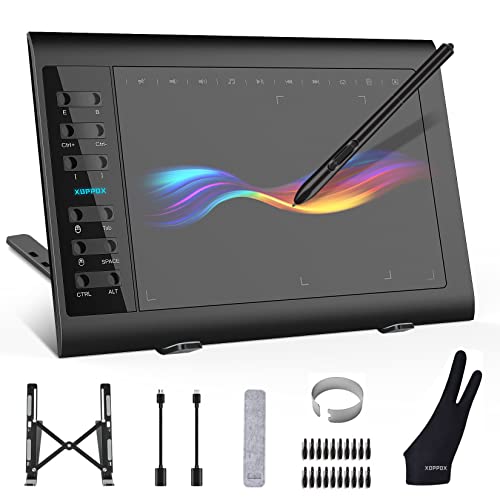
The XOPPOX Graphics Drawing Tablet is an excellent choice for artists, designers, and educators who are seeking a reliable and efficient tool for digital creation. Whether you’re a professional artist or a student exploring the world of digital art, this tablet offers the functionality and ease of use that can cater to both beginners and experienced users. Its compatibility with PC/Mac/Android OS makes it a versatile device suitable for a wide range of applications, from painting and design to online teaching.
Pros:
- Large 10 x 6 Inch Active Area for expansive creativity
- 8192 Levels of pen pressure sensitivity for precise control
- Battery-Free Pen for hassle-free usage
- 12 Hot Keys for customizable shortcuts
- Compatible with PC/Mac/Android OS
Cons:
- May require driver installation for optimal performance on some devices
- No wireless connectivity, limited to wired use
The large active area of the XOPPOX Graphics Drawing Tablet ensures that users have ample space to create intricate designs and detailed artwork. This feature is particularly beneficial for professional artists who require precision and freedom to express their creativity without constraints. Additionally, the 8192 levels of pressure sensitivity provide a natural and responsive drawing experience, mimicking the feel of traditional drawing tools. This level of sensitivity allows for varying line weights and shading, which is essential for detailed work.
Another standout feature is the battery-free pen, which eliminates the need for constant recharging, making it a convenient tool for extended work sessions. The inclusion of 12 hot keys enhances productivity by allowing users to customize shortcuts for frequently used functions, thereby streamlining their workflow. This feature is especially useful for designers who often need to switch between different tools and functions quickly. Overall, the XOPPOX Graphics Drawing Tablet is a versatile and efficient tool that caters to the diverse needs of digital artists and educators.
To buy this product, click here.
Huion Inspiroy 2 Small Drawing Tablet

The HUION Inspiroy 2 Small Drawing Tablet is perfect for budding artists, graphic designers, and digital art enthusiasts looking for an affordable and reliable tool to enhance their creativity. Whether you are a student exploring digital art or a professional seeking a portable solution for on-the-go designing, this compact and feature-rich tablet is designed to meet your needs.
Pros:
- Battery-Free Stylus eliminates the hassle of charging and provides uninterrupted creativity.
- Scroll Wheel enhances efficiency by allowing quick zoom and brush adjustments.
- Compact Size makes it highly portable and easy to carry.
- Compatibility with PC, Mac & Android offers versatile usage across devices.
- 6 Hot Keys provide customizable shortcuts for increased productivity.
Cons:
- Small Drawing Area might not be suitable for users requiring larger canvases.
- The pink color may not appeal to all users.
- Limited advanced features compared to high-end models.
The HUION Inspiroy 2 Small Drawing Tablet comes equipped with a battery-free stylus, which ensures that you never have to worry about charging during your creative sessions. This feature is especially beneficial for artists who spend long hours perfecting their work, as it provides a seamless and uninterrupted drawing experience. The scroll wheel is another standout feature, allowing users to adjust zoom levels and brush sizes quickly, which significantly enhances workflow efficiency and precision.
Additionally, the tablet’s compact dimensions make it an ideal choice for artists who need a portable and lightweight tool without compromising on functionality. Its compatibility with PC, Mac, and Android devices ensures that you can work across different platforms without any hassle. The presence of 6 customizable hot keys further boosts productivity by allowing users to set shortcuts for frequently used commands, saving time and streamlining the creative process. Despite its small size, the HUION Inspiroy 2 offers a reliable and enjoyable drawing experience, making it a valuable addition to any digital artist’s toolkit.
To buy this product, click here.
Frequently Asked Questions
What Is The Best Tablet With Pen Input For Drawing?
The Samsung Galaxy Tab S6 Lite is excellent for drawing. It features a responsive S Pen, long battery life, and expandable storage. It’s suitable for note-taking and gaming too. The tablet is versatile and offers great performance for digital artists.
Which Tablet Is Best For Digital Art Beginners?
The GAOMON S620 Drawing Tablet is ideal for beginners. It offers 8192 levels of pen pressure sensitivity and customizable express keys. It’s compatible with Windows and Mac. This tablet provides a smooth drawing experience for new digital artists.
Is Xppen Starg640 Good For E-learning?
Yes, the XPPen StarG640 is great for e-learning. It features a battery-free stylus and compatibility with multiple platforms. Its compact size makes it convenient for remote work and online classes. The tablet is efficient and user-friendly.
How Does Huion H1060p Compare For Professional Use?
The HUION H1060P is excellent for professional use. It offers 8192 pressure sensitivity and 12 customizable hotkeys. The large active area suits detailed artwork. It’s compatible with Mac, Windows, and Android. This tablet is ideal for advanced digital artists.
Can Wacom Intuos Small Be Used On Android?
Yes, the Wacom Intuos Small works with Android. It features Bluetooth connectivity and customizable ExpressKeys. It’s portable and user-friendly for creators. The tablet is versatile, catering to teachers, students, and artists. It’s compatible with multiple devices.
Are Xoppox Tablets Suitable For Design Work?
XOPPOX tablets are great for design work. They offer large active areas and 8192 pressure sensitivity. The battery-free pen enhances convenience. They’re compatible with PC, Mac, and Android. These tablets are designed for painting, design, and online teaching.
Conclusion
Choosing the right tablet with pen input can enhance creativity and productivity. Each option on our list offers unique features. From the compact xppen starg640 to the versatile samsung galaxy tab s6 lite, there’s something for everyone. These devices cater to artists, students, and professionals alike.
They support various operating systems, including windows, macos, and android. Battery-free styluses and customizable keys are common features, ensuring ease of use. Whether you’re drawing, teaching, or working remotely, these tablets provide a reliable platform. Consider factors like pressure sensitivity, size, and compatibility when making your choice.
The right tablet can make digital tasks more efficient and enjoyable. Take your time to explore these options and find the one that fits your needs best. Investing in a quality tablet with pen input can be a valuable decision for both personal and professional use.
Happy creating!











