

When it comes to choosing a desktop computer, screen size is more important than you might think. Imagine working or gaming on a monitor that perfectly fits your needs—it’s not just about size but also about comfort and productivity.
Are you tired of squinting at tiny text or struggling to see details on a small screen? Or perhaps you feel overwhelmed by a massive monitor that takes over your entire desk space? Finding the right screen size can transform your computing experience, making it more enjoyable and efficient.
We’ll explore how to select the ideal desktop computer screen size tailored to your specific requirements. Whether you use your computer for work, creativity, or leisure, you’ll discover tips that can make a noticeable difference in your daily routine. Keep reading to unlock the secrets to enhancing your digital life with the perfect screen size.
Credit: www.viewsonic.com
Importance Of Screen Size
The screen size of a desktop computer is crucial. It affects your productivity, comfort, and overall experience. A larger screen can make multitasking easier. It reduces eye strain and enhances visual clarity. Smaller screens, on the other hand, may limit your viewing area. Choosing the right screen size can greatly impact how you work and play.
Enhanced Productivity
A bigger screen allows you to open multiple windows. You can view documents side by side. This setup enhances your productivity. It reduces the need to switch between tabs. You can accomplish more tasks in less time.
Improved Comfort
A larger monitor can reduce eye strain. It helps you see details without squinting. Your posture improves as you don’t need to lean forward. This comfort boosts your focus and efficiency.
Better Gaming Experience
Gamers benefit from larger screens. They provide a more immersive experience. You can see game details clearly. This enhances gameplay enjoyment and performance. A big screen makes gaming more fun.
Enhanced Visual Clarity
Screen size affects image clarity. Larger screens often offer better resolution. You see sharper images and vivid colors. This clarity is crucial for design work. It ensures accurate color representation.
Space Considerations
Consider your desk space. A large screen needs more room. Ensure your workspace can accommodate it. You may need to adjust furniture. Choose a screen size that fits your space.
Screen Size And Productivity
When choosing the right desktop computer screen size, productivity often comes to mind. A larger screen can enhance your work efficiency, making tasks feel less cramped and more organized. But how does screen size directly impact productivity? Let’s dive into the specifics of multitasking efficiency and visual comfort.
Multitasking Efficiency
Have you ever tried juggling multiple windows on a small screen? It’s like trying to fit a puzzle piece where it doesn’t belong. Larger screens allow you to open multiple applications side by side effortlessly.
Imagine working on a spreadsheet while referencing a report and keeping an eye on your inbox. With a large screen, you can view all at once without constant alt-tabbing.
This setup not only saves time but also reduces frustration. You’ll notice tasks flow smoother, and you won’t lose track of what you’re doing. Consider how much more you could achieve with this boost in efficiency.
Visual Comfort
Staring at a screen for hours can strain your eyes, especially if you’re squinting at tiny text or images. Larger screens offer better readability, reducing eye fatigue.
Think about your comfort when working long hours. A bigger display provides a wider field of view, allowing you to sit back and relax while still seeing everything clearly.
Have you noticed how much easier it is to watch a movie on a big screen versus a small one? Apply this idea to your daily tasks. Wouldn’t you prefer working in a comfortable environment?
Choosing the right screen size isn’t just about fitting your desk—it’s about fitting your workflow and comfort needs. Consider the impact on both your productivity and well-being. Could a larger screen be the upgrade you need?
Impact On Gaming Experience
When choosing a desktop computer screen size, the impact on your gaming experience is significant. The size of your screen can transform your gaming world, turning it into an immersive adventure or a competitive battleground. Let’s dive into how screen size can enhance your gaming journey.
Immersive Gaming
Imagine diving into your favorite RPG with a screen that envelops your senses. A larger screen can make your gaming experience more immersive. You see more of the game world, feeling like you’re part of it rather than just a spectator.
Think about those breathtaking landscapes in open-world games. With a bigger screen, every detail pops. Colors are more vibrant, and characters are more lifelike. It’s as if you’re stepping into a new dimension.
Have you ever played on a friend’s bigger monitor and wished for the same setup at home? That’s the magic of immersion. A larger screen makes gaming more engaging, drawing you deeper into the story. Isn’t that what gaming is all about?
Competitive Edge
In the world of competitive gaming, every millisecond counts. A larger screen can give you the edge you need. You spot enemies faster and have a broader view of the battlefield, which can be crucial in fast-paced games.
Think of titles like Fortnite or Call of Duty. You need to track multiple elements simultaneously. A bigger screen helps you keep an eye on everything, from hidden threats to strategic movements. It’s like having a panoramic view of your game.
Consider your reaction times. With more visual information, you react quicker, making split-second decisions easier. Have you ever lost a match because you missed seeing an enemy? A larger screen might change that outcome.
Ultimately, the screen size isn’t just about visuals; it’s about enhancing your strategy and performance. Are you ready to level up your gaming setup?
Credit: www.kantek.com
Screen Size For Creative Professionals
Choosing the right screen size is crucial for creative professionals. A larger screen can enhance productivity. It allows for better multitasking and detail visibility. Creative professionals like graphic designers and video editors need screens that meet their specific demands.
Graphic Design Needs
Graphic designers require precision and clarity. A screen size of at least 24 inches is ideal. This size provides ample space for detailed work. It also reduces eye strain. Larger screens offer better color accuracy. Designers can see their creations with true-to-life colors. A wide screen helps in managing multiple palettes and tools.
Video Editing Requirements
Video editors benefit from bigger screens. A 27-inch screen or larger is often preferred. This size makes timeline management easier. Editors can see more frames at once. High resolution is also crucial. It ensures that video quality is not compromised. A larger display allows for efficient editing and reviewing. This results in better final products.
Balancing Cost And Space
Choosing the right desktop computer screen size balances cost and space. A larger screen enhances view but may increase expenses. Smaller screens save space and are often more affordable.
Balancing cost and space is crucial in selecting a desktop computer screen size. A larger screen can enhance productivity, yet it often comes at a higher price. Finding the right balance ensures you get the most from your investment. Consider these aspects carefully to make an informed decision.Budget Considerations
Screen size impacts cost significantly. Larger screens usually cost more. The budget dictates the maximum size you can afford. Smaller screens can be more economical. They offer basic functionality without stretching your finances. Compare prices across brands and models. This helps in identifying a good deal within your budget. Always remember to factor in long-term benefits and costs. A slightly higher initial cost might offer better durability.Desk Space Limitations
Desk space is another critical factor. Large screens need more room. This can be a challenge in smaller spaces. Measure your available desk space before purchasing. A cramped desk can hinder productivity. Smaller screens fit well in limited spaces. They offer flexibility in arrangement. Consider adjustable stands for better ergonomics. This allows you to maximize your desk space efficiently. By optimizing your setup, you enhance your work environment.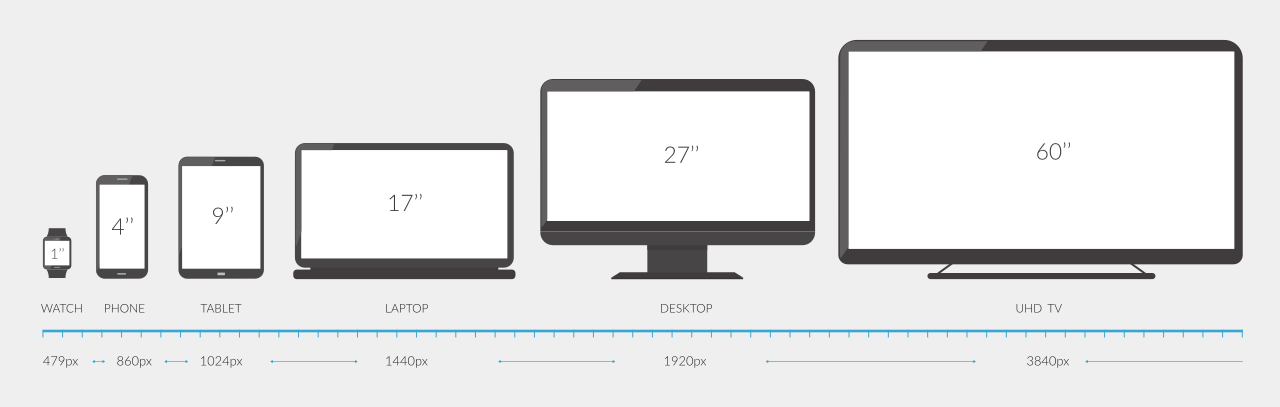
Credit: www.inchcalculator.com
Popular Screen Sizes
Choosing the right desktop computer screen size can make a significant difference in your daily computing experience. Whether you’re a gamer, a professional, or someone who loves streaming movies, your screen size can impact your comfort and productivity. Let’s dive into the popular screen sizes and explore what’s common and what’s emerging in the world of desktop monitors.
Common Options
Most people opt for screen sizes between 21 to 27 inches. This range provides a good balance of visibility and space efficiency. A 24-inch monitor is especially popular, as it fits well on most desks and offers ample screen real estate for multitasking.
Have you ever tried editing a document on a tiny monitor? It’s challenging. The larger screen sizes, like 27-inch, offer more clarity and are perfect for video editors or graphic designers who need to see fine details.
- 21-inch: Compact and affordable, ideal for basic tasks.
- 24-inch: Versatile and widely favored for general use.
- 27-inch: Offers more detail and comfort for creative tasks.
Emerging Trends
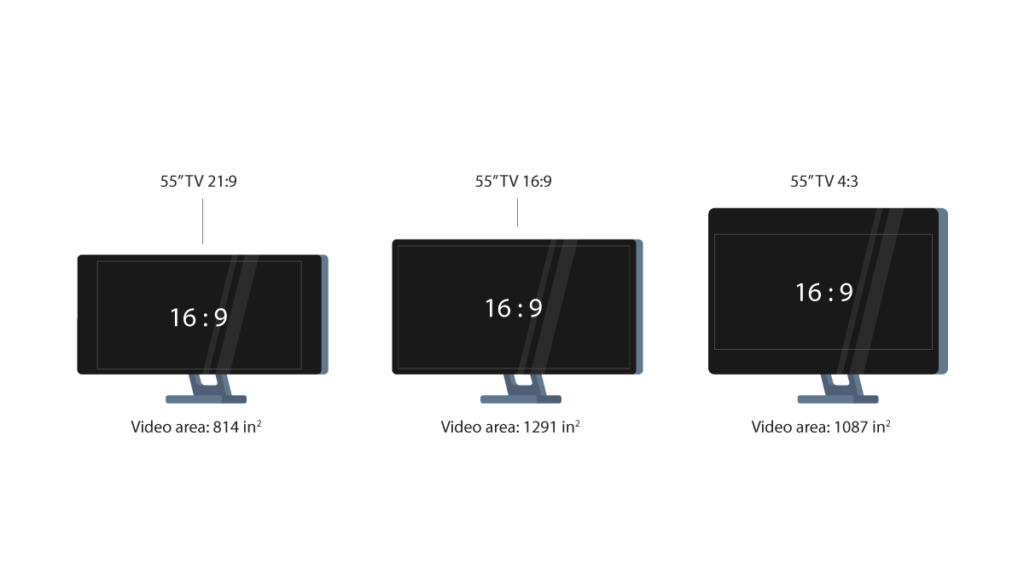
The world of desktop monitors is evolving, with ultrawide and curved screens gaining traction. These screens, often spanning 29 to 34 inches, provide immersive experiences and are great for gaming or watching movies.
Consider this: a curved screen mimics the natural curvature of your eyes, reducing strain. It feels like you’re stepping into a more engaging visual world. But, do you really need a screen that wide?
Dual monitors are another trend. Instead of one large screen, some prefer two medium-sized screens side by side. This setup enhances multitasking and productivity, especially for those who juggle multiple applications.
- Ultrawide screens: Perfect for expansive gaming views.
- Curved screens: Reduces eye strain and enhances immersion.
- Dual monitors: Boosts productivity with side-by-side applications.
Your choice in screen size can transform your computing experience. What screen size are you currently using, and how does it serve your needs?
Ergonomic Considerations
Choosing the right desktop computer screen size affects your comfort. Ergonomics play a crucial role in reducing strain and enhancing productivity. Proper screen size can prevent discomfort during long hours at the computer. It helps maintain a healthy posture and keeps your eyes relaxed. Consider these key aspects to improve your computer setup.
Optimal Viewing Distance
Position your screen at the right distance for comfort. The ideal distance is about 20 to 30 inches from your eyes. This distance helps you see the screen without straining your neck. It also prevents leaning forward, which can cause back pain. Keeping this distance aids in maintaining a good posture.
Reducing Eye Strain
Eye strain is common with improper screen setups. Adjust the screen height so your eyes are level with the top of the monitor. Ensure your screen is at a slight downward angle. This helps reduce glare and minimizes eye strain. Take regular breaks to rest your eyes. Follow the 20-20-20 rule: every 20 minutes, look at something 20 feet away for 20 seconds.
Future Of Desktop Screen Sizes
Desktop computer screen sizes are evolving to meet diverse user needs. As technology advances, screens are becoming wider and more immersive. Users can expect enhanced visual experiences, improving productivity and entertainment.
The future of desktop computer screen sizes is shaping up to be as dynamic as the technology itself. As users demand more from their digital experiences, screen sizes are set to evolve in fascinating ways. Whether you’re a gamer, a designer, or just someone who loves a good streaming session, you’re in for some exciting changes.Smaller Bezels, Bigger Screens
Modern desktops are witnessing a trend towards smaller bezels, effectively giving you more screen space without increasing the device’s overall size. This means you can enjoy a larger display even if your desk space is limited. Have you ever wished your desktop could fit a larger screen without dominating your entire workspace? This trend is making that wish a reality.Ultra-wide And Curved Screens
Ultra-wide and curved screens are becoming increasingly popular, offering an immersive experience that draws you into your work or gameplay. These screens reduce the need for multiple monitors, simplifying your setup while enhancing productivity. Imagine editing a video or working on a project where your entire field of vision is filled with your work—it’s a game-changer.4k And Beyond
High-resolution screens, including 4K and potentially 8K, are becoming mainstream. These screens offer crystal-clear images, making them ideal for detailed work such as graphic design and video editing. You might wonder if you really need such high resolution, but once you see the difference in clarity and detail, it’s hard to go back.Adaptive Screen Technologies
Adaptive screens that adjust brightness and color based on your environment are on the horizon. This technology can help reduce eye strain and make long hours in front of the screen more comfortable. Have you ever noticed how your phone screen adapts to different lighting? Desktop screens are catching up, ensuring your eyes stay fresh throughout the day.Are Larger Screens Always Better?
While larger screens offer more space, they aren’t always the best choice for everyone. It’s essential to balance screen size with your desk space and personal needs. Have you considered how a massive screen might impact your posture or the practicality of your workspace? Sometimes, a well-chosen medium-sized screen can offer the best of both worlds. The future of desktop screen sizes promises not just larger or more advanced screens, but smarter options tailored to how you use them. What screen trends are you most excited about? How will they change the way you work and play? These questions are worth pondering as we embrace a new era of desktop computing.Frequently Asked Questions
What Is The Best Screen Size For Desktops?
The best screen size depends on your usage. For general tasks, a 24-inch screen is ideal. Gamers and designers may prefer 27-inch or larger screens for better immersion and detail.
How Does Screen Size Affect Productivity?
Larger screens enhance productivity by reducing scrolling and switching between windows. They offer more space for multitasking, making it easier to manage multiple applications simultaneously.
Are Bigger Desktop Screens Better For Gaming?
Yes, bigger screens can enhance gaming experiences. They provide better visibility and immersion, allowing players to enjoy detailed graphics and expansive game worlds.
How To Choose A Desktop Screen Size?
Consider your usage and workspace. Evaluate your tasks and available space. Larger screens suit multitasking and gaming, while smaller screens fit compact areas.
Conclusion
Choosing the right desktop screen size matters. It impacts your work efficiency. Larger screens offer better visibility and multitasking. Smaller screens are more compact. They save desk space. Consider your needs before deciding. Think about your work habits. Also, consider your desk size and budget.
Keep in mind your eye comfort too. Your choice should enhance your computing experience. Prioritize what suits your lifestyle best. With the right screen size, productivity improves. Enjoy a better work or gaming experience. Make an informed decision for your desktop setup.











