
Finding a budget-friendly drawing tablet can be challenging. We’ve curated a list of the best-rated cheap options.
Digital art enthusiasts often seek affordable yet high-quality tools to enhance their creativity. Drawing tablets offer a fantastic way to explore digital art without breaking the bank. Many options are available, each with unique features and benefits. From XPPen’s compact tablets to Wacom’s portable designs, these devices cater to both beginners and professionals.
Some, like the PicassoTab X, even operate without a computer. Battery-free stylus technology and customizable keys enhance the drawing experience. Whether you’re into OSU gaming, online teaching, or digital painting, there’s a tablet for you. Dive into our selection to find the perfect match for your creative needs.
Drawing Tablet Xppen G430s Osu

The Drawing Tablet XPPen G430S OSU is perfect for those who are passionate about digital art, graphic design, or online teaching. Ideal for gamers, specifically those who play OSU, this tablet offers precision and reliability. If you’re looking for a compact and affordable option to enhance your digital drawing or gaming experience, this tablet is the right choice for you.
Pros:
- 8192 Levels Pressure Sensitivity for precise drawing and control.
- Battery-Free Stylus for continuous use without interruptions.
- Ultrathin Design makes it highly portable and easy to store.
- Compatibility with both Windows and Mac systems.
Cons:
- Small Drawing Area may not be suitable for complex projects.
- Limited to basic functionalities compared to more advanced models.
The XP-PEN G430S features 8192 levels of pressure sensitivity, allowing artists and gamers to achieve precise control over their strokes and movements. This feature is particularly beneficial for digital artists who require fine detail in their work and for OSU players who need accuracy to excel in the game. The battery-free stylus adds to its convenience, eliminating the need for charging or battery replacements, ensuring uninterrupted creativity and gameplay.
Another highlight is its ultrathin design, which makes it easy to carry and store, an advantage for those who are always on the go. Despite its compact size, the tablet is compatible with both Windows and Mac operating systems, making it versatile for different users. While the drawing area is smaller, it is perfect for those looking for a straightforward, efficient tool to complement their digital workflow without the complexities of more advanced tablets.
To buy this product, click here.
Drawing Tablet Xppen Starg640

The XP-PEN StarG640 Digital Graphic Tablet is an ideal choice for aspiring artists, design students, and professionals engaged in remote work or e-learning. Its compact design and versatile compatibility make it a perfect fit for those who require a portable and efficient drawing tool that can seamlessly integrate with Mac, Windows, and Chromebook systems.
Pros:
- Battery-Free Stylus for uninterrupted creativity.
- Lightweight and portable design.
- Compatibility with major operating systems.
- Affordable price point.
Cons:
- Small drawing area, which may not suit all users.
- Limited pressure sensitivity compared to high-end models.
The XP-PEN StarG640 boasts a battery-free stylus, which means you can enjoy hours of uninterrupted creativity without worrying about charging or replacing batteries. This feature is especially beneficial for students and professionals who need a reliable tool for sketching and graphic design projects. Additionally, its compact size makes it easy to carry around, whether you’re heading to a class, meeting, or simply working from a coffee shop.
Another notable feature is its wide compatibility with Mac, Windows, and Chromebook, ensuring that users can seamlessly integrate the tablet into their existing workflows. This versatility makes it suitable for remote working, online classes, and virtual meetings, allowing users to enhance their digital communication through illustrations and annotations. Despite its compact dimensions, the XP-PEN StarG640 offers a sufficient workspace for those who are just starting out or require a portable solution for their creative needs.
To buy this product, click here.
Picassotab X Drawing Tablet

The PicassoTab X Drawing Tablet is an ideal choice for beginner digital graphic artists looking to explore their creativity without the need for a computer. If you’re someone who enjoys portable solutions and desires an easy-to-use, standalone device equipped with drawing apps and tutorials, this tablet is tailored for you. It also comes with 4 bonus items and a stylus pen, making it a perfect gift for budding artists who want to start their digital journey with a comprehensive package.
Pros:
- Standalone device, no computer needed
- Includes drawing apps and tutorials
- Comes with 4 bonus items
- Portable and easy to use
- 10-inch screen provides ample workspace
Cons:
- Limited to beginner-level features
- Screen size may not suit professional artists
- Battery life might be shorter than expected during extensive use
The PicassoTab X Drawing Tablet is packed with features that are perfect for beginners. The standalone functionality means you can start creating art right away without the need for additional equipment. The drawing apps and tutorials included are tailored to guide you through the basics and help you develop your skills gradually. Additionally, the 10-inch screen offers a comfortable space to work on your art, while still being portable enough to carry with you on the go.
Another standout feature is the inclusion of 4 bonus items and a stylus pen, which enriches the user’s experience by providing all necessary tools right out of the box. This makes it a great option for those who are new to digital art and need comprehensive support to kickstart their journey. The tablet’s compact dimensions and lightweight design also ensure that it is easy to handle, making it a convenient choice for artists who want to express their creativity anywhere, anytime.
To buy this product, click here.
Xoppox Graphics Drawing Tablet
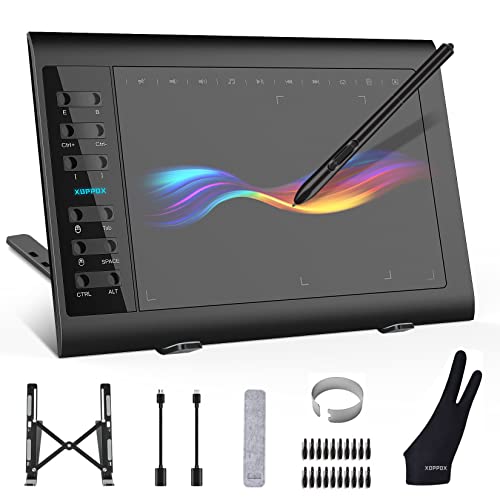
The XOPPOX Graphics Drawing Tablet is perfect for both budding and professional artists, designers, and educators who require a reliable tool for digital painting, design, and online teaching. If you are someone who values a large active drawing area and precision in pen sensitivity, this tablet is an ideal choice for you. Compatible with PC, Mac, and Android OS, it offers versatility and ease of use across different platforms.
Pros:
- Large 10 x 6 inch active area for expansive drawing space
- 8192 levels of pen pressure sensitivity for precise control
- Battery-free pen for uninterrupted creativity
- 12 customizable hot keys to enhance workflow efficiency
- Compatible with PC, Mac, and Android OS
Cons:
- Lacks multi-touch support, limiting gesture controls
- Slightly heavier than some competing models
The XOPPOX Graphics Drawing Tablet stands out with its large active area of 10 x 6 inches, providing ample space for artists to express their creativity without feeling constrained. This is particularly beneficial for those working on detailed projects or larger designs. Its 8192 levels of pressure sensitivity ensure that every stroke is captured with remarkable accuracy, allowing for smooth transitions and detailed work, whether you are painting, sketching, or designing.
One of the major highlights of this tablet is its battery-free pen, which eliminates the need for frequent charging, allowing users to focus on their work without interruptions. The 12 customizable hot keys are a boon for efficiency, enabling users to streamline their workflows by assigning specific functions or shortcuts. This feature is particularly advantageous for educators conducting online classes, as it allows for quick access to frequently used tools or applications. Overall, the XOPPOX Graphics Drawing Tablet is a robust and versatile tool that caters to the needs of both creative professionals and educators alike.
To buy this product, click here.
Huion H420x Osu Tablet

The HUION H420X OSU Tablet is an ideal choice for digital artists, graphic designers, and OSU game enthusiasts who are looking for a compact and budget-friendly drawing tablet. Its compatibility with various operating systems like Windows, Mac, Linux, and Android makes it versatile for different user needs, while the battery-free stylus offers a hassle-free experience for extended use.
Pros:
- 8192 levels of pressure sensitivity for precise control.
- Battery-free stylus for uninterrupted drawing sessions.
- Compact size makes it highly portable.
- Versatile compatibility with multiple operating systems.
Cons:
- Limited active area might be restrictive for larger projects.
- Basic features may not satisfy professional artists’ advanced needs.
The HUION H420X boasts 8192 levels of pressure sensitivity, providing users with precise control over their strokes, making it perfect for detailed artwork and a seamless gaming experience in OSU. This high sensitivity allows for a natural feel while drawing, mimicking the nuances of traditional art tools.
Another standout feature is its battery-free stylus, which eliminates the need for frequent charging, thus ensuring uninterrupted creative sessions. Coupled with its lightweight and compact design, users can effortlessly carry the tablet anywhere, making it ideal for on-the-go artists and educators conducting online teaching from various locations.
To buy this product, click here.
Huion Inspiroy H640p Drawing Tablet

The HUION Inspiroy H640P Drawing Tablet is perfect for budding artists, digital creators, and professionals seeking an affordable yet highly functional drawing tablet. Ideal for students, graphic designers, and educators, this compact device offers an intuitive platform for both creative projects and professional tasks.
Pros:
- Battery-free stylus eliminates the need for charging.
- 8192 levels of pen pressure provide precise control for detailed work.
- Six customizable hot keys enhance productivity and workflow efficiency.
- Compatible with Mac, PC, and mobile devices for versatile use.
Cons:
- Smaller 6×4 inch active area may not suit those needing larger workspaces.
- Lacks wireless connectivity which could limit mobility.
The HUION Inspiroy H640P features a battery-free stylus, which is a significant advantage for users who are constantly on the go or dislike the hassle of charging. This stylus offers 8192 levels of pressure sensitivity, allowing for a highly responsive drawing experience, perfect for detailed illustrations or precise design work. Its lightweight build ensures comfort during extended use, making it a reliable tool for both amateurs and professionals.
Moreover, the tablet is equipped with six customizable hot keys that significantly streamline the creative process by allowing users to set shortcuts for their most-used functions. This feature is particularly beneficial for those who work on complex projects that require frequent tool switching. Additionally, its compatibility with Mac, PC, and mobile devices ensures that users can seamlessly integrate it into any digital setup, making it an adaptable choice for various environments, from home studios to classrooms.
To buy this product, click here.
Huion Inspiroy H1060p Graphics Drawing Tablet

The HUION Inspiroy H1060P Graphics Drawing Tablet is an excellent choice for digital artists, graphic designers, and creative professionals looking for a reliable and high-performance tool. It’s particularly suited for those who desire a combination of portability and functionality without the hassle of charging a stylus.
Pros:
- 8192 Pressure Sensitivity provides precise control and accuracy.
- Battery-Free Stylus eliminates the need for charging.
- 12 Customized Hot Keys enhance productivity.
- Compatibility with Mac, Windows PC, and Android.
- Large Drawing Area of 10 x 6.25 inches.
Cons:
- Limited Color Options as only black is available.
- Some users may find the learning curve slightly steep.
The HUION Inspiroy H1060P stands out with its impressive 8192 pressure sensitivity levels, allowing artists to achieve fine details and variations in their work effortlessly. The battery-free stylus ensures that you never have to worry about running out of charge in the middle of a project, making it a hassle-free experience for users. Additionally, the 12 customized hot keys are a game-changer for those who want to streamline their workflow and access frequently used functions quickly.
This tablet’s compatibility with multiple operating systems, including Mac, Windows PC, and Android, broadens its usability, making it a versatile tool for various devices. The large drawing area of 10 x 6.25 inches offers ample space for creative exploration, providing an immersive drawing experience. However, while the sleek black design is professional, it may not appeal to those looking for more color variety. Nonetheless, the HUION Inspiroy H1060P remains a top choice for professionals and hobbyists alike who seek performance and convenience in their digital art endeavors.
To buy this product, click here.
Gaomon S620 Drawing Tablet

The GAOMON S620 Drawing Tablet is perfect for digital artists, creative professionals, and gaming enthusiasts who seek an affordable yet high-quality graphics tablet. Whether you’re an experienced artist looking for a reliable tool for digital art and painting or a gamer interested in enhancing your OSU playing experience, this tablet offers a versatile solution.
Pros:
- Compact size making it highly portable.
- 8192 levels of pen pressure sensitivity providing precise control.
- 4 customizable express keys for efficiency and ease of use.
- Compatibility with both Windows and Mac systems.
Cons:
- Limited active area compared to larger tablets.
- May require driver updates for optimal performance.
The GAOMON S620 features a compact design with dimensions of 6.5 x 4 inches, making it an ideal choice for artists who frequently travel or need a space-saving solution. Its lightweight build ensures that carrying it around is hassle-free, while the black color adds a sleek, professional touch. The passive pen that comes with the tablet does not require charging, offering convenience for extended use and uninterrupted creative sessions. The pen’s 8192 pressure levels allow for highly accurate strokes, mimicking the experience of drawing on paper.
One of the standout features of this tablet is its customizable express keys. With four keys available, users can tailor the tablet to their workflow, boosting productivity by setting shortcuts for commonly used functions. This is particularly beneficial for digital artists who use multiple tools and need quick access. Furthermore, the tablet’s compatibility with both Windows PC and Mac platforms ensures that users can seamlessly integrate it into their existing setup, providing flexibility for diverse creative applications. Whether you’re sketching, painting, or playing OSU, the GAOMON S620 offers a reliable and efficient tool to enhance your digital experience.
To buy this product, click here.
Ugee M708 Graphics Drawing Tablet

The UGEE M708 Graphics Drawing Tablet is an ideal choice for digital artists, graphic designers, and art students looking for a reliable and affordable tool to enhance their creative process. Its large drawing area and high-pressure sensitivity make it perfect for those who require precision and flexibility in their artwork. Whether you’re working on detailed sketches, digital paintings, or intricate designs, this tablet offers the features you need to bring your visions to life.
Pros:
- Large drawing area of 10 x 6 inches provides ample space for creative expression.
- Equipped with 8192 levels of pressure sensitivity for detailed and nuanced artwork.
- Features 8 customizable hotkeys for enhanced productivity and workflow efficiency.
- Passive stylus requires no battery, ensuring uninterrupted drawing sessions.
- Compatible with most major design software including Photoshop and Illustrator.
Cons:
- The tablet surface may experience wear over extended periods of use.
- Lacks a built-in display, requiring connection to a separate screen.
The UGEE M708 Graphics Tablet boasts a 10 x 6 inch drawing area, which allows users to create expansive and detailed artworks comfortably. This feature is particularly beneficial for those who work on large-scale projects or need a broader canvas to express their creativity without feeling constrained. The 8 customizable hotkeys offer easy access to frequently used functions, streamlining the creative process and saving valuable time during intricate projects.
Additionally, the 8192 levels of pressure sensitivity ensure that every stroke you make is captured accurately, providing a natural and realistic drawing experience. This is crucial for artists who rely on subtle variations in pressure to achieve the desired effects in their work. The passive stylus is another significant advantage, eliminating the need for batteries and ensuring that your workflow is not interrupted by power issues. Overall, the UGEE M708 is a robust tool designed to meet the demands of both amateur and professional artists.
To buy this product, click here.
Wacom Intuos Small Bluetooth Graphics Drawing Tablet

The Wacom Intuos Small Bluetooth Graphics Drawing Tablet is ideal for teachers, students, and creators who seek a portable and versatile tool for their digital drawing and graphic design needs. Its compact size and compatibility with multiple operating systems make it a perfect choice for those who require flexibility and ease of use.
Pros:
- Compact and lightweight, easy to carry
- Bluetooth connectivity for wireless operation
- Compatible with Chromebook, Mac OS, Android, and Windows
- Features 4 customizable ExpressKeys for personalized shortcuts
Cons:
- Limited active area due to its small size
- May require additional software for optimal use
The Wacom Intuos Small offers a range of features that enhance the user experience for both beginners and professionals. Its Bluetooth capability allows users to work without the hassle of cords, ensuring a clean and clutter-free workspace. Additionally, the tablet’s compatibility with various operating systems means that users can seamlessly integrate it into their existing digital setup, whether they’re using a Chromebook, Mac OS, Android, or Windows device.
One of the standout features is the 4 customizable ExpressKeys, which provide users the ability to set shortcuts to their most-used tools, significantly improving workflow efficiency. This feature is particularly beneficial for teachers and students who frequently use the tablet for educational purposes, allowing them to streamline tasks and focus more on their creative projects. The compact design of the tablet ensures that it is easy to carry, making it an excellent choice for creators who are constantly on the move.
To buy this product, click here.
Frequently Asked Questions
What Is The Best Cheap Drawing Tablet For Beginners?
The PicassoTab X is ideal for beginners. It requires no computer and offers drawing apps and tutorials. Its standalone nature and portable design make it user-friendly. It’s a great gift option for aspiring digital artists looking for budget-friendly tablets.
Can I Use Drawing Tablets For Online Teaching?
Absolutely, many tablets like XPPen G430S and HUION H420X are perfect for online teaching. They offer compatibility with Windows, Mac, and Android. Their pressure-sensitive stylus enhances teaching experience by making it interactive and engaging. They are great tools for educators working remotely.
Are Battery-free Stylus Pens Reliable?
Yes, battery-free stylus pens are very reliable. Tablets like XOPPOX and HUION Inspiroy H640P feature them. They provide excellent pressure sensitivity for accurate drawing. These pens eliminate charging hassles and ensure uninterrupted creative sessions. Users find them convenient and efficient for various artistic tasks.
Which Tablet Has Customizable Hot Keys?
The HUION Inspiroy H1060P and UGEE M708 have customizable hot keys. These enhance productivity by providing quick access to tools. Customization allows users to tailor the tablet to their workflow. It’s a feature that significantly improves efficiency for artists and designers.
Are Drawing Tablets Compatible With Chromebooks?
Yes, many tablets like XPPen StarG640 and Wacom Intuos offer Chromebook compatibility. They are versatile for different platforms including Windows and Mac. This makes them suitable for diverse user needs. Compatibility extends their usability across various devices, enhancing flexibility for creators and students.
Conclusion
Choosing the right drawing tablet can be a rewarding experience for artists and hobbyists alike. Each model offers unique features that cater to different needs and budgets. From the xppen g430s to the wacom intuos small bluetooth, these tablets provide excellent value for money.
They are ideal for digital art creation, online teaching, and even gaming. Whether you need a compact tablet for travel or a larger surface for detailed work, there is a suitable option available. Battery-free stylus technology and customizable hot keys enhance user experience.
These tablets are compatible with various operating systems, ensuring flexibility and ease of use. For beginners and seasoned artists, these tablets make digital drawing accessible and enjoyable. Explore these options to find the perfect match for your creative journey. Remember, investing in a drawing tablet is not just about price; it’s about finding the right tool to bring your ideas to life.











