
Finding a monitor that excels in both gaming and photo editing can be tough. The right screen boosts visuals and improves your workflow.
A good gaming and photo editing monitor must offer sharp images, fast response times, and accurate colors. High resolution, wide color range, and smooth refresh rates matter most. Monitors like the Sceptre 4K IPS 27″ and ASUS ProArt series deliver great color accuracy and detail for editing photos.
On the gaming side, models like the Samsung Odyssey G3 and LG Ultragear provide fast refresh rates and low input lag for smooth gameplay. Some monitors even combine these features to suit both needs. Choosing the best monitor depends on your budget and priorities. This guide covers top picks with clear specs to help you decide easily.
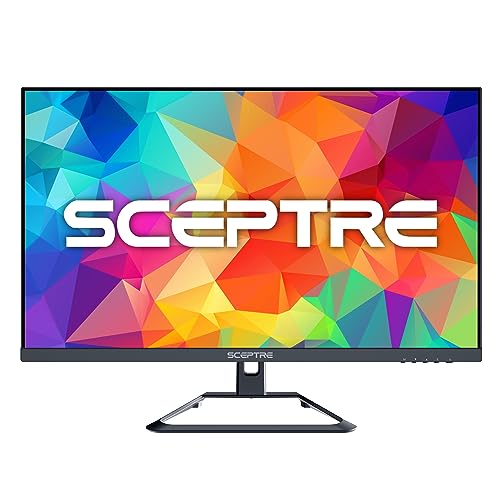
Sceptre 4k Ips 27″ Uhd Monitor

The Sceptre 4K IPS 27″ 3840 x 2160 UHD Monitor is ideal for creative professionals, gamers, and tech enthusiasts who demand high-resolution visuals and accurate color representation. If you are looking for a reliable monitor that delivers stunning detail with vibrant colors and smooth performance, this monitor is designed to meet your needs.
Pros:
- Stunning 4K UHD resolution for ultra-clear visuals and detailed images
- IPS panel technology offering wide viewing angles and accurate color reproduction
- Supports up to 70Hz refresh rate for smoother motion display
- Connectivity options including DisplayPort and HDMI for versatile device compatibility
- 99% sRGB color gamut coverage, perfect for color-critical work
- Built-in speakers reducing the need for external audio devices
- Sleek black design that fits well in any workspace or gaming setup
Cons:
- Refresh rate capped at 70Hz, which may not satisfy competitive gamers seeking higher frame rates
- Speakers are basic and may not provide high-quality audio output
- Relatively heavy at 11.46 pounds, which may limit portability
The Sceptre 27″ 4K UHD monitor features an IPS display panel that ensures vibrant colors and consistent image quality across wide viewing angles. This makes it perfect for graphic designers and video editors who rely on color accuracy. Its 3840 x 2160 resolution delivers crisp images and sharp text, enhancing productivity and providing an immersive viewing experience.
Equipped with DisplayPort and HDMI inputs, this monitor offers easy connectivity with a variety of devices including PCs, gaming consoles, and streaming devices. The 70Hz refresh rate provides smooth visuals for casual gaming and everyday use. Additionally, the built-in speakers add convenience, reducing desk clutter by eliminating the need for external speakers.
To buy this product, click here.
Asus Proart Display 27” 4k Hdr Professional Monitor (pa279crv)

The ASUS ProArt Display 27” 4K HDR Professional Monitor is designed for creative professionals who demand precision and clarity in their work. Ideal customers include graphic designers, photographers, video editors, and content creators who require accurate color representation and detailed image quality.
Pros:
- 4K UHD resolution provides stunning clarity and detail.
- 99% DCI-P3/Adobe RGB color accuracy ensures true-to-life colors.
- Calman Verified for professional-grade color calibration.
- USB-C PD 96W offers convenient connectivity and power delivery.
- Ergonomic design for comfortable, long-term use.
- 3-year warranty for peace of mind.
Cons:
- Higher price point may not fit all budgets.
- Heavy weight can be cumbersome for frequent relocation.
The ASUS ProArt Display features a 27-inch 4K UHD resolution that delivers an exceptional viewing experience, allowing users to see every detail with remarkable clarity. This is particularly beneficial for photographers and video editors who need to work with high-resolution images and videos. The IPS panel ensures wide viewing angles and consistent color reproduction, making it perfect for collaborative work environments.
Another standout feature is the 99% DCI-P3/Adobe RGB color gamut, which provides rich, vibrant colors essential for graphic designers and illustrators who need accurate color representation. The Calman Verified certification assures users of its precision in color calibration, eliminating guesswork and ensuring that what is seen on the monitor is what gets printed or published. Additionally, the USB-C PD 96W connectivity offers a streamlined solution for both data and power delivery, reducing the clutter of cables and enhancing productivity by allowing easy connection to laptops and other devices.
To buy this product, click here.
Asus Proart Display Pa278qv

The ASUS ProArt Display PA278QV 27” WQHD Monitor is ideal for creative professionals, graphic designers, photographers, and video editors who demand precise color accuracy and high-resolution visuals. If you require a reliable display for color-critical work with excellent ergonomics, this monitor is designed to meet those needs with its professional-grade features and versatile connectivity options.
Pros:
- 100% sRGB and Rec. 709 color gamut coverage ensures vibrant and accurate colors.
- ΔE < 2 color accuracy for true-to-life image reproduction.
- IPS panel technology provides wide viewing angles and consistent brightness.
- Multiple connectivity options including DisplayPort, HDMI, DVI-D, and Mini DP for flexible device compatibility.
- Calman Verified certification guarantees professional calibration standards.
- Ergonomic design with tilt, pivot, swivel, and height adjustment for comfortable viewing.
- Anti-glare coating reduces reflections and eye strain in bright environments.
Cons:
- The 27-inch size may be too large for limited desk spaces.
- Price point might be higher compared to standard monitors without professional features.
- Heavier weight (17 pounds) can make setup and adjustments less convenient.
The ASUS ProArt Display PA278QV offers a stunning 2560 x 1440 WQHD resolution that delivers sharp and detailed images, which is essential for intricate editing tasks. Its IPS panel ensures consistent color and clarity from almost any angle, making collaboration and multi-monitor setups more effective. The inclusion of multiple input ports such as DisplayPort, HDMI, DVI-D, and Mini DP allows seamless integration with various devices, enhancing workflow flexibility.
Another significant benefit is the monitor’s professional calibration and Calman Verified status, ensuring that colors are rendered with exceptional accuracy right out of the box. This reduces the need for additional calibration tools and helps maintain consistent results across projects. Additionally, the ergonomic stand with tilt, pivot, swivel, and height adjustments promotes comfortable usage during long work sessions, while the anti-glare coating minimizes reflections, helping to reduce eye fatigue.
To buy this product, click here.
Samsung 27-inch Odyssey G3 Series Fhd Gaming Monitor

The Samsung 27-Inch Odyssey G3 (G30D) Series FHD Gaming Monitor is ideal for gamers who demand a responsive and immersive experience without breaking the bank. If you are a casual or competitive gamer seeking a monitor with fast refresh rates, sharp visuals, and adaptive synchronization technology, this monitor is designed for you. It also suits users who value ergonomic adjustments and eye comfort during extended gaming sessions.
Pros:
- Ultra-fast 1ms response time for smooth and blur-free gameplay
- High 180Hz refresh rate ensures fluid motion and reduces lag
- AMD FreeSync technology eliminates screen tearing and stuttering
- Adjustable stand offers customizable viewing angles for comfort
- Black Equalizer enhances visibility in dark scenes
- Eye Saver Mode and Flicker-Free technology reduce eye strain over long periods
Cons:
- Only Full HD resolution which may not satisfy users seeking 4K quality
- Limited color gamut compared to higher-end gaming monitors
- No built-in speakers, requiring external audio solutions
The Samsung Odyssey G3 features a 27-inch Full HD display that delivers crisp and clear visuals, perfect for fast-paced gaming. Its 1ms response time drastically reduces motion blur, giving gamers a competitive edge by making every frame count. The impressive 180Hz refresh rate provides an ultra-smooth experience that is especially beneficial in action-packed games where every millisecond matters. Additionally, the inclusion of AMD FreeSync technology ensures that screen tearing and stuttering are minimized, providing a seamless viewing experience.
Ergonomics and eye comfort have been carefully considered with features like the adjustable stand, which allows users to find the perfect viewing position, reducing neck and back strain. The Black Equalizer enhances visibility in dark scenes, helping gamers spot enemies more easily. Meanwhile, Eye Saver Mode and Flicker-Free technology protect users’ eyes during long gaming marathons, making this monitor not only powerful but also user-friendly and comfortable for extended use.
To buy this product, click here.
Raywego 32 Inch 4k Gaming Computer Monitor

The Raywego 32 inch 4K Gaming Computer Monitor is ideal for gamers, graphic designers, and multimedia professionals who demand high-resolution visuals and accurate color reproduction. If you are looking for a large display with ultra-high definition, wide color gamut coverage, and features that reduce eye strain during long sessions, this monitor is designed for you.
Pros:
- Ultra-high 3840×2160 4K resolution for crystal-clear visuals
- 99% sRGB color accuracy ensures vibrant and true-to-life colors
- HDR10 support enhances contrast and dynamic range
- FreeSync technology minimizes screen tearing in games
- Low input lag for smooth and responsive gameplay
- Billions of colors provide rich and detailed imagery
- PIP/PBP modes allow multitasking with multiple inputs
- Slim bezel design offers an immersive viewing experience
- VESA mount compatibility for flexible placement
- Eye-care features reduce fatigue during extended use
Cons:
- 60Hz refresh rate might be limiting for competitive gamers seeking ultra-high frame rates
- Relatively heavy at 10 pounds, which may require a sturdy desk or mount
- Limited to HDMI and DisplayPort inputs without USB-C support
The Raywego 32 inch 4K monitor combines a stunning UWQHD 3840×2160 resolution with a large screen size, making it perfect for immersive gaming and detailed graphic design work. Its 99% sRGB coverage ensures that colors are displayed accurately, which is essential for professionals who rely on precise color grading. The inclusion of HDR10 further enhances image quality by delivering better contrast and deeper blacks.
Gamers will appreciate the FreeSync technology and low input lag features, which help provide smooth gameplay without distracting screen tearing or latency. Additionally, the monitor’s PIP/PBP functionality supports multitasking by allowing users to view content from multiple sources simultaneously. The slim bezel and eye-care technologies also contribute to a comfortable and visually appealing setup, reducing eye strain during long hours of use.
To buy this product, click here.
Crua 27″ White Monitor

The CRUA 27″ White Monitor is ideal for professionals and gamers seeking a versatile display that combines high resolution with smooth performance. If you need a monitor that excels in both work tasks such as graphic design, video editing, and general productivity, as well as immersive gaming experiences, this monitor is tailored for you.
Pros:
- 2K QHD (2560x1440P) resolution delivers crisp and detailed visuals.
- IPS panel ensures vibrant colors and wide viewing angles.
- 120Hz refresh rate offers smooth and fluid motion, ideal for gaming.
- Supports AMD FreeSync to reduce screen tearing and stuttering.
- 120% sRGB color gamut provides accurate and rich color reproduction.
- USB Type-C connectivity allows easy connection and charging of compatible devices.
- Wall mountable design offers flexible installation options.
Cons:
- White color may not match all workspace aesthetics.
- Lack of built-in speakers might require external audio solutions.
- Limited length (2.6 inches) may restrict some ergonomic adjustments.
The CRUA 27″ Monitor features a stunning 2K QHD resolution combined with an IPS panel, delivering vibrant, true-to-life colors and wide viewing angles. This makes it perfect for professionals who require color accuracy, such as graphic designers and video editors. The 120% sRGB coverage ensures that visuals are rich and precise, which enhances the quality of any creative work.
For gamers, the 120Hz refresh rate and AMD FreeSync support provide a smooth and responsive experience by reducing input lag and preventing screen tearing. Additionally, the inclusion of USB Type-C connectivity offers convenience by simplifying cable management and enabling fast data transfer or device charging. The monitor’s sleek white finish and wall-mountable design also allow for a clean, customizable setup that fits both professional and gaming environments.
To buy this product, click here.
Lg Ultragear 32gs60qc-b

The LG 32GS60QC-B Ultragear 32-inch Curved Gaming Monitor is ideal for serious gamers and creative professionals who demand a high-performance display with vibrant visuals and smooth gameplay. If you are looking for a monitor that combines a large immersive screen with fast refresh rates and crisp resolution, this gaming monitor is designed to meet those needs effectively.
Pros:
- QHD resolution (2560×1440) delivers sharp and detailed images for immersive visuals.
- 180Hz refresh rate ensures ultra-smooth gameplay without motion blur.
- 1ms response time minimizes input lag for competitive gaming advantage.
- 1000R curved screen enhances viewing comfort and immersion.
- AMD FreeSync technology reduces screen tearing and stuttering.
- HDR10 support provides richer colors and better contrast.
- Multiple input options including HDMI x2 and DisplayPort for versatile connectivity.
Cons:
- Relatively heavy at 13.0 pounds, which may require a sturdy desk setup.
- Curved design might not suit users who prefer flat screens for multi-monitor setups.
- Lack of built-in speakers may require additional audio equipment.
The LG Ultragear 32GS60QC-B features a QHD resolution that strikes a perfect balance between Full HD and 4K, offering crisp and vibrant images that enhance gaming and multimedia experiences. The large 32-inch screen with a 1000R curvature wraps around your field of vision, creating a more immersive environment that reduces eye strain during extended gaming sessions or work hours. Additionally, the fast 180Hz refresh rate combined with a 1ms response time ensures that even the fastest action sequences are fluid and responsive, giving competitive gamers a distinct edge.
This monitor’s inclusion of AMD FreeSync technology effectively synchronizes the display’s refresh rate with compatible graphics cards, eliminating screen tearing and stuttering for smoother gameplay. The support for HDR10 further enhances visual quality by delivering richer colors and higher contrast, making games and videos look more lifelike. Multiple connectivity options including two HDMI ports and a DisplayPort provide flexibility for connecting multiple devices such as gaming consoles, PCs, and streaming devices, making it a versatile addition to any setup.
To buy this product, click here.
Sceptre New 27-inch Gaming Monitor

The Sceptre New 27-inch Gaming Monitor 100Hz 1ms DisplayPort HDMI x2 100% sRGB AMD FreeSync Build-in Speakers, Eye Care Frameless Machine Black 2024 (E275W-FW100T) is ideal for avid gamers and creative professionals who demand high performance and vibrant visuals. If you are looking for a monitor that combines speed, color accuracy, and immersive features for both gaming and multimedia tasks, this model is designed for you. It suits users who value smooth gameplay and eye comfort during extended use.
Pros:
- 100Hz refresh rate for fluid motion and reduced screen tearing
- 1ms response time ensuring minimal input lag for competitive gaming
- 100% sRGB color gamut delivering vivid and accurate colors
- AMD FreeSync technology for smooth, stutter-free visuals
- Built-in speakers providing convenient audio without extra peripherals
- Eye Care technology reducing eye strain during long sessions
- Frameless design enhancing the aesthetic and multi-monitor setups
Cons:
- Speakers may lack depth compared to dedicated audio systems
- Limited ergonomic adjustments like height or swivel
- No USB ports for peripheral connectivity
The Sceptre 27-inch Gaming Monitor features a 100Hz refresh rate combined with a 1ms response time, which significantly improves the smoothness and responsiveness of fast-paced games. This allows gamers to experience reduced motion blur and input lag, giving them a competitive edge. Additionally, the inclusion of AMD FreeSync technology eliminates screen tearing and stuttering, providing seamless gameplay even during intense action sequences. The dual HDMI ports and DisplayPort connectivity offer versatile options for connecting multiple devices effortlessly.
Beyond gaming, the monitor’s 100% sRGB color accuracy makes it a great choice for graphic designers and content creators who require precise color representation. The Eye Care technology helps minimize eye fatigue by reducing blue light and flicker, making it comfortable for prolonged use. Its frameless design not only looks sleek but also supports multi-monitor setups for enhanced productivity and immersive experiences. Overall, this monitor balances performance, aesthetics, and user comfort effectively.
To buy this product, click here.
Lg 27us500-w Ultrafine Monitor

The LG 27US500-W Ultrafine Monitor is ideal for professionals, creatives, and tech enthusiasts seeking a high-resolution display with vibrant colors and sharp details. If you require a reliable 27-inch 4K UHD monitor for photo editing, video production, or immersive multimedia experiences, this monitor offers excellent performance and eye-friendly features. Its sleek white design also suits modern workspaces and home offices.
Pros:
- 4K UHD (3840×2160) resolution delivers crisp and clear visuals
- HDR10 support enhances color accuracy and dynamic range
- IPS panel ensures wide viewing angles and consistent colors
- Borderless design provides a sleek, modern aesthetic
- Reader Mode and Flicker Safe technology reduce eye strain during long usage
- Multiple connectivity options including HDMI and DisplayPort
- Lightweight and compact dimensions make it easy to fit in various setups
Cons:
- Limited color gamut compared to professional-grade monitors
- No built-in speakers, requiring external audio solutions
- Adjustability options like height and swivel may be limited
The LG 27US500-W monitor features a stunning 27-inch 4K UHD display that brings images and videos to life with exceptional clarity and detail. Thanks to the IPS technology, users benefit from consistent color reproduction and wide viewing angles, making it suitable for collaborative work and entertainment. The inclusion of HDR10 further enhances the visual experience by delivering richer colors and deeper contrasts, ideal for multimedia content creators and casual viewers alike.
Designed with user comfort in mind, the monitor incorporates Reader Mode and Flicker Safe features to minimize eye fatigue during extended periods of use. Its borderless design not only offers a modern look but also maximizes screen real estate, allowing for seamless multi-monitor setups. With versatile connectivity options such as HDMI and DisplayPort, the LG 27US500-W easily integrates into various desktop environments, providing both functionality and style in a compact, lightweight package.
To buy this product, click here.
Cunpu 27 Inch 4k White Monitor

The CUNPU 27 Inch 4K White Monitor is ideal for creative professionals, photographers, videographers, and anyone who demands precise and vibrant color accuracy for their work. If you are looking for a monitor that delivers ultra-high-definition visuals with a sleek design and advanced features, this monitor is a great choice for editing photos, videos, and even reading e-books comfortably.
Pros:
- 4K UHD (3840 2160) resolution for incredibly sharp and detailed images
- 73Hz refresh rate ensures smooth visuals and reduced motion blur
- IPS panel offers wide viewing angles and consistent color accuracy
- Ultra-slim bezel design for a modern and immersive viewing experience
- ΔE < 2 and 100% DCI-P3 color gamut for professional-grade color precision
- E-Book Mode reduces eye strain during long reading sessions
- Supports multiple inputs with DP/HDMI ports
- Displays over 1.07 billion colors for rich and vivid imagery
Cons:
- Refresh rate limited to 73Hz, which may not suit high-end gaming needs
- White color finish might show fingerprints more easily
- Physical dimensions require ample desk space
The CUNPU 27 Inch 4K White Monitor stands out with its impressive UHD resolution and IPS panel technology, ensuring every detail is crisp and colors remain true from any angle. This makes it particularly beneficial for photo and video editing professionals who require exact color reproduction. Its ΔE < 2 rating and full 100% DCI-P3 color gamut coverage guarantee that the colors you see on screen are as accurate as possible, which is essential for high-quality content creation. The ultra-slim bezel design not only adds aesthetic value but also allows for a more immersive and less distracting workspace.
Additionally, the monitor features a 73Hz refresh rate, which provides smoother motion than standard 60Hz displays, making video playback and general navigation feel more fluid. The inclusion of an E-Book Mode enhances user comfort by reducing blue light and adjusting brightness, thus minimizing eye fatigue during extended reading or editing sessions. Connectivity options like DisplayPort and HDMI ensure compatibility with various devices, making it easy to integrate into your existing setup. Overall, this monitor balances performance, color precision, and user comfort, making it a versatile tool for both creative professionals and casual users who value visual quality.
To buy this product, click here.
Frequently Asked Questions
What Monitor Is Best For Both Gaming And Photo Editing?
The ASUS ProArt Display PA279CRV is ideal for gaming and photo editing. It offers 4K UHD resolution, 99% DCI-P3 color, and Calman verification for precise colors. It also supports USB-C PD 96W and has ergonomic features for long sessions.
How Important Is Color Accuracy In A Gaming And Editing Monitor?
Color accuracy ensures true-to-life visuals, essential for photo editing and immersive gaming. Monitors like ASUS ProArt PA278QV offer 100% sRGB and ΔE < 2 for precise color reproduction. Accurate colors improve editing quality and enhance gaming experience with vivid graphics.
Which Features Matter Most For Photo Editing Monitors?
Key features include high resolution (4K or QHD), wide color gamut (99% sRGB or higher), low ΔE values, and IPS panels for consistent colors. Monitors like Sceptre 4K UHD and ASUS ProArt series meet these needs, ensuring sharp images and accurate color grading.
What Refresh Rate Suits Gaming And Photo Editing Monitors?
A refresh rate between 60Hz and 120Hz works well. Gaming monitors like LG 27GS60QC offer 180Hz for smooth gameplay. Photo editing monitors prioritize resolution and color accuracy over extremely high refresh rates, but 60-120Hz balances both uses effectively.
Are Built-in Speakers Useful In Gaming And Editing Monitors?
Built-in speakers, like those in the Sceptre 4K and New 27-inch Gaming Monitor, add convenience for casual audio needs. However, dedicated external speakers or headphones provide better sound quality for immersive gaming and precise audio editing.
How Does Usb-c Connectivity Benefit These Monitors?
USB-C ports, found in ASUS ProArt PA279CRV and CRUA 27″, simplify connections by delivering video, data, and power through one cable. This reduces desktop clutter and supports fast charging, making it convenient for creative professionals and gamers alike.
Conclusion
Choosing the best monitor for both gaming and photo editing means finding a balance between speed and color accuracy. Monitors like the ASUS ProArt series offer excellent color precision needed for editing photos. Meanwhile, gaming monitors such as the Samsung Odyssey G3 provide fast refresh rates and low response times for smooth gameplay.
Some models, like the Raywego 32-inch 4K, combine high resolution with good color coverage, making them versatile for both tasks. Features such as FreeSync and HDR support improve the visual experience without causing eye strain. It’s important to consider screen size, resolution, and connectivity options based on your personal needs.
Whether you prioritize color accuracy or gaming performance, there is a monitor in this list to fit your setup. Take your time to compare the specs and pick the one that matches your budget and preferences. The right monitor can truly enhance both your gaming and creative work.











