
Choosing the right pen tablet can be daunting for beginners. We’ll guide you to find the best options available.
Starting digital art is exciting but requires the right tools. Pen tablets offer a seamless transition from traditional to digital drawing. They are ideal for beginners eager to explore digital creativity. In this post, we will explore some of the best pen tablets for beginners.
These tablets are known for their user-friendly features and affordability. Brands like XPPen, HUION, and Wacom offer excellent options with various features. Whether you need a tablet with customizable hotkeys or one with a standalone screen, there’s something for everyone. Dive in to discover which tablet matches your needs and budget. Let’s get started on your digital art journey!
Xppen Updated Deco 01 V3 Drawing Tablet

The XPPen Updated Deco 01 V3 Drawing Tablet is ideal for digital artists, teachers, and gamers who seek a versatile and efficient tool to enhance their creativity and productivity. Whether you are a professional illustrator, a hobbyist, or an educator who needs a reliable graphic tablet for digital art, teaching, or gaming, this tablet offers a seamless experience with its innovative features.
Pros:
- 16384 Levels of Pressure Sensitivity for precise control and natural drawing experience.
- Battery-Free Stylus eliminates the need for charging, ensuring uninterrupted use.
- Large 10×6 Inch workspace suitable for detailed artwork.
- 8 Customizable Hotkeys for quick access to frequently used functions.
- Compatible with Chrome, PC, Mac, and Android, providing flexibility across multiple platforms.
Cons:
- May require initial setup and configuration to optimize settings for individual use.
- Weight of 2.204 pounds could be slightly heavy for some users seeking ultra-portability.
The XPPen Updated Deco 01 V3 Drawing Tablet boasts 16384 levels of pressure sensitivity, which allows artists to achieve fine details and smooth gradients effortlessly. This feature is particularly beneficial for digital artists who demand precision and fluidity in their work. Additionally, the battery-free stylus ensures that you can focus on your creative process without worrying about battery life or interruptions. The convenience of not having to charge the stylus can be a major advantage for users who frequently engage in long drawing sessions.
With a generous 10×6 inch workspace, the tablet provides ample room for creativity, making it suitable for complex projects or detailed sketches. The 8 customizable hotkeys further enhance productivity by allowing users to tailor the device to their specific needs, facilitating a more efficient workflow. Moreover, its compatibility with Chrome, PC, Mac, and Android means you can seamlessly integrate this tablet into your existing tech ecosystem, whether you are working from a desktop, laptop, or mobile device. This versatility makes it a valuable tool for artists, educators, and gamers alike, helping them unlock their full potential.
To buy this product, click here.
Picassotab X Drawing Tablet

The PicassoTab X Drawing Tablet is an ideal choice for beginner digital graphic artists who seek a portable and standalone device to nurture their creativity. With its 10-inch screen and a variety of drawing apps and tutorials, it offers an all-in-one solution that doesn’t require a computer. This product is perfect for those who want to explore digital art without the hassle of setting up additional equipment.
Pros:
- No computer needed, making it portable and easy to use anywhere.
- Comes with 4 bonus items, adding extra value to your purchase.
- Stylus pen included for precise and effortless drawing.
- Drawing apps and tutorials available, perfect for beginners to learn and improve their skills.
Cons:
- Limited screen size of 10 inches may not be ideal for advanced projects requiring more space.
- Being a standalone device, it might have limited processing power compared to high-end tablets.
The PicassoTab X Drawing Tablet stands out with its portable design and comprehensive features tailored for beginners. With its stylus pen, users can create precise digital artwork effortlessly. The drawing apps and tutorials are a great resource for newcomers, guiding them through the basics and helping them develop their skills. The tablet’s compact design ensures that it can be used comfortably anywhere, making it a versatile tool for digital artists on the go.
Additionally, the inclusion of 4 bonus items enhances the overall value, providing users with essential tools to start their creative journey. While the 10-inch screen offers a decent workspace, advanced artists seeking larger canvases might find it somewhat restrictive. However, for beginners, this size is manageable and encourages focus on developing core drawing techniques. Despite its limited processing power, the PicassoTab X offers a seamless experience for those embarking on their digital art adventure.
To buy this product, click here.
Huion Inspiroy H1060p Graphics Drawing Tablet

The HUION Inspiroy H1060P Graphics Drawing Tablet is ideal for digital artists, graphic designers, and illustrators who seek a reliable and versatile tool to enhance their creative process. This tablet is perfect for those who want to work seamlessly across different platforms, including Mac, Windows PC, and Android devices. Whether you’re a professional or an aspiring artist, this tablet offers the precision and customization options needed to bring your creative visions to life.
Pros:
- 8192 Pressure Sensitivity levels for precise drawing
- Battery-Free Stylus for continuous work without interruptions
- 12 Customized Hot Keys to streamline workflow
- Compatible with multiple platforms (Mac, Windows, Android)
- Large working area of 10 x 6.25 inches
Cons:
- Initial setup may be complex for beginners
- Driver updates required for optimal performance
- Limited wireless connectivity options
The HUION Inspiroy H1060P boasts an impressive 8192 pressure sensitivity levels, allowing artists to achieve precise and detailed artwork with ease. This feature is particularly beneficial for those looking to create intricate designs or realistic sketches, as it provides a natural drawing experience similar to traditional media. Additionally, the battery-free stylus ensures that users can work continuously without the hassle of recharging, making it an efficient tool for long creative sessions.
Another standout feature of this tablet is the 12 customized hot keys, which enable artists to tailor their workflow according to their preferences. By assigning frequently used functions or shortcuts to these keys, users can significantly enhance their productivity and streamline their creative process. The tablet’s compatibility with multiple platforms ensures that artists have the flexibility to work across different devices, while the large working area provides ample space for unrestricted creativity. Overall, the HUION Inspiroy H1060P offers a comprehensive set of features that cater to both professionals and hobbyists alike.
To buy this product, click here.
Gaomon S620 Drawing Tablet

The GAOMON S620 Drawing Tablet is an ideal purchase for budding digital artists, gaming enthusiasts, and professionals seeking a reliable and affordable graphics tablet. Whether you’re delving into digital art, painting, or enhancing your skills in OSU playing, this tablet caters to a wide range of creative needs, making it perfect for both beginners and seasoned creators.
Pros:
- 8192 levels of pen pressure for precise control and smooth strokes.
- Compact design that fits easily into any workspace.
- 4 customizable ExpressKeys for quick access to frequently used functions.
- Compatibility with both Windows PC and Mac.
Cons:
- Limited active area might not suit large-scale projects.
- No built-in screen, requiring connection to a computer.
The GAOMON S620 offers a lightweight and portable design, making it easy to carry around and use in various settings. Its compact size ensures that it doesn’t take up much space, yet provides an ample working area for most artistic tasks. The 8192 levels of pressure sensitivity allow for a natural drawing experience, giving users the ability to create intricate details with ease. This is particularly beneficial for artists who need precision in their work, as it mimics the feel of traditional drawing tools.
Another standout feature of the GAOMON S620 is its 4 customizable ExpressKeys, which enhance productivity by allowing users to set shortcuts for their most-used tools and commands. This feature is especially advantageous for gamers and artists who require quick access to functions without interrupting their workflow. Additionally, its compatibility with both Windows and Mac ensures that it integrates seamlessly with a wide range of systems, broadening its usability across different platforms.
To buy this product, click here.
Drawing Tablet Huion Hs64

The HUION HS64 Drawing Tablet is an ideal choice for beginners venturing into the world of digital art, painting, and design. It’s perfect for students, hobbyists, and OSU players who seek a reliable and versatile tool that combines affordability with functionality. Whether you’re a budding artist looking to explore creative avenues or a gamer wanting to enhance your gameplay experience, this tablet serves as an excellent starting point.
Pros:
- Battery-free stylus ensures uninterrupted creativity without the hassle of charging.
- 8192 pressure sensitivity levels offer precise control over brush strokes for detailed artwork.
- Compatible with multiple operating systems including Windows, Mac, Android, and Linux, providing versatility and convenience.
- Lightweight design makes it easily portable for on-the-go use.
Cons:
- Smaller active area compared to higher-end models, which might limit professional use.
- Lacks built-in display, requiring an external monitor for visual feedback.
The HUION HS64 features a battery-free stylus that eliminates the inconvenience of frequent charging, allowing users to focus entirely on their creative process. This is particularly beneficial for beginners who need a reliable tool without worrying about power issues. The stylus also boasts 8192 levels of pressure sensitivity, enabling artists to achieve a wide range of line thicknesses and opacities, which is crucial for creating detailed and expressive artwork.
Another standout feature is its broad compatibility with various operating systems like Windows, Mac, Android, and Linux, making it a versatile option for users who might switch between different platforms. This flexibility ensures that the HUION HS64 can integrate smoothly into your existing digital workflow, whether you’re using it for art, design, or even playing OSU. The tablet’s lightweight and portable nature further enhance its appeal, allowing you to carry it effortlessly wherever your creative pursuits take you.
To buy this product, click here.
Drawing Tablet Xppen Starg640

The XP-PEN StarG640 is the perfect tool for budding artists, digital illustrators, or anyone who requires a compact and efficient solution for drawing, e-learning, or remote-working. Its user-friendly interface and compact size make it ideal for both beginners and professionals who want a reliable graphic tablet without the bulk.
Pros:
- Battery-Free Stylus for uninterrupted drawing sessions.
- Compact Design makes it highly portable and easy to use in various settings.
- Compatible with Mac, Windows, and Chromebook for versatile usage.
- Affordable price point for high-quality features.
Cons:
- Limited active area of 6×4 inches may not suffice for large-scale projects.
- Basic features compared to high-end models.
The XP-PEN StarG640 boasts a battery-free stylus, which means you’ll never have to worry about charging your pen in the middle of an inspired moment. This feature not only saves time but also reduces the hassle of managing additional cables and chargers. The pen’s responsiveness and pressure sensitivity are ideal for capturing the nuances of your strokes, whether you’re sketching, shading, or editing photos.
With its compact design, the StarG640 is incredibly easy to carry around, fitting comfortably in a backpack or laptop bag. This makes it an excellent choice for students or professionals who might need to work in different environments, from home studios to coffee shops. Additionally, its cross-platform compatibility ensures that it works seamlessly with popular operating systems like Mac, Windows, and Chromebook, providing a hassle-free setup for users.
To buy this product, click here.
Huion Inspiroy H950p Drawing Tablet

The HUION Inspiroy H950P Drawing Tablet is ideal for budding artists, graphic designers, or anyone seeking to enhance their digital art skills without breaking the bank. It’s also perfect for students and professionals who need a reliable and efficient tool for digital writing and design tasks. With its compact size, it’s especially suitable for users who are always on the go, looking for a lightweight and portable device that doesn’t compromise on performance.
Pros:
- Battery-Free Stylus eliminates the need for constant charging.
- 8192 Pen Pressure Levels offer precise control for detailed work.
- Tilt Function for a natural drawing experience.
- 8 Customizable Hot Keys for improved workflow efficiency.
- Compact and Lightweight design for easy portability.
Cons:
- Limited active area for larger projects.
- Requires driver installation for full functionality.
The HUION Inspiroy H950P features an 8192-level pressure sensitivity and tilt recognition, ensuring that every stroke you make is captured with incredible accuracy. This is particularly beneficial for artists who want to translate their traditional skills into the digital realm while maintaining the nuances of their natural hand movements. Whether you are sketching, painting, or doing intricate design work, the tablet responds fluidly to the pressure and angle changes, offering a realistic pen-on-paper experience.
Moreover, the 8 customizable hot keys are a standout feature for those who value efficiency. These keys can be configured to suit your workflow, allowing you to access frequently used functions with ease. This can significantly speed up the creative process, as you won’t need to constantly switch between tools or menus. Additionally, the tablet’s compact dimensions make it easy to carry around, ensuring that your creativity is never hindered by location. Whether you’re in a coffee shop, classroom, or office, the HUION Inspiroy H950P is designed to be your versatile digital companion.
To buy this product, click here.
One By Wacom Drawing Tablet
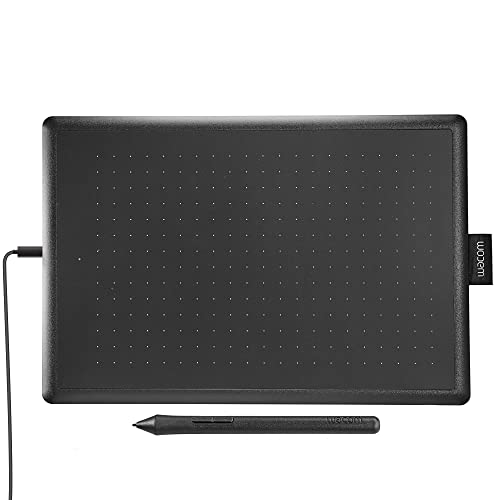
The One by Wacom Drawing Tablet is an ideal choice for students and beginners looking to explore their creative potential. If you’re someone who is just starting out in digital art, or a student needing a reliable tool for graphic design assignments, this compact graphics tablet offers a perfect blend of functionality and affordability. It’s designed to be compatible with Chromebook, Mac, and Windows, making it versatile for various operating systems.
Pros:
- Affordable entry-level option for beginners
- Compact and lightweight design for easy portability
- Versatile compatibility with Chromebook, Mac, and Windows
- High-quality brand assurance from Wacom
Cons:
- Limited to basic features suitable for beginners only
- Medium size may not be suitable for advanced users seeking larger workspaces
- Lack of customization options found in higher-end models
The One by Wacom Drawing Tablet boasts a compact design with dimensions of 10.9″ x 7.4″, making it easy to carry around and fit into any workspace. Its lightweight nature at just 0.95 pounds ensures it won’t be a burden in your bag, making it perfect for students who need to transport their equipment between classes. The black and red color scheme offers a sleek, modern aesthetic that complements any creative environment.
Users can enjoy the benefit of seamless compatibility with Chromebook, Mac, and Windows, which means there’s no need to worry about software limitations. This tablet’s simplicity is its strength, allowing beginners to focus on honing their skills without being overwhelmed by complex features. Whether you’re sketching, drawing, or designing, the One by Wacom provides a reliable platform to nurture your creativity.
To buy this product, click here.
Huion 420 Osu Tablet Drawing Tablet

The HUION 420 OSU Tablet Drawing Tablet is an ideal choice for budding digital artists, designers, and animators who are just starting out and looking for a compact and affordable tool to hone their skills. It’s perfect for those who need a portable device that can easily connect to both Mac and PC systems, providing flexibility and ease of use.
Pros:
- Affordable for beginners and hobbyists
- Compact size makes it highly portable
- Compatible with both Mac and PC, ensuring wide accessibility
- Lightweight, easy to carry and handle
Cons:
- Limited active area may not suit advanced users
- Basic features, lacking advanced functionalities
The HUION 420 OSU Tablet boasts a compact 4 x 2.23 inches working area, making it easy to carry and use on-the-go. Despite its small size, it provides a responsive drawing experience, which is essential for creating detailed digital art. Its lightweight design, weighing just 0.275 pounds, ensures that it can be easily transported in a backpack or laptop bag, making it a great companion for students or professionals who frequently travel.
Equipped with a digital stylus, the tablet allows users to draw and design with precision. The stylus is pressure-sensitive, providing a natural drawing experience that mimics traditional pen and paper. This feature is especially beneficial for artists looking to create intricate designs or animations. Furthermore, the tablet’s compatibility with both Mac and PC systems means that users can seamlessly integrate it into their existing workflow, regardless of the operating system they prefer.
To buy this product, click here.
Xoppox Graphics Drawing Tablet
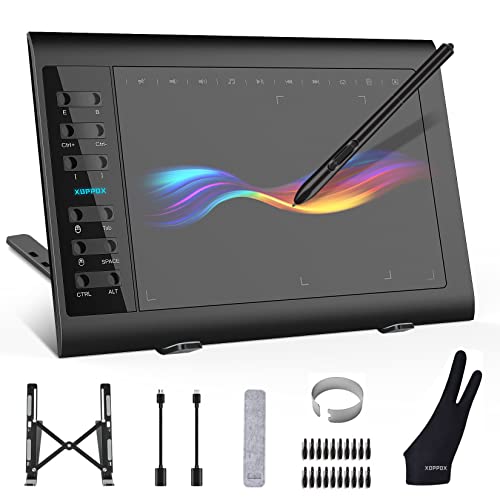
The XOPPOX Graphics Drawing Tablet is perfect for artists, designers, and educators seeking a reliable and versatile tool for digital creation and instruction. Whether you’re a professional artist looking to enhance your creative process or a teacher aiming to deliver engaging online lessons, this tablet offers the features you need for a seamless experience.
Pros:
- Large Active Area of 10 x 6 inches provides ample space for detailed work.
- 8192 Levels of pressure sensitivity for precise and responsive drawing.
- Battery-Free Pen eliminates the hassle of charging and ensures uninterrupted workflow.
- 12 Hot Keys customizable for quick access to frequently used functions.
- Compatibility with PC, Mac, and Android OS for versatile use across devices.
Cons:
- Learning Curve for those new to graphics tablets may be steep.
- No Multi-touch support, limiting gesture-based controls.
The XOPPOX Graphics Drawing Tablet boasts a large active area, making it ideal for intricate designs and expansive digital canvases. This generous workspace allows users to execute wide strokes and fine details with ease, enhancing both creativity and productivity. Additionally, the 8192 levels of pressure sensitivity enable artists to achieve a natural and expressive drawing experience, closely mimicking traditional art tools.
The battery-free pen technology is a standout feature, offering convenience and reliability without the need for constant charging. This feature is particularly beneficial for users who engage in long hours of work or teaching, as it ensures a steady and uninterrupted creative flow. Furthermore, the 12 customizable hot keys provide quick access to essential functions, streamlining the workflow and allowing users to focus more on their art rather than navigating software menus.
To buy this product, click here.
Frequently Asked Questions
What Makes Xppen Deco 01 V3 Ideal For Beginners?
The XPPen Deco 01 V3 offers a large 10×6 inch active area. It has 16,384 pressure levels for precise control. Battery-free stylus ensures seamless drawing. Its 8 hotkeys enhance productivity in digital art, teaching, and gaming. Compatible with Chrome, PC, Mac, and Android, it’s perfect for beginners.
Can Picassotab X Be Used Without A Computer?
Yes, the PicassoTab X functions independently, requiring no computer connection. It includes drawing apps and tutorials, making it user-friendly. With a 10-inch screen and stylus pen, it’s portable and convenient. Ideal for beginner digital artists, it offers a comprehensive creative experience.
How Does Huion Inspiroy H1060p Enhance Digital Art?
HUION Inspiroy H1060P features 8192 pressure sensitivity levels for fine detail. The battery-free stylus provides uninterrupted drawing sessions. Twelve customizable hotkeys streamline workflow efficiency. Its 10 x 6. 25 inches active area is perfect for diverse creative projects. Compatible with Mac, Windows PC, and Android, it’s versatile for digital art.
Is Gaomon S620 Suitable For Osu Gaming?
The GAOMON S620 is perfect for OSU gaming with its responsive 8192 pressure sensitivity. Its compact 6. 5 x 4-inch size offers portability. Four customizable express keys enhance gameplay and digital art. Compatible with Windows, Mac, and Android, it provides versatility for gaming and art enthusiasts.
How Does Huion Hs64 Support Beginners In Design?
HUION HS64 has a battery-free stylus with 8192 pressure sensitivity for precise design work. It’s compatible with Windows, Mac, Android, and Linux. This makes it versatile for various platforms. Its compact size is ideal for beginners. It’s perfect for digital art, painting, and design projects.
What Features Do Xoppox Graphics Tablets Offer?
XOPPOX Graphics Tablets boast a large 10×6 inch active area for comfortable drawing. With 8192 pressure levels, they provide detailed artistry. The battery-free pen ensures uninterrupted creativity. Twelve hotkeys enhance productivity in painting, design, and teaching. Compatible with PC, Mac, and Android, they’re versatile for diverse uses.
Conclusion
Choosing the right pen tablet can significantly enhance your digital art journey. Beginners have a wide array of options. The xppen updated deco 01 v3 offers a large working area and battery-free stylus. Its eight hotkeys make customization easy. The picassotab x is a standalone option, perfect for beginners wanting portability.
Huion inspiroy h1060p provides high pressure sensitivity and customizable keys, ideal for precision work. For those seeking compactness, the gaomon s620 is a great pick. It’s efficient and easy to use. The huion hs64 is versatile, supporting various operating systems.
Xppen starg640 is perfect for those who need a simple, effective tool. The one by wacom is a reliable choice for students. Meanwhile, the huion 420 is compact and budget-friendly. Finally, the xoppox tablet offers a large active area with high pressure sensitivity.
Each of these tablets has unique features. Select one that best fits your creative needs.











