
Affiliate Disclosure: This post may contain affiliate links. If you purchase through links on our site, we may earn an affiliate commission at no extra cost to you.
Choosing a new laptop can feel overwhelming, especially with so many options available. You’re likely looking for something that meets your needs without breaking the bank.
Whether you’re a student, a professional, or simply someone who loves staying connected, this guide will help you make the best choice. Imagine having a laptop that enhances your productivity, fits your lifestyle, and lasts for years. You deserve to find that perfect match.
You’ll discover the key features to look for, ensuring your next laptop purchase is a smart investment. Dive in to find out what really matters when picking the right laptop for you.
Budget Considerations
When you’re in the market for a new laptop, budget considerations are crucial. It’s easy to get overwhelmed by the array of options and price points. Understanding how to balance cost with your needs can save you money and ensure you get the best value. What factors should guide your financial decisions?
1. Evaluate Your Needs
Start by assessing what you need the laptop for. Will it be for basic tasks like browsing and email, or do you need it for more demanding applications like video editing or gaming? A clear understanding of your primary use will help you avoid overspending on unnecessary features.
2. Set A Realistic Budget
Determine how much you’re willing to spend before you start shopping. Consider your income and expenses to set a budget that won’t strain your finances. Remember, a higher price tag doesn’t always mean better performance for your specific needs.
3. Consider Long-term Costs
Think about the total cost of ownership, not just the initial purchase price. Factor in expenses like software, accessories, and potential repairs. Would spending a bit more upfront on a reliable brand save you repair costs down the line?
4. Look For Deals And Discounts
Keep an eye out for sales, student discounts, or refurbished models that can offer significant savings. Websites often have seasonal sales, so timing your purchase can make a big difference. Are you patient enough to wait for a deal?
5. Prioritize Essential Features
Make a list of must-have features and compare them against optional extras. Do you really need that touch screen, or is a larger storage capacity more important? Prioritizing helps keep your budget focused on what really matters to you.
6. Think About Future Needs
Consider how your computing needs might change over the next few years. Investing in a slightly better model now could prevent the need for an upgrade sooner than expected. Are you planning any career changes or new hobbies that might require more computing power?
By carefully evaluating your needs, setting a realistic budget, and prioritizing essential features, you can make an informed decision that aligns with your financial goals. What’s your top priority when choosing a laptop?
Operating System Choices
Choosing the right operating system is crucial for your laptop. It affects usability, software compatibility, and overall experience. Each operating system has unique features. Understanding these can help you make an informed decision.
Windows
Windows is popular for its user-friendly interface. It supports a wide range of applications. Many people find it easy to navigate. Windows laptops are ideal for gaming and work. Regular updates enhance security and performance. Windows offers flexibility and customization options.
Macos
macOS is known for its sleek design. It provides seamless integration with Apple devices. macOS is great for creative tasks like video editing. Its interface is intuitive and responsive. Regular updates keep macOS secure and stable. macOS laptops often have high-quality hardware.
Linux
Linux is open-source and highly customizable. It’s preferred by tech enthusiasts and programmers. Linux offers strong security features. Many distributions are available, like Ubuntu and Fedora. They cater to different needs and preferences. Linux can run efficiently on older hardware.
Processor And Performance
Choosing the right processor is crucial when you’re hunting for a new laptop. The processor is the brain of your computer, affecting how smoothly and quickly your applications run. Performance will dictate your laptop’s ability to handle tasks, whether you’re streaming videos, gaming, or multitasking with several apps. Let’s dive into the key aspects of processors to ensure you make an informed decision.
Intel Vs Amd
Deciding between Intel and AMD processors can be challenging. Intel processors have long been known for their reliability and strong single-core performance, making them ideal for tasks like video editing and gaming. They tend to offer better power efficiency, which can be a bonus for battery life.
On the other hand, AMD processors are often praised for their multitasking capabilities, thanks to more cores at competitive prices. AMD’s Ryzen series has gained popularity, especially among gamers and creators. You may find that AMD gives you more bang for your buck, especially if you’re looking for robust performance without breaking the bank.
Core Count And Clock Speed
The core count and clock speed of a processor significantly impact performance. More cores mean your laptop can handle multiple tasks simultaneously. If you’re into heavy multitasking or gaming, consider processors with higher core counts like quad-core or octa-core.
Clock speed, measured in GHz, reflects how fast a processor can execute tasks. Higher clock speeds mean faster performance, but don’t forget that this might lead to increased heat and power consumption. It’s a balancing act: do you need raw speed for demanding tasks, or is energy efficiency more important for everyday use?
Think about what you really need from your laptop. Is it raw power or efficiency? Understanding your requirements will help you choose the right processor for your everyday life.
Credit: preyproject.com
Memory And Storage
Choosing a new laptop involves understanding memory and storage. These two components influence performance and capacity. They determine how smoothly your laptop runs and how much data it can hold. Knowing their differences helps in making a smart decision.
Ram Requirements
RAM stands for Random Access Memory. It affects how fast your laptop performs tasks. More RAM means smoother multitasking. For basic use, 4GB of RAM is enough. For gaming or heavy software, consider at least 8GB. More RAM is better for future-proofing your laptop.
Ssd Vs Hdd
SSD and HDD are types of storage. SSD stands for Solid State Drive. It is faster and quieter. It loads programs quickly and consumes less power. HDD means Hard Disk Drive. It offers more storage at a lower price. It is suitable for storing large files. Consider SSD for speed and HDD for more space.
Display And Graphics
When searching for a new laptop, the display and graphics are crucial components that can significantly affect your user experience. Whether you’re a gamer, a graphic designer, or someone who just enjoys binge-watching shows, understanding the essentials of screen size, resolution, and graphics can guide you in making the right choice. But what should you really be paying attention to?
Screen Size And Resolution
The screen size of your laptop can impact your overall satisfaction. A larger screen is great for viewing detailed content or multitasking, but it also makes the laptop less portable. A smaller screen is easier to carry around, but may not be as enjoyable for watching movies or editing photos.
Resolution is equally important. The higher the resolution, the clearer and more detailed the image will be. If you are someone who watches a lot of 4K content, a laptop with a 4K resolution might be worth the investment. However, for everyday use, a Full HD (1920×1080) resolution often suffices. Have you ever tried editing a photo on a low-resolution screen? It can be frustrating.
Integrated Vs Dedicated Graphics
Graphics play a pivotal role if you are into gaming or graphic-intensive tasks. Integrated graphics are built into the processor and are generally enough for basic tasks like web browsing or video streaming. They are more energy-efficient and help extend battery life.
On the other hand, dedicated graphics come with their own memory and offer better performance for demanding applications. If you love playing the latest games or work with professional video editing software, dedicated graphics are a must. Have you ever tried running a high-end game on integrated graphics? It’s like trying to run a marathon in flip-flops.
Ultimately, the right choice depends on your specific needs and how you intend to use your laptop. Do you prioritize portability, or is superior image quality more important to you? Consider these aspects as you shop around, and you’ll be better equipped to find the perfect match.
Battery Life
Battery life is crucial in a new laptop computer. Whether for work, school, or play, a reliable battery keeps you connected. A long-lasting battery enhances portability, allowing you to work without constant charging. Understanding battery life helps you choose a laptop that meets your needs.
Check The Battery Capacity
Battery capacity is measured in watt-hours (Wh) or milliamp-hours (mAh). A higher number means longer battery life. Compare different models to find the best option. Most laptops offer 40Wh to 60Wh for daily tasks.
Consider Usage Patterns
Your usage affects battery life. Browsing, streaming, and gaming drain the battery faster. If you need long hours, seek a laptop with a robust battery. Consider how you use your laptop daily.
Look For Power-efficient Components
Power-efficient parts improve battery performance. Processors like Intel’s latest models use less power. Solid-state drives (SSDs) consume less energy than traditional hard drives. Choose components wisely to extend battery life.
Evaluate Battery Life Claims
Manufacturers often list expected battery life. Real-world usage may differ from claims. Consider reviews and user feedback for a realistic view. Understand how long the battery lasts under normal conditions.
Think About Charging Options
Fast charging can be a lifesaver. Some laptops charge 50% in under an hour. USB-C charging offers flexibility with compatible devices. Check if these features are available for convenience.
Portability And Design
Choosing a laptop is more than just picking out the latest model. Portability and design are crucial factors that affect how you use your device daily. Whether you’re a student, a business professional, or a casual user, the laptop’s ease of transport and aesthetic appeal can greatly enhance your experience. Have you ever struggled to fit your laptop in a crowded backpack, or felt burdened by its weight during a commute? Let’s explore what makes a laptop truly portable and stylish.
Weight And Dimensions
Your laptop’s weight and dimensions can be make-or-break factors, especially if you’re constantly on the move. A lightweight laptop can save you from shoulder pain and make it easier to slip into your bag. Imagine carrying something as light as a tablet but with the full functionality of a computer. Look for laptops under 3 pounds for the ultimate portability.
Consider the dimensions too. Slim laptops often fit better in tight spaces and are easier to handle. A compact design might mean a smaller screen, but modern laptops offer high resolution displays that make up for the size. Would you sacrifice a bit of screen real estate for a more comfortable travel experience?
Build Quality
A laptop’s build quality speaks volumes about its durability and style. Well-built laptops often feature sturdy materials like aluminum or magnesium alloy. These materials not only enhance the laptop’s look but also protect it from the daily wear and tear. Have you ever found yourself wishing your laptop was more resilient after an accidental drop?
Check for features like a reinforced hinge or spill-resistant keyboard. Such details can extend your laptop’s lifespan significantly. Choose a design that feels solid and looks appealing, making your laptop a reliable companion for years. How does your current laptop hold up in terms of build quality?
Connectivity Options
Choosing the right laptop involves more than just speed and storage. Connectivity options are key. They determine how well your laptop connects to other devices and networks. This section explores the essential connectivity features you should consider.
Ports And Slots
Laptops come with various ports and slots. These are crucial for connecting peripherals. USB ports are common for mice, keyboards, and external drives. Look for USB-C ports for faster data transfer. HDMI ports are ideal for connecting to monitors or TVs. SD card slots are useful for photographers. They allow easy access to photos and videos. Check the number and type of ports available. This ensures compatibility with your devices.
Wireless Connectivity
Wireless features are vital for internet access. Most laptops support Wi-Fi for online connectivity. Ensure your laptop supports the latest Wi-Fi standards. This guarantees faster internet speeds. Bluetooth is another important feature. It lets you connect wireless devices like headphones. Some laptops offer NFC for quick sharing between devices. Reliable wireless connectivity enhances your laptop’s usability. It allows seamless interaction with other gadgets.
Keyboard And Touchpad
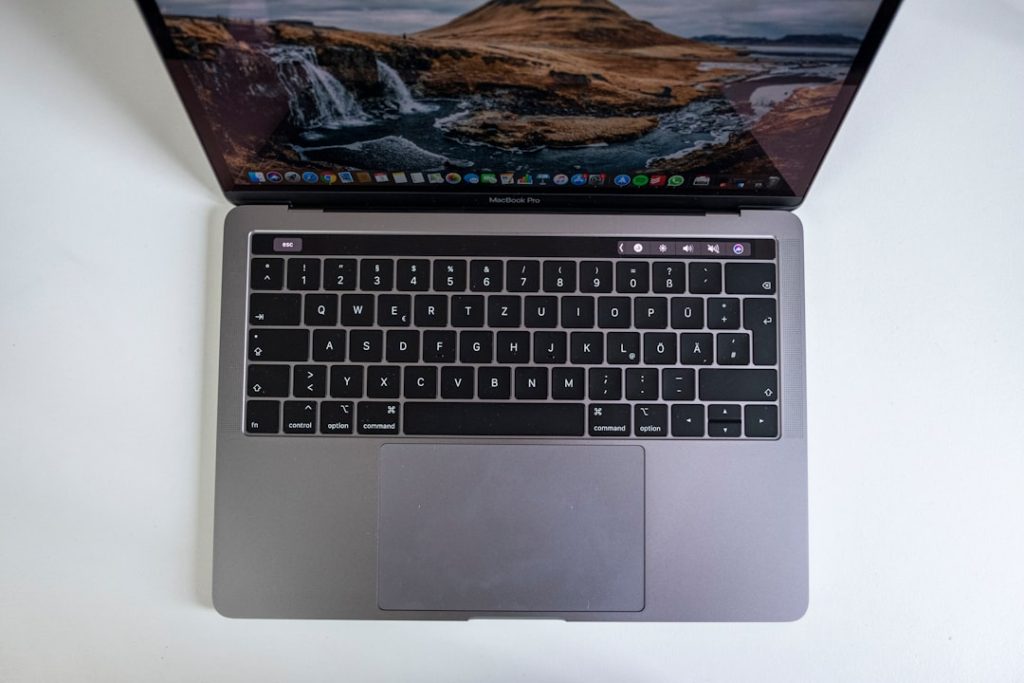
The keyboard and touchpad are vital parts of any laptop. They affect how comfortable and efficient your work will be. A good keyboard and touchpad can make a big difference in your daily tasks. When buying a laptop, these components need special attention.
Keyboard Quality
A good keyboard offers a comfortable typing experience. Key spacing and depth are essential factors. Look for a keyboard with keys that travel smoothly. This reduces typing fatigue. Backlighting is useful for low-light conditions.
Check for a solid build. A flexible keyboard can be annoying. Test for noise levels if you prefer quiet typing. A loud keyboard might not be suitable for shared spaces.
Touchpad Responsiveness
The touchpad should respond quickly to gestures. It should have a smooth surface for easy navigation. Multi-touch gestures like pinch-to-zoom should work seamlessly. A laggy touchpad can slow down your productivity.
Consider the size of the touchpad. A larger touchpad allows more room for gestures. Ensure it is positioned centrally for comfort.
Ergonomics
Ergonomics play a crucial role in preventing strain. The keyboard should have a natural layout. Ensure the touchpad doesn’t interfere with typing. Palm rest areas can enhance comfort during long use.
Try typing on the keyboard before purchase. This ensures it feels right for you. Your comfort should always come first.
Brand And Warranty
Choosing a reputable brand ensures reliability and performance in a new laptop. A solid warranty provides peace of mind, covering unexpected issues. Prioritize brands known for customer support and durability.
When buying a new laptop, the brand and warranty play a crucial role in your decision-making process. Choosing a reputable brand ensures that you receive a product with a proven track record for quality and reliability. Additionally, a solid warranty offers peace of mind, safeguarding your investment and covering unexpected issues. But how do you decide which brand to trust and what kind of warranty to look for?
Brand Reputation
Brand reputation matters. It reflects the company’s history and customer satisfaction. Brands like Apple, Dell, and Lenovo have consistently ranked high in user satisfaction due to their innovation and customer service. If you’ve ever been frustrated by a malfunctioning device, you know how valuable a responsive support team can be. Reading reviews from other users can provide insights into a brand’s reliability. Online forums and tech review sites often discuss the longevity and performance of different laptop brands. If a brand frequently appears in discussions about faulty hardware or poor customer service, it’s a red flag.
Warranty Coverage
A good warranty can save you from unexpected expenses. Most brands offer a standard one-year warranty, but some extend to two or even three years. Consider the duration and what the warranty covers. Does it include accidental damage? Are there any hidden conditions? Check if the warranty offers on-site service or requires you to send the laptop in for repairs. This can greatly impact your convenience and downtime if issues arise. Personal experience taught me the value of on-site service when my laptop’s screen failed during a crucial project. Having a technician fix it at my home saved me time and stress.
Customer Support
Good customer support can make a huge difference. When you encounter a problem, you want quick and efficient solutions. Does the brand offer 24/7 support? Do they have a live chat option or only email support? Researching how a brand handles customer queries can inform your buying decision. Try contacting their support with a question before purchasing to gauge their responsiveness. Imagine needing help late at night and having no one to assist you. Choosing a brand with reliable support can prevent such scenarios.
Extended Warranty Options
Some brands offer extended warranties for an additional fee. These can be beneficial if you plan to keep the laptop for several years. Compare the cost of an extended warranty with potential repair expenses. Consider the likelihood of needing repairs based on the laptop’s usage. If you travel frequently or use the laptop for demanding tasks, an extended warranty could be a smart investment. Evaluate if the peace of mind it provides is worth the extra cost. In your quest for the perfect laptop, consider how brand reputation and warranty options align with your needs. What value do you place on peace of mind and long-term reliability? Making an informed choice can enhance your tech experience and prevent future headaches.
Frequently Asked Questions
What Features Are Essential In A Laptop?
When choosing a laptop, consider the processor, RAM, and storage. These components affect speed and performance. Also, check battery life and display quality. The operating system should match your needs, whether it’s Windows, macOS, or Linux. Finally, ensure the laptop has necessary ports for connectivity.
How Much Ram Is Needed For A Laptop?
For general use, 8GB of RAM is usually sufficient. If you multitask frequently or use demanding applications, consider 16GB. Gamers and professionals working with media often need even more. RAM impacts performance, especially in running multiple programs smoothly.
What Is The Ideal Laptop Screen Size?
Laptop screen size depends on your usage. For portability, 13-inch is ideal. If you need more workspace, consider a 15-inch screen. Larger screens, like 17 inches, offer a desktop-like experience but are less portable. Choose based on your balance of work needs and mobility.
How Important Is Battery Life In A Laptop?
Battery life is crucial for laptops, especially if you travel often. Look for a battery that lasts at least 8 hours. Longer battery life means fewer interruptions and more productivity. Consider your daily usage patterns to determine the battery life you need.
Conclusion
Choosing the right laptop is important. Consider your needs first. Think about battery life, size, and weight. Performance matters too, so check the processor and RAM. Storage is another key factor. SSDs are faster than HDDs. Don’t forget the display quality.
A clear screen improves your experience. Look for a laptop with good connectivity options. USB ports and Wi-Fi are essential. A comfortable keyboard and touchpad enhance usability. Finally, set a budget and compare prices. Finding the perfect laptop takes time, but it’s worth it.
Make a choice that suits you best.











